Here is a link to a Community post on the topic. Click to add your two cents. Time to pile on.
Bottomline Software, Inc.
Original Message:
Sent: 09-07-2023 08:22
From: Madeline Stefanou
Subject: v2023 Upgrade Issues
Thank you @Jeff Schwenk for that information.
------------------------------
Madeline Stefanou
RKL eSolutions, LLC
------------------------------
Original Message:
Sent: 09-07-2023 08:14
From: Jeff Schwenk
Subject: v2023 Upgrade Issues
This just in from a client I am migrating from 2020 PVX to 2023 SQL and is using DOCLINK. Note the statement regarding 32 bit only!!!!!!!!!
Hi Ted,
Please see the attached documentation related to your server move. Professional Services recommends assistance on the ProvideX to SQL migration specifically.
IMPORTANT NOTES
The DocLink integration is only supported with Sage 100 ERP 32-bit.
Also, it is our policy that any client attempting to perform DocLink version updates, or DocLink version upgrades, or DocLink server moves and issues are encountered after their self-performed attempts at such activities, this defaults to triggering a project with Professional Services, rather than assisting through Support.
------------------------------
Jeff Schwenk
Bottomline Software, Inc.
(540) 221-4444
Original Message:
Sent: 08-21-2023 14:13
From: Beth Bowers
Subject: v2023 Upgrade Issues
I"ve used it both ways internally - no issues
------------------------------
Beth Bowers
(269) 358-0989
Original Message:
Sent: 08-21-2023 13:56
From: Barbara Goldstein
Subject: v2023 Upgrade Issues
How confident are you running the 64-32-bit switch utility? Either direction?
------------------------------
Barbara Goldstein
Sr. Consultant
DSD Business Systems
Original Message:
Sent: 08-16-2023 16:59
From: Brett Zimmerman
Subject: v2023 Upgrade Issues
Re: Crystal - https://community.90minds.com/discussion/error-200-sy-reportcommonpvc-line-705#bm0571059c-106a-4487-ab9e-018a0020fcb1
------------------------------
Brett Zimmerman
Net at Work
Greater Boston Area
Original Message:
Sent: 07-27-2023 18:07
From: Jeff Schwenk
Subject: v2023 Upgrade Issues
@Kevin Moyes - I heard him say "deep in the core" and something to the effect that it was best (easiest) just to run the 64 OS to solve the problem. I tend to think that they COULD fix it but why not just tell WIN 11 users to run 64 OS. Plus, IT departments buy into the 64 spiel very easily. Yes, it is time we start moving in that direction, but I don't think Sage has any idea of the gotchas coming down the pike. To paraphrase the old adage- "The RESELLER needs to be aware!"
------------------------------
Jeff Schwenk
Bottomline Software, Inc.
(540) 221-4444
Original Message:
Sent: 07-27-2023 17:43
From: David Overholt
Subject: v2023 Upgrade Issues
isn't there still an issue with the 64-bit version and BOI not playing together?
While that is not specific to version 2023, the last time we asked Sage, it was not going to be fixed in 2023 PU 1 and slated for PU 2
------------------------------
David Overholt
DWD Technology Group
Original Message:
Sent: 07-27-2023 17:23
From: Doug Higgs
Subject: v2023 Upgrade Issues
Thanks @Kevin Moyes I guess that leaves only one way to proceed.
------------------------------
Doug Higgs
Midwest Commerce Solutions, Inc
(312) 315-0960
Chauffeur, Chef, and Personal Assistant to Sprinkles
Original Message:
Sent: 07-27-2023 17:20
From: Kevin Moyes
Subject: v2023 Upgrade Issues
Doug,
John @ Sage answered during the call that the 32-bit / Win11 issue is due to something deep in the core programming and a fix is not technically feasible. Translation: not likely to happen.
------------------------------
Kevin Moyes
Technical Systems Analyst
Munjal White Consulting Co.
Toronto ON
Original Message:
Sent: 07-27-2023 17:06
From: Doug Higgs
Subject: v2023 Upgrade Issues
Has Sage issued a bug fix for the Win 11 / 32 bit issue yet? This is an important issue for customers. Changing to 64 bit is not a good answer as many users have multiple third party apps that can be affected.
------------------------------
Doug Higgs
Midwest Commerce Solutions, Inc
(312) 315-0960
Chauffeur, Chef, and Personal Assistant to Sprinkles
Original Message:
Sent: 07-27-2023 16:51
From: Kevin Moyes
Subject: v2023 Upgrade Issues
I know, but I'd also have to change the service... and if the old version is still online (for reference), that could break it.
Scheduled VI jobs in batch files: update from pvxwin32.exe to pvxwin64.exe...
Lots of little extra little re-work details, for questionable gains.
Changing later (if encountering the Win11 issue) is just as easy then.
------------------------------
Kevin Moyes
Technical Systems Analyst
Munjal White Consulting Co.
Toronto ON
Original Message:
Sent: 07-27-2023 16:34
From: Beth Bowers
Subject: v2023 Upgrade Issues
Once you're live, you can run the conversion between 32 and 64.
------------------------------
Beth Bowers
(269) 358-0989
Original Message:
Sent: 07-27-2023 16:29
From: Kevin Moyes
Subject: v2023 Upgrade Issues
I asked during the call about 32-bit and 64-bit being able to co-exist on the same server. Elliott said he'd look into it.
For a lot of our upgrades we do a test migration, meaning we are basically forced to 32-bit (so the old version is not broken by the new version install).
Sage wants to push 64-bit, and while the list of issues is shrinking, the technical hurdles are not all gone yet.
------------------------------
Kevin Moyes
Technical Systems Analyst
Munjal White Consulting Co.
Toronto ON
Original Message:
Sent: 07-27-2023 15:43
From: Jeff Schwenk
Subject: v2023 Upgrade Issues
So the big question (based on the round table discussion today) is SHOULD we be installing 64 bit Sage as a default? What are the downsides? It didn't sound like @Beth Bowers & @Jeff Fiddelman are experiencing any. Sage Intelligence issues? What about Starship and the myriad of other enhancements? I recall Beth having issues with the Avalara 64 DLLs(?) last year. Resolved? Any push back about not being able to use the old 32 bit versions of Sage?
TIA
------------------------------
Jeff Schwenk
Bottomline Software, Inc.
(540) 221-4444
Original Message:
Sent: 07-27-2023 13:09
From: Wayne Schulz
Subject: v2023 Upgrade Issues
Suggestion ( Small / Medium / Large options )
Small:
- Create a shareable master document where everyone who has the link can see the document
- Create links off this screen to additional documents ( so there's only one spot to check )
Medium:
- Post the above document to an email alert
Large
- Have users obtain paid Google Workspace account ( $144/yr) to actively participate in edits/maintenance
- This could always been reimbursed if the user is active for a period of time
I am not successful enough searching Higher Logic to think that HL or a mass email chain will be enough
------------------------------
Wayne Schulz
wayne@s-consult.com
Schulz Consulting
(860) 516-8990
Moodus, CT
Original Message:
Sent: 07-27-2023 12:28
From: Anne Sawyer
Subject: v2023 Upgrade Issues
Hi Kevin - I am going to do both a Google Doc (with actual posts copied for cross-reference) and a Spreadsheet. Both can have notifications of any updates as well as posted comments. With the spreadsheet - you can even request a daily digest.
If someone has a better suggestion - I am always open. We do have a team beginning to work in the background on content retention so I am hoping to get some assistance. Thanks!
------------------------------
Anne Sawyer
Executive Director
90 Minds Inc.
Sunset Beach CA
Original Message:
Sent: 07-27-2023 12:15
From: Kevin Moyes
Subject: v2023 Upgrade Issues
Having a consolidated list would be useful... but is there a way to set up email notifications for changes to a Google Doc? How will people find it?
------------------------------
Kevin Moyes
Technical Systems Analyst
Munjal White Consulting Co.
Toronto ON
Original Message:
Sent: 07-27-2023 08:44
From: Wayne Schulz
Subject: v2023 Upgrade Issues
Why not just throw the details on a shareable Google Doc that can be maintained. Then it won't matter how many threads are started or if comments about v2023 are left in an unrelated thread as you can just share that master document.
------------------------------
Wayne Schulz
wayne@s-consult.com
Schulz Consulting
(860) 516-8990
Moodus, CT
Original Message:
Sent: 07-26-2023 22:39
From: Anne Sawyer
Subject: v2023 Upgrade Issues
@Jeff Schwenk and @Robert Wood
Unfortunately, you can only move a thread and not move any individual posts or merge threads.
However, here is the link to the prior discussion for reference in this thread:
V2023 Issues | Sage 100 (90minds.com)
------------------------------
Anne Sawyer
Executive Director
90 Minds Inc.
Sunset Beach CA
Original Message:
Sent: 07-26-2023 22:25
From: Robert Wood
Subject: v2023 Upgrade Issues
I don't believe we can but I will look into it tomorrow.
------------------------------
Robert Wood
DDF Consulting Group
(352) 615-5898
Original Message:
Sent: 07-26-2023 22:10
From: Jeff Schwenk
Subject: v2023 Upgrade Issues
Hey @Robert Wood - Looks like there are two threads for v2023 issues. Can you combine them?
------------------------------
Jeff Schwenk
Bottomline Software, Inc.
(540) 221-4444
Original Message:
Sent: 07-26-2023 22:09
From: Jeff Schwenk
Subject: v2023 Upgrade Issues
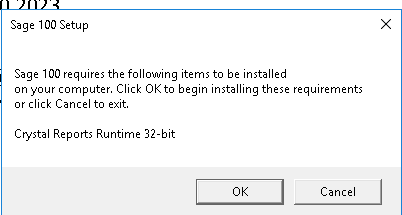
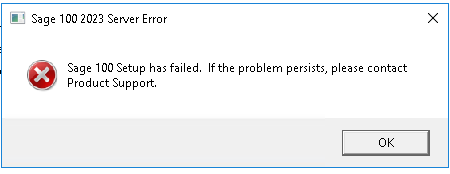
Another twist on an outdated Crystal Runtime Engine 32 bit. Trying to install Sage v2023 on the server. Not sure why the program can't detect the existing older version and install it......
------------------------------
Jeff Schwenk
Bottomline Software, Inc.
(540) 221-4444
Original Message:
Sent: 05-13-2023 14:41
From: Jeff Schwenk
Subject: v2023 Upgrade Issues
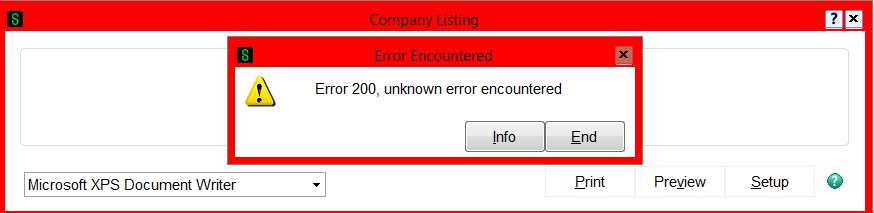
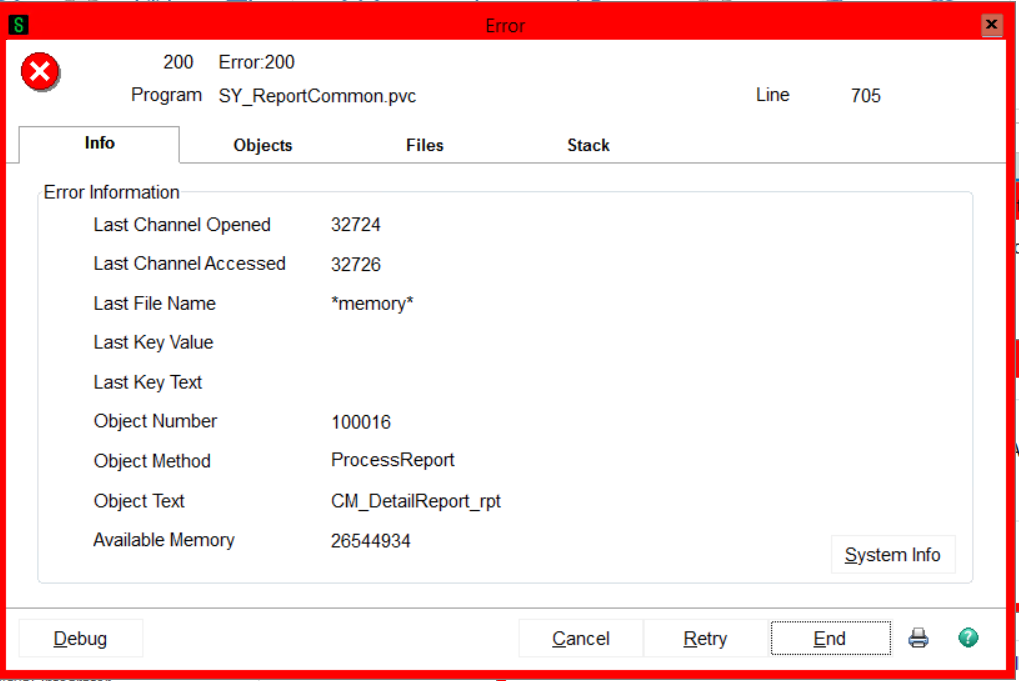
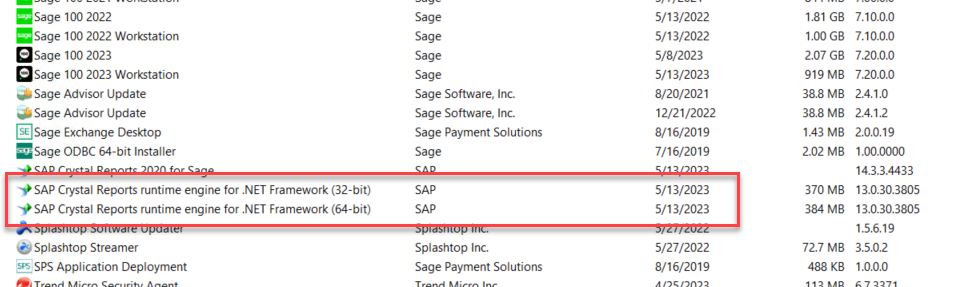
In case you encounter this issue while printing a report, save yourself some time. Uninstall the workstation client AND the two Crystal runtime engines. Reinstall the WS client. The issue also impacted v2022 printing.
------------------------------
Jeff Schwenk
Bottomline Software, Inc.
(540) 221-4444
Original Message:
Sent: 05-12-2023 14:07
From: Kevin Moyes
Subject: v2023 Upgrade Issues
Sage patched something related to Standard Prereq's.
Link.
------------------------------
Kevin Moyes
Technical Systems Analyst
Munjal White Consulting Co.
Original Message:
Sent: 05-12-2023 14:03
From: Jeff Schwenk
Subject: v2023 Upgrade Issues
Not sure if it is me or my clients or Sage. The 2023 client installs are taking a long time installing the prerequisites!!
------------------------------
Jeff Schwenk
Bottomline Software, Inc.
(540) 221-4444
Original Message:
Sent: 05-11-2023 10:00
From: Wayne Schulz
Subject: v2023 Upgrade Issues
I've noticed Sage referring to the 2023 versions with different names. I suspect this mirrors those names.
------------------------------
Wayne Schulz
wayne@s-consult.com
Schulz Consulting
(860) 516-8990
Moodus, CT
Original Message:
Sent: 05-11-2023 09:52
From: Brett Zimmerman
Subject: v2023 Upgrade Issues
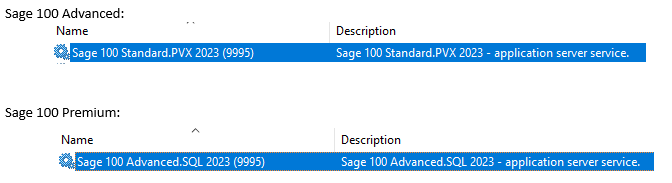
Argh, apparently the Sage 100 v2023 Service names have changed for some reason! 🙄 Why does Sage do things like this?! I heard about this from another Consultant; haven't yet seen it first-hand.
- Advanced says "Standard"
- Premium says "Advanced"
- And I guess Standard is now "StandAlone/LAN"
------------------------------
Brett Zimmerman
Net at Work
Greater Boston Area
Original Message:
Sent: 05-10-2023 12:59
From: Jeff Schwenk
Subject: v2023 Upgrade Issues
Ther school of hard knocks. Home of the best teachers!
------------------------------
Jeff Schwenk
Bottomline Software, Inc.
(540) 221-4444
Original Message:
Sent: 05-10-2023 12:43
From: Beth Bowers
Subject: v2023 Upgrade Issues
Reminds me of learning the hard way that the Reversal button is only available in Account MAINTENANCE, not INQUIRY...
------------------------------
Beth Bowers
(269) 358-0989
Original Message:
Sent: 05-10-2023 10:52
From: Jeff Schwenk
Subject: v2023 Upgrade Issues
NEVER MIND!!!!! After migrating, be sure to check role maintenance for new security permissions!!!!!!!!!! Another 45 minutes of non productive time.....
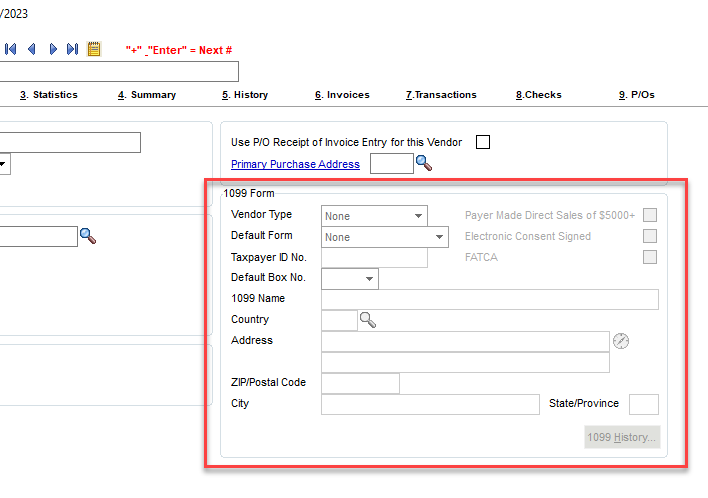
Trying to access 1099 fields in AP Vendor maintenance. Fields are "locked" and I am unable to access. Since I had screen modifications, I disabled those and tried again. Crickets. I verified 1099 was on in Option set up. Turned it off. Saved. Re-enabled. Crickets. Changed 1099 year to current. Nothing. Works fine in v2022. I rebuilt the custom panels in CO.
Can someone test and let me know if it works or is this a bug?
------------------------------
Jeff Schwenk
Bottomline Software, Inc.
(540) 221-4444
Original Message:
Sent: 05-05-2023 08:54
From: Jeff Schwenk
Subject: v2023 Upgrade Issues
Any ramifications in using Crystal 2020 to create/modify reports for pre 2023 Sage?
------------------------------
Jeff Schwenk
Bottomline Software, Inc.
(540) 221-4444
Original Message:
Sent: 05-04-2023 12:19
From: Kevin Moyes
Subject: v2023 Upgrade Issues
Interesting. On day 1 I installed v2023 on a test machine (having multiple older versions already installed) and had no issues with printing at all. (After the Sage 100 v2023 install I can print from v2021, 2019, 2017, 2015... all Standard, all 32-bit).
I saw the prompt that the new CR engine was being installed, but I don't know if it was successful. (This machine doesn't have SFA).
I believe there are issues with Crystal Reports engine 32-bit vs 64-bit not being cross compatible, so maybe that's what you ran into?
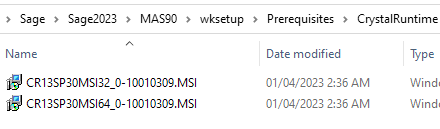 Are those 3 independent sources all trying out 64-bit at the same time?
------------------------------
Kevin Moyes
Technical Systems Analyst
Munjal White Consulting Co.