Sage 100

 View Only
  • 1.  v2021 PU4 with Repay installed

    Posted 08-21-2022 12:07
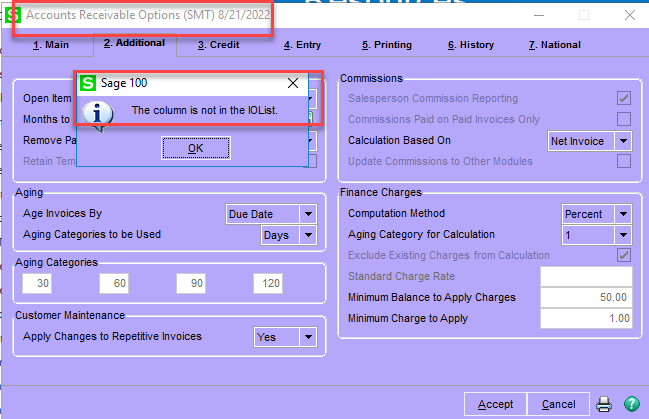
    Getting this error while in AR set up.

    KB 57102 suggest this:Resolution below.  I am just not sure if it is the correct resolution as the set up panel has no modifications that I did.  Perhaps Repay?
    <content style="box-sizing: border-box;">
    1. On the File menu, click Run.
    2. Type SYZCON to open the ProvideX prompt.
    3. At the prompt, type the following commands:
      • o=new("sy_activation_bus",%sys_ss)
      • Type ? o
      • Type ? o'activate("X/X","XXX")
        Note:
         X/X = module and XXX = company code
    4. After the last command, a number returns. Any number other than zero is valid. If zero, repeat the steps.
    5. If the error persists, recreate the customization.
    </content>


    ------------------------------
    Jeff Schwenk
    Bottomline Software, Inc.
    (540) 221-4444
    ------------------------------


  • 2.  RE: v2021 PU4 with Repay installed

    Posted 08-22-2022 01:15
    Edited by Alnoor Cassim 08-22-2022 01:16
    Jeff - I'll bet you it is Repay but don't think you need Brittany for this one. That error "The column is not in the IOList" means the physical table is not in alignment with the dictionary. On this reply I mentioned 3 ways to update the table from the dictionary: https://community.90minds.com/discussion/sql-vs-m4t

    In this case I would go with what the KB says, which is also my option 3, as this will cover all the tables. I'll bet there are new Repay fields in AR_Options and/or AR_OpenInvoice.

    ------------------------------
    Alnoor Cassim

    Email: alnoor.cassim@90minds.com
    Ph:
    ------------------------------