Steve - In thinking about it some more, you're dictionary is probably correct (as you saw) but the physical table may not be aligned exactly to it. Here are some ways you can update the table from the dict. The 3rd way may be best for you:
1. File / Run / SYZCON
%sys_ss'CreateTable("AP_OpenInvoice","COMPANY:ABC") ! Substitute ABC with actual company
Now go try Invoices tab. If it works to fix it for other companies, use the up arrow to repeat the last command (remember DosKey from way back when) and change ABC to the next company and press Enter. Repeat until you're done with all companies.
2. Another way which is more comprehensive is File / Run / SYZCON then call the Update_Physical routine for the dictionary.
FILE$ = "AP_OpenInvoice"
CALL "*dict/dd_updt;Update_Physical",ERR=*NEXT,FILE$,"","",ERRMSG$
? ERRMSG$ ! Use this to check for error messages.
3. 3rd way which is most comprehensive but everyone needs to be out of A/P at least is File / Run / SYZCON then
oACT = NEW("Sy_Activation_bus",%sys_ss)
? oAct'Activate("A/P",ABC") ! This does it for every A/P table. May take awhile.
! It should return a 1 if no errors. Press up arrow to repeat command and changed ABC to next company
! Type BYE when all done
------------------------------
Alnoor Cassim
Email:
alnoor@asifocus.comPh:
------------------------------
Original Message:
Sent: 05-23-2022 16:21
From: Steve Iwanowski
Subject: SQL vs M4T
That field is still checked so I'll see if I can get a better error. Thank you, Alnoor!
------------------------------
Steve Iwanowski, NextStep Technology Advisors, aka DSD Lancaster PA ¯\_(ツ)_/¯
------------------------------
Original Message:
Sent: 05-23-2022 15:58
From: Alnoor Cassim
Subject: SQL vs M4T
Error 80 is a dictionary error. If you suspect that Providex M4T files are being hit instead of the SQL table here is how you can check:
1. File / Run / SYZCON
2. type in DD and press Enter
3. type in or lookup the table you're getting the Error 80 on in the err msg.
4. Double-click the Custom Info button in bottom left. See if the SQL Create Table box is unchecked. Here is an example using AR_OpenInvoice but also check the table that you see in the error.
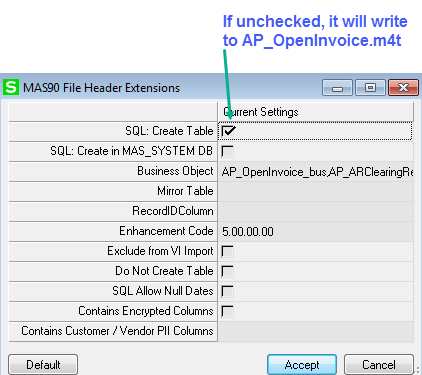
------------------------------
Alnoor Cassim
Email: alnoor@asifocus.com
Ph: