@Amber Prayfrock I opened a case with both Scanco (EAS) and Sage.
Scanco would not even consider this a problem for them to address. I reported that after Migration and after Re-Install of JobOps; the version levels were still wrong, and v7.20 on all records in the Installed Application Listing. I found that "after" I converted, if I installed JobOps again, it set all the Installed Application Listing Items to v7.30 with the exception of "one record". My plan is to "manually" fix that record (DFDM) and see if my MASCRW Utility works properly. I've not tested this yet. Scanco EAS did not offer anything but to "fix the installed listing" before go live manually. Otherwise, any case I open with an out of sync installed listing will get bounced back asking me "are you sure you installed the OM Software again".
We have a second client where it works fine. But they have Multi-Bin and the broken client does not. I'm wondering if the MB Install fixes something the standard OM Install did not fix.
Sage connected with me and felt it was the craziest thing. We tried everything they could think of and could not get it to work. I even copied the file from my v2024 Standard Install (without OM and with OM) and it still did not convert them with the utility. In Sage 100, it will "convert" one at a time after being prompted. Sage offered to have engineering look at this but I said "never mind"; we will just manually convert the reports.
------------------------------
Madeline Stefanou
RKL eSolutions, LLC
------------------------------
Original Message:
Sent: 04-14-2025 14:20
From: Amber Prayfrock
Subject: MASCRW not working
Interestingly, I had this same issue with another v2024 Premium with OM system where the version level shows 7.20 instead of 7.30 within the reports/forms. I searched and found this older article from 2024 where David Speck suggests to take a copy of the mascrcw.ini from a "clean" system and bring it to the client's side. https://community.90minds.com/discussion/mascrw-converts-to-wrong-version?hlmlt=VT.
I am not sure what "clean" means in this case, whether I need to compare a mascrcw.ini from a vanilla v2024 system, one from a different v2024 with OM, etc. I do see differences with "JT" records between the client's and my test v2024 system, so could the issue be Premium, or could it be Scanco, or could it be a combination? We may never know :D
Madeline, did you find out any more from your open case? I'm going to try my vanilla mascrcw.ini on the client's system and see what happens.
------------------------------
Amber Prayfrock, Blytheco
------------------------------
Original Message:
Sent: 04-10-2025 13:13
From: Alnoor Cassim
Subject: MASCRW not working
Madeline it's good you've tried replace the 2024 INI file with your own. Now is v2021 and v2024 (the app server part) installed on the same server? It seems like when you run MAScrcw.exe, which means it's not being called from the Launcher, something tells it to look at a different MAScrcw.ini file where under [Version] the Key=7.20. Maybe what you can try is creating a Windows shortcut to the v2024 \mas90\home\MAScrcw.exe then modify the shortcut and place the path to the \Home folder in the Start In box. Then run the shortcut and point it to just a single unconverted RPT file in some folder and see if it works or not.
------------------------------
Alnoor Cassim
Accounting Systems, Inc. (ASI)
Original Message:
Sent: 04-04-2025 16:35
From: Madeline Stefanou
Subject: MASCRW not working
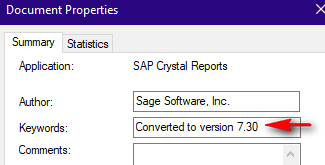
The "AP_AgedInvoice" has not been manually converted. It reads: Converted to version 7.20.
Opened in Sage and followed the prompts to convert. Now when I check it reads: Converted to version 7.30
I have Crystal 2020 installed on this device, I wonder if I need to run it from a different server that has the older version of crystal? or does that really not play into the process?
------------------------------
Madeline Stefanou
RKL eSolutions, LLC
Original Message:
Sent: 04-04-2025 16:16
From: Kevin Moyes
Subject: MASCRW not working
Open a report you think should be converted, and check File - Summary Info. If the keywords don't already have the new version number, something is definitely wrong. (I believe this is what MASCRCW checks to see if the report needs to be updated).
------------------------------
Kevin Moyes
Technical Systems Analyst
Munjal White Consulting Co.
Toronto ON
Original Message:
Sent: 04-04-2025 16:09
From: Madeline Stefanou
Subject: MASCRW not working
It is so weird. I have converted the main company data; then ran this utility for just \..\MAS90\MAS-XXX\Reports; same Issue. Converted the other companies brought over from v2021 Advanced and let the "conversion run for them" with the Crystal conversion; that did not work. Ran MASCW on just the \..\MAS90\Reports folder, same issue. Copied a fresh MASCRW and a MASCRW.ini from my PC and same issue.
------------------------------
Madeline Stefanou
RKL eSolutions, LLC
Original Message:
Sent: 04-04-2025 15:59
From: Kevin Moyes
Subject: MASCRW not working
I never scan the full MAS90 folder... just the MAS_###\Reports, MAS_System\Reports and a temp folder where I copy the custom reports.
Did you run the company data conversions yet?
------------------------------
Kevin Moyes
Technical Systems Analyst
Munjal White Consulting Co.
Toronto ON