@Alnoor Cassim and others, I'm wondering if Alnoor's above pdf can allow for specifying a label qty for each individual item, and not just a single qty that applies to all lines. I have the latter working but need the former. I'm using a custom S/O Entry label report. The label qty can be different every single time and for each line item.
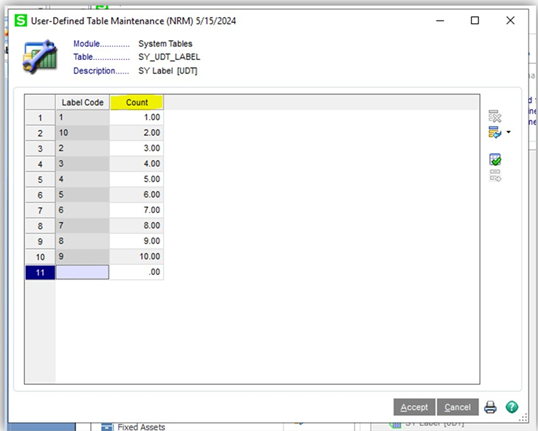
I'm using a similar process as above, i.e. "Create a table with one numeric field and have each row one incremental number (e.g.1,2,3,4) then add it to the report without a join (cross join) then it will make a row (label) per row (which equates to per number) value in the table. Then use your param to limit the number of rows it returns: {?LabelQty} >= table.numberfield"
cross ref: https://community.90minds.com/discussion/anyone-know-how-to-produce-1-label-per-qty-ordered
------------------------------
Brett Zimmerman
Net at Work
Greater Boston Area
------------------------------
Original Message:
Sent: 07-04-2019 13:27
From: Kevin Moyes
Subject: Inventory Receipt Label
Be sure to fill in the UDT with many more than you'll ever need. We used a similar solution and a year later had a complaint about higher numbers not working, tracing it back to the UDT not counting above 50.
A run-time parameter works too, with a different join type (and report selection criteria which does the same thing, based on the entered value).
------------------------------
Kevin Moyes
Technical Systems Analyst
Munjal White Consulting Co.
Toronto ON
------------------------------
Original Message:
Sent: 07-03-2019 15:02
From: Alnoor Cassim
Subject: Inventory Receipt Label
Lulu since you want to specify No of Labels per item, I've put together some quick steps on how this can be done with Crystal Reports using P/O Entry tables, a UDF for PO Detail to hold the number of labels to print, and a UDT. I saw somebody else use this technique for S/O Shipping Labels once and have used it myself since then. In your case, instead of worktables you use the PO tables as well as specifying a Crystal Label template. Hope this helps.
------------------------------
Alnoor Cassim
Free Agent Developer and Consultant
CallForHelp.biz
Email: alnoor@callforhelp.biz
Orange County, CA
Original Message:
Sent: 07-03-2019 11:34
From: Randy Marion
Subject: Inventory Receipt Label
Using a custom CR to print the labels using the PO header and detail tables would be the direction I would look in...
------------------------------
Randy Marion
Original Message:
Sent: 07-01-2019 11:14
From: Jeff Schwenk
Subject: Inventory Receipt Label
I am sure you could though it might take a little extra work liking the tables together. I can do it using Label Matrix. Create the template and add a prompt for PO number.
------------------------------
Jeff Schwenk
FORMER 90M Board Member
Bottomline Software, Inc.
Waynesboro VA
540-221-4444
Original Message:
Sent: 07-01-2019 10:24
From: Bob Sosbee
Subject: Inventory Receipt Label
Which is why almost everyone that does inventory labels, particularly with bar codes use Seagull Scientific's Bartender. A single user version can import a CSV file containing the part number, number of labels, and the PO number and depending on how you set up the print job, will at the end of the import start printing the labels.
Sage uses a temporary work file it generates during the receipt label printing that contains the PO information. Unfortunately, there isn't a way short of a custom solution to recreate that work file for receipt labels.
------------------------------
Bob Sosbee
Senior Developer
Accounting Systems, Inc. (ASI)
Covina CA
803-252-6154 x245
Original Message:
Sent: 07-01-2019 10:05
From: Lourdes Sobrino
Subject: Inventory Receipt Label
If they do that...they dont have the parameter for Purchase Order number. They would manually need to go to each item that is included in the PO and enter que quantity per label.
---------------------------------
Lourdes Sobrino
LU² DSD Puerto Rico
Guaynabo Puerto Rico
787.485.9638
Original Message:
Sent: 07-01-2019
From: Therese Logeais
Subject: RE: Inventory Receipt Label
They are just Inventory labels so they could manually print labels via the IM module.
------------------------------
Therese Logeais, Technology Integrators