Crap, I forgot to mention they don't know the # of labels needed for each item until it's actually packed and ready to print the labels.
------------------------------
Brett Zimmerman
Net at Work
Greater Boston Area
------------------------------
Original Message:
Sent: 05-15-2024 13:00
From: Jeff Schwenk
Subject: Anyone know how to produce 1 label per qty ordered
I use a UDF on the detail line allowing the user to specify QTY per line.
------------------------------
Jeff Schwenk
Bottomline Software, Inc.
(540) 221-4444
------------------------------
Original Message:
Sent: 05-15-2024 11:41
From: Kevin Moyes
Subject: Anyone know how to produce 1 label per qty ordered
You probably have to use a sub-report for your labels, with the cross join being done in the sub-report.
------------------------------
Kevin Moyes
Technical Systems Analyst
Munjal White Consulting Co.
Toronto ON
Original Message:
Sent: 05-15-2024 11:36
From: Brett Zimmerman
Subject: Anyone know how to produce 1 label per qty ordered
I'm using a custom S/O Entry label report. Is there a way to specify a label qty for each individual item, and not just a single qty that applies to all lines? I have the latter working but need the former. The label qty can be different every single time and for each line item.
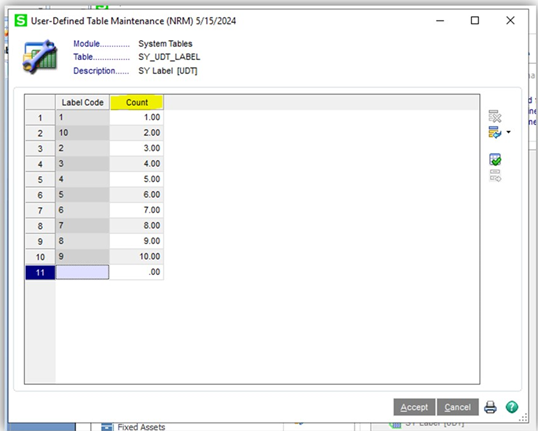
I'm using a similar process as above, i.e. "Create a table with one numeric field and have each row one incremental number (e.g.1,2,3,4) then add it to the report without a join (cross join) then it will make a row (label) per row (which equates to per number) value in the table. Then use your param to limit the number of rows it returns: {?LabelQty} >= table.numberfield"
cross ref: https://community.90minds.com/discussion/inventory-receipt-label
------------------------------
Brett Zimmerman
Net at Work
Greater Boston Area
Original Message:
Sent: 01-08-2018 13:53
From: Kevin Moyes
Subject: Anyone know how to produce 1 label per qty ordered
Yes, that is basically what I was trying to describe in the linked thread.