Sage 100

 View Only
Expand all | Collapse all

Error printing Customized Crystal Report ins Sage 2023 Prem

  • 1.  Error printing Customized Crystal Report ins Sage 2023 Prem

    Posted 08-31-2023 11:01
      |   view attached

    Successfully migrated/converted Sage 2017 to Sage 2023 (7.20.1) Premium including all reports with no errors. 

    However, when user attempts to print customized "Sales Order Recap" repot it errors out with following error. Report is in folder D:\Sage\v7.2\MAS90\MAS_CON\Reports\SO_SALESORDERRECAPREPORT\CONAC-WHS

    The database login failed.  Failed to open the connection. SO_SalesOrderRecap

    2664_4848_{63DBF9C2-59F6-464B-AC55-5A12EC28EC53}.rpt Details:  [Database

    Vendor Code: 18456

    Original Report in D:\Sage\v7.2\MAS90\MAS_CON\Reports\SO_SALESORDERRECAPREPORT\STANDARD runs successfully with no errors.

    Solutions suggested by SAGE KB 224924150049613 (Attached) is not working. 

    Any suggestions or guidance will be greatly appreciated.

    ---------------------------------------

    Mahesh N. Gajjar

    MBA Business Software

    678-495-5714

    ---------------------------------------


    ------------------------------
    Mahesh Gajjar
    Sage Consultant
    MBA Business Software, Inc.
    ------------------------------


  • 2.  RE: Error printing Customized Crystal Report ins Sage 2023 Prem

    Posted 08-31-2023 11:16

    I ran into something similar before (here) and aside from that posting I think I've run into this with customized forms/reports that were saved with credentials where the user/password was no longer valid on a new SQL server. The MAS_REPORTS can definitely be one issue though when all other reports are printing fine except for customized report settings then I think it may have to do with a credential saved with just the customized report.

    Someone else will probably chime in with a better solution. As a "plan B" , I'd probably try to re-add or recreate the report setting.


    ------------------------------
    Wayne Schulz
    wayne@s-consult.com
    Schulz Consulting
    (860) 516-8990
    Moodus, CT
    ------------------------------


  • 3.  RE: Error printing Customized Crystal Report ins Sage 2023 Prem

    Posted 08-31-2023 11:22

    We had a similar issue with custom reports on a custom report menu. The report pointed to the old Sage. I remove the report from menu in report manager and added the one in the 2022 version's report folder and then it worked.


    Thanks

    Avron


    Avron Katz

    President

    K-Four Systems, LLC

    P: 774 233 0467 Cell: 508 380 1720

    www.kfoursystems..com  e-mail: avron@kfoursystems.com


    IMPORTANT: The contents of this email and any attachments are confidential. They are intended for the named recipient(s) only.  If you have received this email in error, please notify the system manager or the sender immediately and do not disclose the contents to anyone or make copies thereof.

    P Please consider the environment before printing this e-mail


  • 4.  RE: Error printing Customized Crystal Report ins Sage 2023 Prem

    Posted 08-31-2023 11:25

    Make sure the SQL Browser services is running on the SQL server.  And set the MAS_Reports password. Also check the Firewall  you need to add runs for the ports and SQLserver.exe


    Jim


  • 5.  RE: Error printing Customized Crystal Report ins Sage 2023 Prem

    Posted 08-31-2023 12:39

    The easiest thing to do is to do Database - Verify Database in a working custom report, then use the activated connection... with the little plug icon...

    ...to then do a Database - Set Datasource Location in the broken report.

    Otherwise, open the broken report and make sure it is not using a DSN... which should never be the case for reports run from within Sage 100.  (The mascrcw report conversion won't fix that).

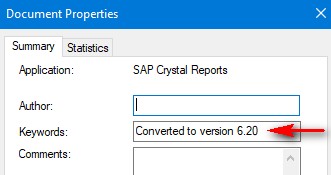
    The go to File - Summary Info and remove whatever is in the Keywords field, save, then try running it, and let Sage "convert" the report... which should fix up the connection string.


    ------------------------------
    Kevin Moyes
    Technical Systems Analyst
    Munjal White Consulting Co.
    Toronto ON
    ------------------------------


  • 6.  RE: Error printing Customized Crystal Report ins Sage 2023 Prem

    Posted 08-31-2023 14:51

    Kevin, 

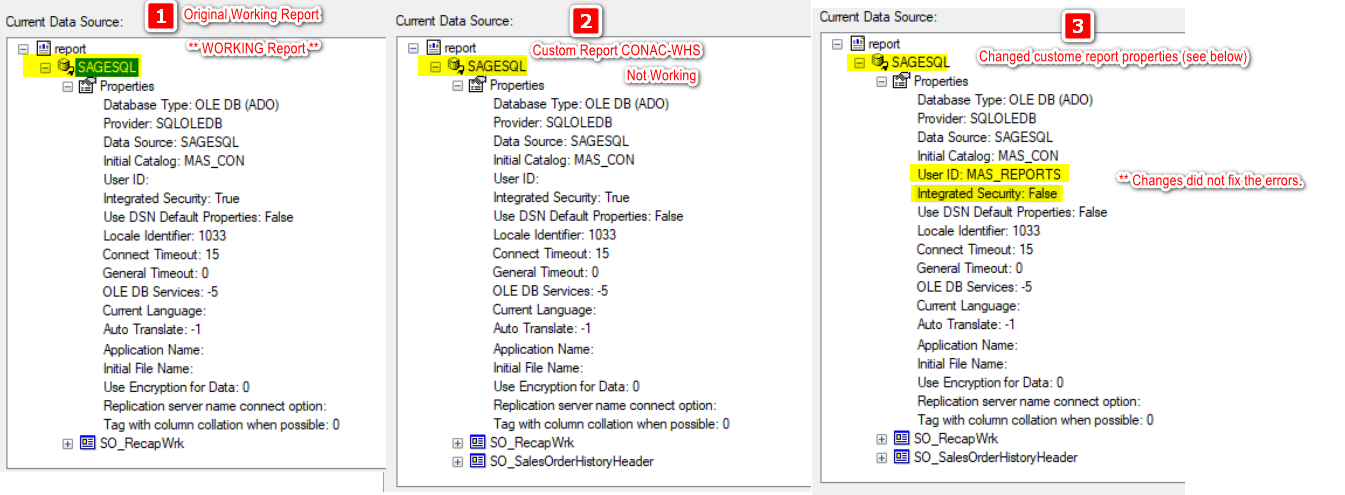
    As per your suggestion I made the changes. In below image

    1. Working Report
    2. Customized failing report
    3. Made changed to the customized report as per your suggestion. 

    Reports still fails.
     

    Thanks Mahesh

    Mahesh Gajjar
    Systems Specialist
    Main: 678-495-5700 • DiD: 678-495-5714
    Support: 770-399-8021 • Fax: 770-399-5772
       
    MaheshGajjar@mbabsi.com/bookings/">Book time on my calendar!


  • 7.  RE: Error printing Customized Crystal Report ins Sage 2023 Prem

    Posted 08-31-2023 15:08

    Do the Data Source SO_RecapWrk settings in the custom report match what appears in the STANDARD report setting?  Is it a significant customization, or could it be recreated from the STANDARD version?


    ------------------------------
    Steve Iwanowski, NextStep Technology Advisors, aka DSD Lancaster PA ¯\_(ツ)_/¯
    ------------------------------


  • 8.  RE: Error printing Customized Crystal Report ins Sage 2023 Prem

    Posted 08-31-2023 15:32

    Steve,

    The problem is that none of the customizable reports are working. 

    And there are lots of them, so recreating all of them would not be an option.

    Thanks Mahesh


    Mahesh Gajjar
    Systems Specialist
    Main: 678-495-5700 • DiD: 678-495-5714
    Support: 770-399-8021 • Fax: 770-399-5772
       
    MaheshGajjar@mbabsi.com/bookings/">Book time on my calendar!


  • 9.  RE: Error printing Customized Crystal Report ins Sage 2023 Prem

    Posted 08-31-2023 15:42

    That 18456 error means failed authentication (bad username/password). Are the custom reports pointing to another database or another MAS_xxx company?


    ------------------------------
    Steve Iwanowski, NextStep Technology Advisors, aka DSD Lancaster PA ¯\_(ツ)_/¯
    ------------------------------


  • 10.  RE: Error printing Customized Crystal Report ins Sage 2023 Prem

    Posted 08-31-2023 16:02

    These two things have solved some report connection errors for me in the past – thought I'd pass them along:

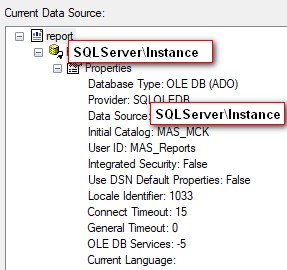
    In the Sage 100 Premium SQL Settings Utility be sure your Database server has servername\SQL_Instance_Name and not .local

    Change the MAS_Reports password to something you know (will need SQL permissions to do this).


    Please use the link below if you would like to book an appointment with me.

    DSDInc@dsdinc.com/bookings/">Book with Mary


    Mary MaysSr. Consultant


    Wichita: 316.269.4264 | DSD Corporate: 800.627.9032

    e: marymays@dsdinc.com

    w: dsdinc.com


    Sage 100 Support:       Sage100support@dsdinc.com


  • 11.  RE: Error printing Customized Crystal Report ins Sage 2023 Prem

    Posted 09-01-2023 15:09

    Thank you everyone for a quick response. We resolved this issue by 

    1) opening failing reports (CONAC-WHS)

    2) and saving them with a new Report Setting (CONAC-WHS-2023).

    MBA1

    3) Successfully ran CONAC-WHS-2023.

    Thanks Mahesh


    ------------------------------
    Mahesh Gajjar
    Sage Consultant
    MBA Business Software, Inc.
    ------------------------------


  • 12.  RE: Error printing Customized Crystal Report ins Sage 2023 Prem

    Posted 08-31-2023 15:41

    You don't make the changes in Crystal to the report settings.  (I've tried that in the past and it hasn't worked).

    Copy a generic Sage form from an old version and let Sage convert it, then use those connection settings.  If using mascrcw to do the conversion, never use integrated authentication.  Always set a password for MAS_Reports (using the Sage tool) and use that for the report conversion.

    Never, never use Integrated Security for Sage 100 reports.  That requires individual SQL read permissions for each user running the report, which is impractical to manage.


    ------------------------------
    Kevin Moyes
    Technical Systems Analyst
    Munjal White Consulting Co.
    Toronto ON
    ------------------------------