You don't make the changes in Crystal to the report settings. (I've tried that in the past and it hasn't worked).
Copy a generic Sage form from an old version and let Sage convert it, then use those connection settings. If using mascrcw to do the conversion, never use integrated authentication. Always set a password for MAS_Reports (using the Sage tool) and use that for the report conversion.
Never, never use Integrated Security for Sage 100 reports. That requires individual SQL read permissions for each user running the report, which is impractical to manage.
------------------------------
Kevin Moyes
Technical Systems Analyst
Munjal White Consulting Co.
Toronto ON
------------------------------
Original Message:
Sent: 08-31-2023 14:50
From: Mahesh Gajjar
Subject: Error printing Customized Crystal Report ins Sage 2023 Prem
Kevin,
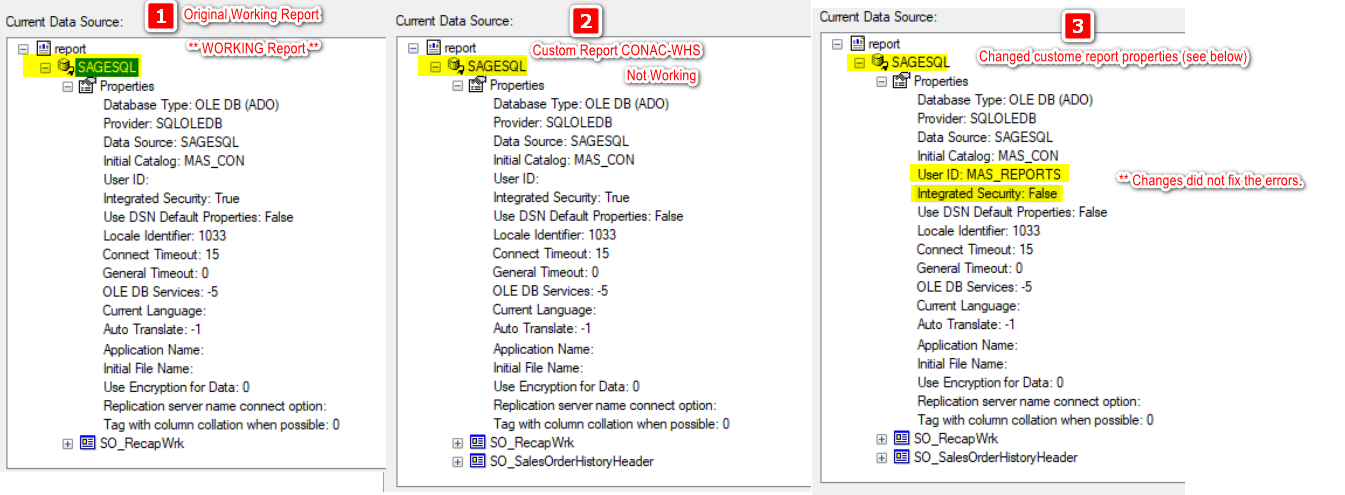
As per your suggestion I made the changes. In below image
- Working Report
- Customized failing report
- Made changed to the customized report as per your suggestion.
Reports still fails.
Thanks Mahesh
Original Message:
Sent: 8/31/2023 12:39:00 PM
From: Kevin Moyes
Subject: RE: Error printing Customized Crystal Report ins Sage 2023 Prem
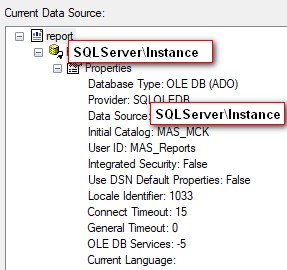
The easiest thing to do is to do Database - Verify Database in a working custom report, then use the activated connection... with the little plug icon...

...to then do a Database - Set Datasource Location in the broken report.
Otherwise, open the broken report and make sure it is not using a DSN... which should never be the case for reports run from within Sage 100. (The mascrcw report conversion won't fix that).
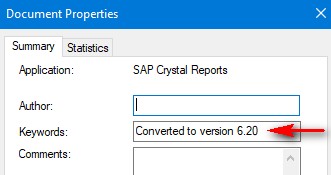
The go to File - Summary Info and remove whatever is in the Keywords field, save, then try running it, and let Sage "convert" the report... which should fix up the connection string.
------------------------------
Kevin Moyes
Technical Systems Analyst
Munjal White Consulting Co.
Toronto ON
------------------------------