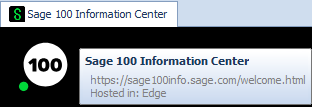
I would think you would be able to, but you would also have to disable DNS over HTTPS. Probably not something you would want to do globally on the workstation. If the internet is down it defaults to mas90/launcher/html/info-center/welcome.html. You would have to change this file as well as the host file and the DNS over HTTPS setting.
But an easier solution that works is to change the webconfig file in the [Integration] section for HomePage to whatever page you want it to be. This file is located in the MAS90/Launcher/ folder. Just remember that if the internet is down that you would want to also change that welcome page I mentioned above. It is probably controlled in a file somewhere too but I haven't searched for it yet.
------------------------------
Todd Martin
MBA Business Software
https://www.mbabsi.com------------------------------
Original Message:
Sent: 01-04-2024 01:28
From: George Khairallah
Subject: Can Sage 100 Web Content be disabled?
Can this URL not be put in a hosts file and point it to any new IP with the content hosted.
I haven't tried it, but I don't see why it wouldn't work, if you can convince IT to add the hosts file entry on workstations.
------------------------------
George Khairallah
CTO / Co-Founder | gotomyerp, LLC
george.k@gotomyerp.com | 877-888-5525
https://gotomyerp.com
------------------------------
Original Message:
Sent: 01-03-2024 12:50
From: Kevin Moyes
Subject: Can Sage 100 Web Content be disabled?
Sage removed the web-page override, since it is pointing at a URL (not a local file).
------------------------------
Kevin Moyes
Technical Systems Analyst
Munjal White Consulting Co.
Toronto ON
Original Message:
Sent: 12-20-2023 21:18
From: Wayne Schulz
Subject: Can Sage 100 Web Content be disabled?
x-reference to Jun 2023 discussion on this - there seem to be ways to drag screens wider or open other screens on top of the web content. I'm hoping there's another way to just drop a file somewhere in the folder structure and have that file overwrite the web content display.
https://community.90minds.com/discussion/scrolling-news-feed-in-sage-100-launcher
------------------------------
Wayne Schulz
wayne@s-consult.com
Schulz Consulting
(860) 516-8990
Moodus, CT