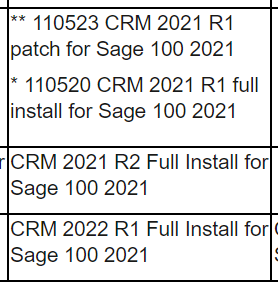
Gotcha - Sage 100 v2021 works with only three releases of Sage CRM - and there have been reports that the integration engine that was rewritten back in 2013 is starting to show its age with the newer releases of Sage CRM. Below are the three versions that integrate with Sage 100 v2021:
Source URL:
View Document - Sage KnowledgebaseOnce we get some additional insight into what the Sage 100 "Customer Relationship Management" Activity logs say and the version of Sage CRM, that should provide additional context to continue troubleshooting. If you haven't already, go into Sage 100, go into the "Customer Relationship Management" module, and find the "Activity Log" report. Select the dates where you observed the behavior reported in your initial post. Run the report. Hopefully, this gives you some semblance as to the error reported by Sage 100 when pushing the zip code from Sage CRM into Sage 100.
There are things we can "fix" with a very specific "order of operations/PEMDAS"-style solution. And others require us to send the issue to Sage CRM Support and pray the first technician comprehends that you need very specific help from someone that provides support for Sage 100-Sage CRM integrated system support.
I'm hoping this isn't one of the latter issues. :)
------------------------------
Basil Malik
e:
basil@ss-adv.comp: (918)600-8700
"Whatever you are, try to be a good one."
------------------------------
Original Message:
Sent: 02-06-2023 15:22
From: Brett Zimmerman
Subject: Zip code integration/sync issue with Sage CRM and Sage 100
The only info I have right now is Sage 100 v2021 Adv. I'm waiting to hear back from the Lead Consultant. Thanks!!
------------------------------
Brett Zimmerman
Net at Work
Greater Boston Area
------------------------------
Original Message:
Sent: 02-06-2023 12:39
From: Basil Malik
Subject: Zip code integration/sync issue with Sage CRM and Sage 100
Hey Brett!
I have a few quick clarification questions - what version of Sage 100/CRM is the customer on? Edition of Sage 100 (Std/Adv/Prm)? You mentioned an error as well - where is the sync error observed and what is the exact error that you can see?
These issues are a bit more difficult to sniff out, but that should give me what I need to provide some guidance.
------------------------------
Basil Malik
e: basil@ss-adv.com
p: (918)600-8700
"Whatever you are, try to be a good one."