Sage 100

 View Only
Expand all | Collapse all

Wrong Remit To

  • 1.  Wrong Remit To

    Posted 02-23-2026 16:13

    I have a Sage 100 2024 who is on about their third round of contacting me to advise that their AP remit to address prints using what they say is an old address. Sage 100 2024 Premium. I tried searching the KB but there's not much that would lead me to think this is some type of bug. They "think" it happened around the time of their Aatrix 1099 printing.

    Unless someone else has seen this I don't have anything more to offer them aside from kicking it to Sage and let Sage look for any unpublished issues.


    ------------------------------
    Wayne Schulz
    wayne@s-consult.com
    Schulz Consulting
    (860) 516-8990
    Connecticut
    ------------------------------


  • 2.  RE: Wrong Remit To

    Posted 02-23-2026 16:21

    To confirm - if you go into the Remit To, there is a different address there than what shows on the check AND the Main tab address is ALSO not what shows on the check?  If it's the Main address, they unchecked the Print Remit to on their check printing.  If it's neither address, then... gremlins.


    ------------------------------
    Beth Bowers
    Dog Mom, first and foremost. The rest is all just necessary to keep the dogs in biscuits.
    (269) 358-0989
    ------------------------------


  • 3.  RE: Wrong Remit To

    Posted 02-23-2026 16:29

    Yes it's odd - the client has a screen shot of the check ( I can't verify that they actually check "print remit to" ) however the address on the check doesn't match either of the vendor master or remit to. They claim it's an old address.

    The other wildcard could be someone it restoring a table though that seems unlikely to me.


    ------------------------------
    Wayne Schulz
    wayne@s-consult.com
    Schulz Consulting
    (860) 516-8990
    Connecticut
    ------------------------------


  • 4.  RE: Wrong Remit To

    Posted 02-23-2026 16:38

    Or someone updated after the check run.  You can bring up the Remit to and right click and see what the last date updated was (unless they've fixed it by now)


    ------------------------------
    Beth Bowers
    Dog Mom, first and foremost. The rest is all just necessary to keep the dogs in biscuits.
    (269) 358-0989
    ------------------------------


  • 5.  RE: Wrong Remit To

    Posted 02-23-2026 17:07

    They did fix it - and when I look on the audit viewer I only see the person making the fix. There isn't any other record that looks like someone went in and changed it by mistake earlier. Leading me to think it is either (a) bug, (b) someone restored over the table  (c) some type of VI Job ( I looked but don't see any likely suspects) or (d) they're using some type of AP solution that had a sync glitch


    ------------------------------
    Wayne Schulz
    wayne@s-consult.com
    Schulz Consulting
    (860) 516-8990
    Connecticut
    ------------------------------


  • 6.  RE: Wrong Remit To

    Posted 02-23-2026 17:14

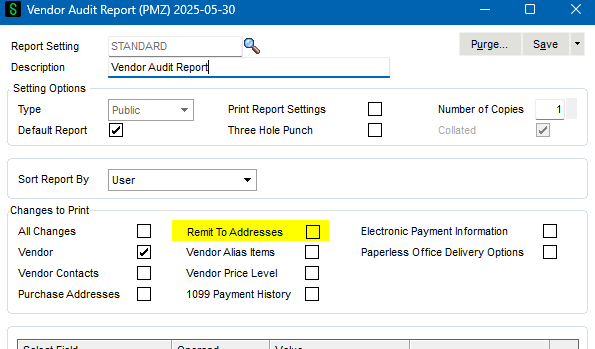
    Any changes should show up on the audit report (manual, VI...) assuming you have the AP Option set to track "All" changes.


    ------------------------------
    Kevin Moyes
    Technical Systems Analyst
    Munjal White Consulting Co.
    Toronto ON
    ------------------------------


  • 7.  RE: Wrong Remit To

    Posted 02-23-2026 17:27

    It seems to be tracking all changes because I do see changes going back almost 10 years.

    They also have Concur which I've added to my list of likely suspects...(in order of easiest explanation for the problem)

    1. Bug
    2. VI 
    3. Third party ( Concur )
    4. Someone restored over Sage data


    ------------------------------
    Wayne Schulz
    wayne@s-consult.com
    Schulz Consulting
    (860) 516-8990
    Connecticut
    ------------------------------


  • 8.  RE: Wrong Remit To

    Posted 02-23-2026 17:29

    Also look for a modified report / form.  That could easily explain inconsistencies.


    ------------------------------
    Kevin Moyes
    Technical Systems Analyst
    Munjal White Consulting Co.
    Toronto ON
    ------------------------------


  • 9.  RE: Wrong Remit To

    Posted 02-23-2026 17:44

    Yeah that was my first thought that maybe we made a unique change to the check form. I didn't find anything that seemed to have been modified or any stray links to tables.


    ------------------------------
    Wayne Schulz
    wayne@s-consult.com
    Schulz Consulting
    (860) 516-8990
    Connecticut
    ------------------------------


  • 10.  RE: Wrong Remit To

    Posted 02-23-2026 18:03

    Not that this is the same thing at all, but we just had a client who received new checks, and asked for our help in aligning the checks.  We did so, and the client called back to say that the format was still wrong and the addresses were wrong as well.


    Turns out they had answered NO to the "Apply Changes to Remit to Address" in AP Setup, so when they did change the address on the fly, it never prompted to change the Remit To Address.  So – the checks continued to be printing with wrong information.  Again, not that it applies in this case, but turning off that "Apply Changed to Remit to Address" really messed them up.  We normally set that to "Prompt" so it does prompt the user and asks if they want the remit to address changed...


    Sue Bennett/President

    P. 503.620.3484 / E. sue@benpor.com


    Bennett/Porter & Associates, Inc.
    12559 SW 69th Ave / Tigard, OR 97223
    benpor.com / facebook / instagram


    A black background with a black square  Description automatically generated with medium confidence


    The information in this email and any attachments is considered confidential.

    This information may be subject to legal, professional, or other privilege.

    It must not be disclosed to any person without our authority. If you are not

    the intended recipient you are not authorized to and must not disclose, copy,

    distribute, or retain this message or any part of it. Please return this message to

     the sender immediately and delete any and all copies from your system.


  • 11.  RE: Wrong Remit To

    Posted 02-23-2026 17:43

    And I'm looking on their server at a Concur file - config.json - which I guess maybe I have access to as an admin. The SA for their SQL server seems to be stored in plain text... 


    ------------------------------
    Wayne Schulz
    wayne@s-consult.com
    Schulz Consulting
    (860) 516-8990
    Connecticut
    ------------------------------


  • 12.  RE: Wrong Remit To

    Posted 02-23-2026 17:54

    Brilliant!  Plain text password for critical company data.

    Raw SQL data edits would be really hard to detect... and that is exactly how someone might try to hide shady activity.


    ------------------------------
    Kevin Moyes
    Technical Systems Analyst
    Munjal White Consulting Co.
    Toronto ON
    ------------------------------


  • 13.  RE: Wrong Remit To

    Posted 02-23-2026 17:55

    Maybe one of the work tables isn't getting cleared.


    ------------------------------
    Doug Higgs
    Midwest Commerce Solutions, Inc
    (312) 315-0960
    Chauffeur, Chef, and Personal Assistant to Sprinkles
    ------------------------------


  • 14.  RE: Wrong Remit To

    Posted 02-24-2026 08:22

    Blank record in a table, like AP_VendorRemit?


    ------------------------------
    Cullen Lowe | Senior Business Consultant

    Kissinger Associates, Inc.
    Office: 800-562-5456 x255 | Mobile: 717-460-3755
    cullenl@kissingerassoc.com | kissingerassoc.com
    ------------------------------


  • 15.  RE: Wrong Remit To

    Posted 02-24-2026 08:25

    This gets better and boy do I love how modern tech support is actually three phases:

    1. What is the actual problem? ( sorry, "not working" ) isn't a problem
    2. What else aren't you telling me that is relevant to your issue
    3. Be able to replicate the problem --- because no third party takes the support case unless you can hold their hand and show them that it is highly likely to be their issue (this is extra phone with multiple enhancements)


    The client says that "someone logged in with Aatrix" when we were trying to print 1099. And coincidentally they mention that they think the issue started right around the time of (wait for it, wait for it)..... 1099 printing.

    But rather than bundle all that up into one helpful problem report - why not just say that Sage remit to is broken and we don't know why? 

    I wish I could say it's just this client but I find that many more clients are this way now. The easy days of "tell me how to print a check" support and mostly gone. Now it's "This used to work, fix please" type support inquirites. That's the consultants cue to play 20 questions before sitting down and researching a possible solution.


    ------------------------------
    Wayne Schulz
    wayne@s-consult.com
    Schulz Consulting
    (860) 516-8990
    Connecticut
    ------------------------------


  • 16.  RE: Wrong Remit To

    Posted 02-24-2026 17:21

    The client came back and said that Aatrix connected and only moved some files in their eFiling folder that is within the AP data folder. I don't think that would be the cause. 

    I'm going to give it to Sage and let the client get a second opinion. The case will probably close once Sage (a) checks the KB and (b) asks us to demonstrate the issue in action.

    If anything else occurs I will come back with an update.


    ------------------------------
    Wayne Schulz
    wayne@s-consult.com
    Schulz Consulting
    (860) 516-8990
    Connecticut
    ------------------------------


  • 17.  RE: Wrong Remit To

    Posted 02-25-2026 11:07

    I opened a case with Sage on this primarily because the client has called me about six times on the same issue. To be clear I think the issue is all the same thing which is at some unknown point someone or something reverted some of their AP_VendorRemit back to older values.

    Sage didn't have any new knowledge to share on this. My working theory is that somehow Concur synchronized some data ( yeah, not sure why it would be remit to either) back to AP. I don't have a better explanation and I'll advise the client they need to check the data going forward. It's possible I could create a Crystal Report showing which AP_VendorRemit records have a last change date > mm/dd/yy and that could narrow their search/replace. 


    ------------------------------
    Wayne Schulz
    wayne@s-consult.com
    Schulz Consulting
    (860) 516-8990
    Connecticut
    ------------------------------