Brilliant! Plain text password for critical company data.
Raw SQL data edits would be really hard to detect... and that is exactly how someone might try to hide shady activity.
------------------------------
Kevin Moyes
Technical Systems Analyst
Munjal White Consulting Co.
Toronto ON
------------------------------
Original Message:
Sent: 02-23-2026 17:42
From: Wayne Schulz
Subject: Wrong Remit To
And I'm looking on their server at a Concur file - config.json - which I guess maybe I have access to as an admin. The SA for their SQL server seems to be stored in plain text...
------------------------------
Wayne Schulz
wayne@s-consult.com
Schulz Consulting
(860) 516-8990
Connecticut
------------------------------
Original Message:
Sent: 02-23-2026 17:27
From: Wayne Schulz
Subject: Wrong Remit To
It seems to be tracking all changes because I do see changes going back almost 10 years.
They also have Concur which I've added to my list of likely suspects...(in order of easiest explanation for the problem)
1. Bug
2. VI
3. Third party ( Concur )
4. Someone restored over Sage data
------------------------------
Wayne Schulz
wayne@s-consult.com
Schulz Consulting
(860) 516-8990
Connecticut
Original Message:
Sent: 02-23-2026 17:13
From: Kevin Moyes
Subject: Wrong Remit To
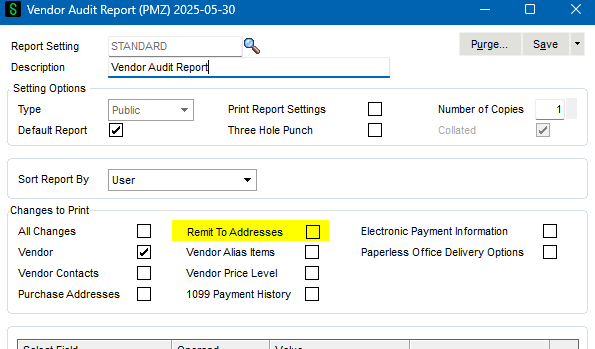
Any changes should show up on the audit report (manual, VI...) assuming you have the AP Option set to track "All" changes.
------------------------------
Kevin Moyes
Technical Systems Analyst
Munjal White Consulting Co.
Toronto ON
Original Message:
Sent: 02-23-2026 17:06
From: Wayne Schulz
Subject: Wrong Remit To
They did fix it - and when I look on the audit viewer I only see the person making the fix. There isn't any other record that looks like someone went in and changed it by mistake earlier. Leading me to think it is either (a) bug, (b) someone restored over the table (c) some type of VI Job ( I looked but don't see any likely suspects) or (d) they're using some type of AP solution that had a sync glitch
------------------------------
Wayne Schulz
wayne@s-consult.com
Schulz Consulting
(860) 516-8990
Connecticut
Original Message:
Sent: 02-23-2026 16:38
From: Beth Bowers
Subject: Wrong Remit To
Or someone updated after the check run. You can bring up the Remit to and right click and see what the last date updated was (unless they've fixed it by now)
------------------------------
Beth Bowers
Dog Mom, first and foremost. The rest is all just necessary to keep the dogs in biscuits.
(269) 358-0989
Original Message:
Sent: 02-23-2026 16:29
From: Wayne Schulz
Subject: Wrong Remit To
Yes it's odd - the client has a screen shot of the check ( I can't verify that they actually check "print remit to" ) however the address on the check doesn't match either of the vendor master or remit to. They claim it's an old address.
The other wildcard could be someone it restoring a table though that seems unlikely to me.
------------------------------
Wayne Schulz
wayne@s-consult.com
Schulz Consulting
(860) 516-8990
Connecticut
Original Message:
Sent: 02-23-2026 16:21
From: Beth Bowers
Subject: Wrong Remit To
To confirm - if you go into the Remit To, there is a different address there than what shows on the check AND the Main tab address is ALSO not what shows on the check? If it's the Main address, they unchecked the Print Remit to on their check printing. If it's neither address, then... gremlins.
------------------------------
Beth Bowers
Dog Mom, first and foremost. The rest is all just necessary to keep the dogs in biscuits.
(269) 358-0989