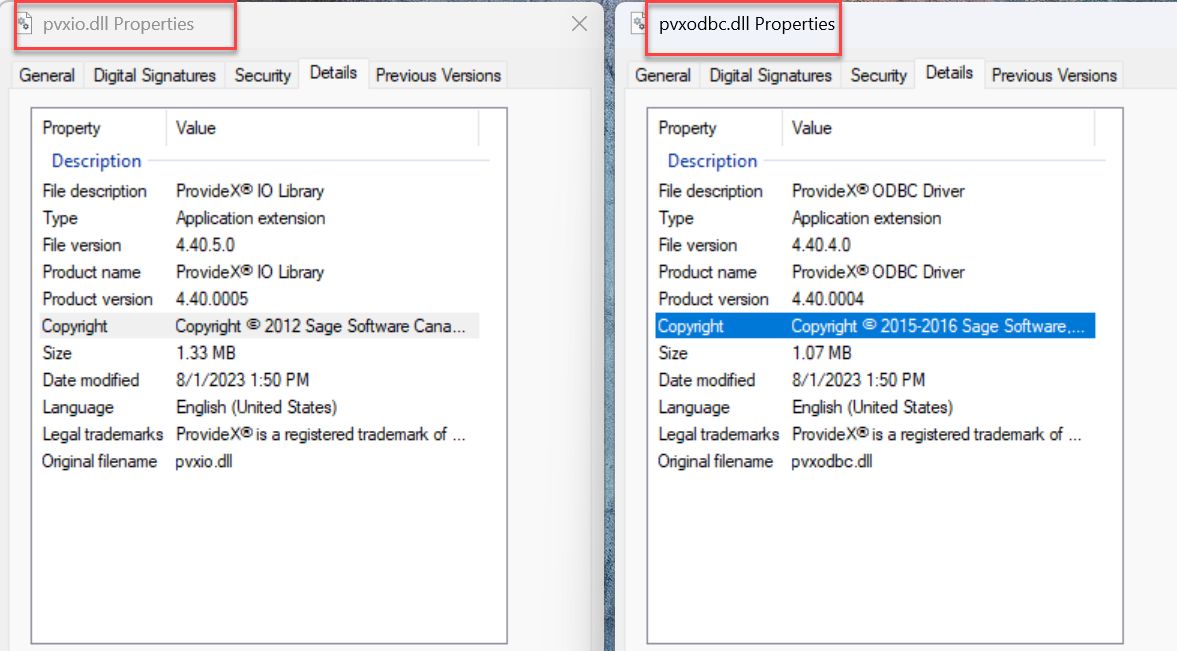
By manually running PVXIOSVR.exe from \mas90\home of the v2021 system as a desktop app instead of starting the CS ODBC service, we saw a specific version conflict error appear. This tipped me off as to the problem. The version of all the ODBC driver DLLs below were 4.50 which is new to v2025 I think.
C:\Windows\SysWOW64 - Renamed pvxio.dll, pvxodbc.dll, pvxsec32.dll and replaced them with a 4.40 version of the same files
C:\Windows\System32 - Renamed pvxio.dll, pvxodbc.dll, pvxsec64.dll and replaced them with a 4.40 version of the same files
The 4.40 version of these files were grabbed from a client running v2023 but it could have been one on v2022 or v2021 and perhaps earlier too, as 4.40 ODBC has been around for awhile. After that, manually starting PVXIOSVR.exe worked. Then we tried starting CS ODBC Driver service and it worked. Then Sage printing from v2021 worked. Woohoo.
** I think we should have a content library folder for older ODBC driver DLLs.
------------------------------
Alnoor Cassim
Accounting Systems, Inc. (ASI)
------------------------------
Original Message:
Sent: 01-09-2026 16:11
From: Jeff Schwenk
Subject: Windows could not start the Sage 100 Client Server ODBC Driver Service on the local computer - 106192016
With the assistance from @Alnoor Cassim, the issue has been determined and resolved. Details to follow. The short version is v2025 installs new drivers for pvxiosvr.exe, which are incompatible with previous versions of Sage. Beware if you need to use the CSODBC during your transition.
------------------------------
Jeff Schwenk
Owner
Bottomline Software, Inc.
Waynesboro VA
(540) 221-4444
Improving bottom lines for over 25 years!
------------------------------
Original Message:
Sent: 01-08-2026 14:52
From: Jeff Schwenk
Subject: Windows could not start the Sage 100 Client Server ODBC Driver Service on the local computer - 106192016
Nope, there is something more going on with the v2025 ADV installation. This is the third time the issue has occurred. I am simply doing a base install of v2025. I am not installing the service nor activating it. I run it in MAS90 mode. EVERY time, when I reboot the server, the existing CSODBC service crashes at start up. I cannot manually start it. I uninstall the existing (production) CSODBC service and reinstall (e.g. v2022,v2021). I uninstalled, reinstalled both Crystal runtime programs. Rebooted ad nauseam.
Any new thoughts???
------------------------------
Jeff Schwenk
Owner
Bottomline Software, Inc.
Waynesboro VA
(540) 221-4444
Improving bottom lines for over 25 years!
Original Message:
Sent: 01-07-2026 14:11
From: Kevin Moyes
Subject: Windows could not start the Sage 100 Client Server ODBC Driver Service on the local computer - 106192016
You have to remove the old ODBC service, then add it back from the new version's folder. Sage KB has instructions.
------------------------------
Kevin Moyes
Technical Systems Analyst
Munjal White Consulting Co.
Toronto ON
Original Message:
Sent: 01-07-2026 13:56
From: Jeff Schwenk
Subject: Windows could not start the Sage 100 Client Server ODBC Driver Service on the local computer - 106192016
Just started an upgrade to v2025 from v2022. v2022 CSODBC service was running fine on the server. As SOON as I rebooted the server post v2025 install, the v2022 CSODBC service crashed (would not restart). The Short term fix was to remove the CSODBC flag in user maintenance.
Has anyone else experienced this with v2025?
------------------------------
Jeff Schwenk
Owner
Bottomline Software, Inc.
Waynesboro VA
(540) 221-4444
Improving bottom lines for over 25 years!
Original Message:
Sent: 12-18-2025 15:53
From: Jeff Schwenk
Subject: Windows could not start the Sage 100 Client Server ODBC Driver Service on the local computer - 106192016
Yep
------------------------------
Jeff Schwenk
Owner
Bottomline Software, Inc.
Waynesboro VA
(540) 221-4444
Improving bottom lines for over 25 years!
Original Message:
Sent: 12-18-2025 11:56
From: Kevin Moyes
Subject: Windows could not start the Sage 100 Client Server ODBC Driver Service on the local computer - 106192016
Both installs are the same architecture? (32-bit / 64-bit). Make sure both are running the same... at least until go-Live.
------------------------------
Kevin Moyes
Technical Systems Analyst
Munjal White Consulting Co.
Toronto ON
Original Message:
Sent: 12-18-2025 09:46
From: Jeff Schwenk
Subject: Windows could not start the Sage 100 Client Server ODBC Driver Service on the local computer - 106192016
Thanks all.
Server in use now. Will do the suggestions tonight.
------------------------------
Jeff Schwenk
Owner
Bottomline Software, Inc.
Waynesboro VA
(540) 221-4444
Improving bottom lines for over 25 years!
Original Message:
Sent: 12-18-2025 09:32
From: David Overholt
Subject: Windows could not start the Sage 100 Client Server ODBC Driver Service on the local computer - 106192016
The install likely corrupted the 2023 Crystal Runtimes.
Uninstall the crystal runtimes from the server and then run workstation setup for 2025 again on the server to install the new Crystal runtimes.
The new runtimes will work fine for the 2023 or 2025 versions
Original Message:
Sent: 12/18/2025 9:30:00 AM
From: Doug Higgs
Subject: RE: Windows could not start the Sage 100 Client Server ODBC Driver Service on the local computer - 106192016
PVXIOSVR not PVXIO
------------------------------
Doug Higgs
Midwest Commerce Solutions, Inc
(312) 315-0960
Chauffeur, Chef, and Personal Assistant to Sprinkles