Sage 100

 View Only
  • 1.  WIN 10 Pro WS Client Install - Sage 100 STD PU3

    Posted 02-06-2019 10:26
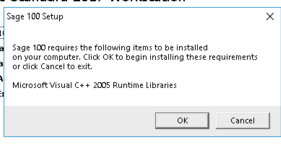
    Client having issue with a new workstation.  Sage runs normally on another workstation but will not on this workstation.  So my first inclination is to uninstall / reinstall the Sage WS client.  When I click on autorun.exe (right click - run as admin).  This message pops up.  OK.
    Immediately, this message pops.
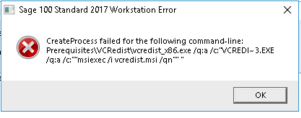


    The only KB appearing when I search discusses installing Net 3.5 on the SERVER.  IT says it is already installed...........

    Any quick thoughts before I get Sage Tech Support involved??  Logged on workstation as an Admin, UAC is off.

    TIA

    ------------------------------
    Jeff Schwenk
    Bottomline Software, Inc.
    Waynesboro VA
    540-221-4444
    ------------------------------


  • 2.  RE: WIN 10 Pro WS Client Install - Sage 100 STD PU3

    Posted 02-06-2019 11:09

    Possibly you have a newer Microsoft Visual C++ runtime library that is preventing the 2005 version from installing.


    Mary Mays

    Professional Software, Inc. 

    DSD Wichita, Inc.

    800 East First Street, Suite 150 Wichita, KS  67202

    phone: (316)269-4264   fax: (316)269-0512


    ------Original Message------

    Client having issue with a new workstation.  Sage runs normally on another workstation but will not on this workstation.  So my first inclination is to uninstall / reinstall the Sage WS client.  When I click on autorun.exe (right click - run as admin).  This message pops up.  OK.

    Immediately, this message pops.


    The only KB appearing when I search discusses installing Net 3.5 on the SERVER.  IT says it is already installed...........

    Any quick thoughts before I get Sage Tech Support involved??  Logged on workstation as an Admin, UAC is off.

    TIA

    ------------------------------
    Jeff Schwenk
    Bottomline Software, Inc.
    Waynesboro VA
    540-221-4444
    ------------------------------


  • 3.  RE: WIN 10 Pro WS Client Install - Sage 100 STD PU3

    Posted 02-06-2019 11:31
      |   view attached
    Is it Win 10 version 1809?  There are compatibility issues with this version.  Also, you can bypass the prerequisites by choosing either setup or the .msi (It;s one of the two, I can't remember which one).

    ------------------------------
    Doug Higgs
    Assistant Technical Support / Building Maintenance Specialist
    Midwest Commerce Solutions, Inc
    ------------------------------


  • 4.  RE: WIN 10 Pro WS Client Install - Sage 100 STD PU3

    Posted 02-06-2019 12:07
    The real issue I am trying to resolve is the workstation does not play well with the payroll services wizard in v2017.  The older WIN 10 workstation does.  Since IT installed the WS client, I am trying to reinstall it myself.  And naturally, they were able to get it installed with out me shadowing so I don't know how they did it differently.  @Doug Higgs I will ask about the version.  If that isn't it, then it is 800-854-3415 or bust!


    ------------------------------
    Jeff Schwenk
    Bottomline Software, Inc.
    Waynesboro VA
    540-221-4444
    ------------------------------


  • 5.  RE: WIN 10 Pro WS Client Install - Sage 100 STD PU3

    Posted 02-06-2019 11:55
    Find the exe and Run As Admin manually (outside the installer).

    I had to do this last night when installing CR 2016 on a new server.  It would not install from the menu, but did when started manually.

    ------------------------------
    Kevin Moyes
    Technical Systems Analyst
    Munjal White Consulting Co.
    Toronto ON
    ------------------------------