Susan,
CSV is just a text file, with commas separating the data fields. The method I described gets you a CSV, without relying on the Crystal Reports CSV export programming (which sometimes does things like inserting quotes where you don't want them).
------------------------------
Kevin Moyes
Technical Systems Analyst
Munjal White Consulting Co.
------------------------------
Original Message:
Sent: 04-19-2023 17:54
From: Susan Pawlowic
Subject: Wells-Fargo ACH File
Thanks, @Kevin Moyes . Unfortunately since WF requires a .csv file, exporting directly to text won't work for them. I'll see if anyone on my team is technical enough to take on that VBscript. Re. encrypting bank info, I think we're good because technically all of the data in the file is from AP, none is actually Bank info. Thanks again!
------------------------------
Susan Pawlowic
Sage 100 Solutions Architect
RKL eSolutions, LLC
spawlowic@rklesolutions.com
(717) 735-9109 Ext. 4352
------------------------------
Original Message:
Sent: 04-19-2023 11:44
From: Kevin Moyes
Subject: Wells-Fargo ACH File
Commas in any kind of output, exported to CSV, will be wrapped in quotes by the CR export process.
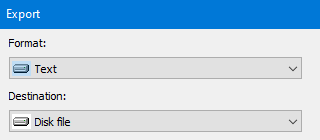
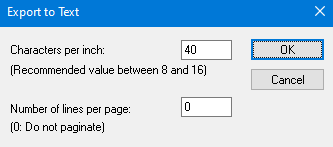
We've had to do this a few times for different purposes (not WF ACH). If you need meticulous output, when the export to CSV is unreliable, we put everything into one long formula field for each line, then export to text file format (not CSV). The trick there is to make sure your page size is wide enough, and use the same characters per inch value (tested for the report with wide example data).
Or write an ODBC VBScript instead, which gives much more reliable output formatting without users having to export the data to a file.
 Of course, ODBC won't work with any PII values, and I think Sage said vendor banking information is about to be encrypted in v2023, so probably not a good strategy for this.
------------------------------
Kevin Moyes
Technical Systems Analyst
Munjal White Consulting Co.