I don't see it as a SAP issue at all. This is all on Sage. It is Sage business unit dev teams not coordinating what they are deploying and how.
Original Message:
Sent: 07-09-2024 18:27
From: Kevin Moyes
Subject: Warning if you have customers with HRMS and 100
Hmm... I wonder if Sage might have the weight to push SAP for correcting this systemic issue.
(Of course Sage execs would have to be motivated to try).
------------------------------
Kevin Moyes
Technical Systems Analyst
Munjal White Consulting Co.
Toronto ON
------------------------------
Original Message:
Sent: 07-09-2024 17:56
From: Doug Higgs
Subject: Warning if you have customers with HRMS and 100
Agreed. We and particularly the customers shouldn't have to deal with this crap. It should just work. The customer doesn't care nor should they if it is forward, backward, or sideways compatibility or any other reason it doesn't work. if Sage can't or won;t work with SAP to solve the issue then the least they can do is insure compatibility of Crystal between integrated solutions. You know, if HRMS is using Crystal 2020 then Sage 100 needs to use version 2020.
------------------------------
Doug Higgs
Midwest Commerce Solutions, Inc
(312) 315-0960
Chauffeur, Chef, and Personal Assistant to Sprinkles
Original Message:
Sent: 07-09-2024 17:45
From: Kevin Moyes
Subject: Warning if you have customers with HRMS and 100
Po-teh-to, Po-tah-to.
Commands from a program to produce output using ABC123.rpt with parameters [1,a,3] and data source {whatever}... should continue to work with higher version of the runtime engine. I'd expect problems if the report used was higher than the runtime is designed for... but installing a newer runtime shouldn't break programs designed to work with an older runtime.
(I'm sure I'm not the only one to remember the nightmares of DLL H3LL in the late 90's / early 2K's... SAP should do better... seriously... this stuff is not exactly new problem type).
------------------------------
Kevin Moyes
Technical Systems Analyst
Munjal White Consulting Co.
Toronto ON
Original Message:
Sent: 07-09-2024 17:35
From: Doug Higgs
Subject: Warning if you have customers with HRMS and 100
Isn't forward compatibility the issue, not backward compatibility? Crystal version 20 can run a report created in version 16. The issue I run into is forms and reports in Sage 100 don't run because there is a higher version of the run time program installed on the computer, typically by another application that uses Crystal.
------------------------------
Doug Higgs
Midwest Commerce Solutions, Inc
(312) 315-0960
Chauffeur, Chef, and Personal Assistant to Sprinkles
Original Message:
Sent: 07-09-2024 14:53
From: Kevin Moyes
Subject: Warning if you have customers with HRMS and 100
Sage teams work in isolation. "One Sage" is only a marketing strategy, not an indication of cohesive teamwork... but you know that already.
Technically, using the latest version of runtimes (to include all the latest bug fixes) is something each team will want to do... understandably. But Sage has no internal communication (or outward communication) about how that impacts other Sage products... with the root cause of problems being SAP not making updates backwards compatible. Can you imagine M$ releasing a new version of Word that can't open an old .doc file?
------------------------------
Kevin Moyes
Technical Systems Analyst
Munjal White Consulting Co.
Toronto ON
Original Message:
Sent: 07-09-2024 13:52
From: Wayne Schulz
Subject: Warning if you have customers with HRMS and 100
>>Sage could certainly do a better job of communication around the conflicts, but they don't control a big piece of this.
So, wait, what? Sage doesn't control the version of Crystal runtime that they use in their own products and doesn't have a duty to ensure that there aren't conflicts with their own products?
------------------------------
Wayne Schulz
wayne@s-consult.com
Schulz Consulting
(860) 516-8990
Moodus, CT
Original Message:
Sent: 07-09-2024 13:44
From: Kevin Moyes
Subject: Warning if you have customers with HRMS and 100
Blame for this one is something I'd lay at the feet of SAP. Programming the CR runtime updates to not be backwards compatible is simply evil / insanity. Sage could certainly do a better job of communication around the conflicts, but they don't control a big piece of this.
------------------------------
Kevin Moyes
Technical Systems Analyst
Munjal White Consulting Co.
Toronto ON
Original Message:
Sent: 07-09-2024 13:39
From: Brett Zimmerman
Subject: Warning if you have customers with HRMS and 100
Some day I envision Sage business units actually speaking with each other.
------------------------------
Brett Zimmerman
Net at Work
Greater Boston Area
Original Message:
Sent: 07-08-2024 12:10
From: Kevin Moyes
Subject: Warning if you have customers with HRMS and 100
Indeed! (Finding simple fixes to Crystal Reports runtime issues is always difficult).
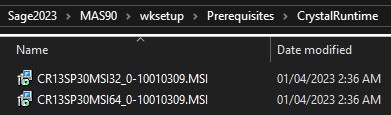
I'm guessing the MSI's (plus .NET 4.8?) would suffice...
------------------------------
Kevin Moyes
Technical Systems Analyst
Munjal White Consulting Co.
Toronto ON
Original Message:
Sent: 07-08-2024 11:53
From: Wayne Schulz
Subject: Warning if you have customers with HRMS and 100
Great post! 👍
------------------------------
Wayne Schulz
wayne@s-consult.com
Schulz Consulting
(860) 516-8990
Moodus, CT
Original Message:
Sent: 07-08-2024 10:34
From: Jeff Schwenk
Subject: Warning if you have customers with HRMS and 100
A timely post. This happened to a client running Sage 100 v2022 (Crystal 2016) and HRMS v10.7070 - Q2 2024. Everything was working great until the Q2 2024 update was installed. Apparently, there was no warning that this update was using Crystal 2020. Sage 100 Custom reports stopped working. When I reinstalled the Sage client, HRMS custom reports stopped working.
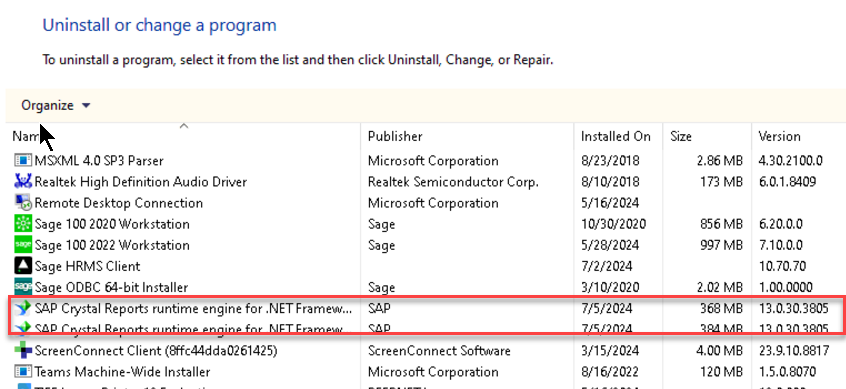
I deleted the Crystal runtimes (via the control panel). I then launched the Sage 100 2023 workstation update. The very first thing the installer did was install the two Crystal runtimes (below). Once installed, I exited the installer (did not install the v2023 client).
Sage 100 2022 and HRMS can generate Crystal reports without issue.
Will post back if issues arise.
Fingers crossed.
------------------------------
Jeff Schwenk
Bottomline Software, Inc.
(540) 221-4444
Original Message:
Sent: 07-02-2024 16:37
From: Eric Lunceford
Subject: Warning if you have customers with HRMS and 100
Thank you. I was hoping with your description that both would be able to play together with the full 13.34 runtime installed.
Unfortunately, this user is out until next Wednesday to try this.
Sage indicated the KB was going to be updated with this information.
------------------------------
Eric Lunceford
First Mate Business Solutions
Oklahoma City, OK
877-880-8960
Original Message:
Sent: 07-02-2024 14:43
From: Phil McIntosh
Subject: Warning if you have customers with HRMS and 100
And after this, you may have to uninstall and reinstall the HRMS client to get printing working in HRMS....
------------------------------
Phil McIntosh
Friendly Systems, Inc.
Original Message:
Sent: 07-02-2024 12:43
From: Phil McIntosh
Subject: Warning if you have customers with HRMS and 100
The fix:
(1) Uninstall the Sage 100 Crystal runtimes (13.30)
(2) Download and install the 13.34 runtimes from SAP:
https://origin-az.softwaredownloads.sap.com/public/file/0020000000674342023
https://origin-az.softwaredownloads.sap.com/public/file/0020000000674412023
(3) Uninstall the 13.34 runtimes this will remove the embedded runtime installs done by HRMS/Sage 300
(4) Install the 13.34 runtimes
------------------------------
Phil McIntosh
Friendly Systems, Inc.
Original Message:
Sent: 07-02-2024 12:20
From: Phil McIntosh
Subject: Warning if you have customers with HRMS and 100
Ahh - the Payroll in HRMS is the Sage 300 payroll...
------------------------------
Phil McIntosh
Friendly Systems, Inc.
Original Message:
Sent: 07-02-2024 11:47
From: Brett Zimmerman
Subject: Warning if you have customers with HRMS and 100
According to this chart from January, I would have expected the latest HRMS release to be 13.0.30:
System | Crystal Version | Crystal Runtime Version |
Sage 100 2022 | Crystal Reports 2016 | 13.0.23, 13.0.24 |
Sage 100 2023 | Crystal Reports 2020 | 13.0.30 |
Sage HRMS (Q4 and Prior) | Crystal Reports 2016 | 13.0.23, 13.0.24 |
Sage HRMS (Q4 SR1 and Beyond) | Crystal Reports 2020 | 13.0.30 |
Sage 500 | Crystal Reports 2011 | 13.0.21 |
Sage 300 CRE | | 13.0.22 |
Sage 300 2021 | Crystal Reports 2016 | 13.0.26 |
Sage 300 2022 | Crystal Reports 2016 | 13.0.30 |
Sage 300 2024 | Crystal Reports 2020 | 13.0.34 |
------------------------------
Brett Zimmerman
Net at Work
Greater Boston Area
Original Message:
Sent: 07-02-2024 11:19
From: Eric Lunceford
Subject: Warning if you have customers with HRMS and 100
Were you able to come up with any resolution?
I have a customer right now that has this issue.
Fortunately, most of the users don't have to have both. But the CFO and Controller do and are not happy. Again.
------------------------------
Eric Lunceford
First Mate Business Solutions
Oklahoma City, OK
877-880-8960