Sage 100

 View Only
  • 1.  Visual integrator - prompting

    Posted 12-08-2023 12:59

    Recently upgraded from work order to production management for a client.

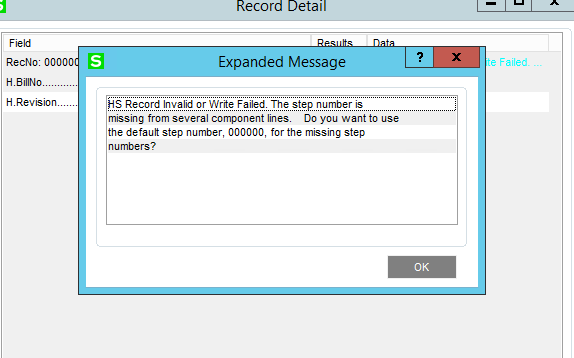
    Trying to update some item records is the bill of materials.  Discovered that in the conversion process step numbers were not automatically added to the bills.  If you access via bill maintenance you get a prompt that component lines are missing the step and it prompts to use the default step number.

    When you try to di a v/i import, the import fails because you get this message.  Is there any way to get the question automatically answered with a yes? 

    Clearly this could be resolved by accessing each bill one by one however there are 4000+ records where this would need to be done.

    I imagine the steps could be updated with a script, but I'm hoping for an easier way.


    ------------------------------
    Thomas Rogers (TomTarget)
    Target System Technology, Inc.
    ------------------------------


  • 2.  RE: Visual integrator - prompting

    Posted 12-08-2023 13:13

    Don't have a quick response, though I would probably export the entire table into my Excel spreadsheet, fix the missing data, create blank tables and reimport via VI.

    However, I would be interested in the migration specifics and whether you contacted Sage and what their response was.  When you mention B of M, are you referring to the BOM module or the material listing in the PM template?  Is this a PM issue or a BOM issue?


    ------------------------------
    Jeff Schwenk
    Bottomline Software, Inc.
    (540) 221-4444
    ------------------------------


  • 3.  RE: Visual integrator - prompting

    Posted 12-08-2023 13:32

    Have not talked with Sage yet.

    The materials are contained within the BOM  not the PM template.

    When a work ticket is created, the steps for the materials are automatically defaulted so it is not really an issue in that respect.   It's just a problem trying to update the quantities on some of the materials in the BOMs.


    ------------------------------
    Thomas Rogers (TomTarget)
    Target System Technology, Inc.
    ------------------------------


  • 4.  RE: Visual integrator - prompting

    Posted 12-10-2023 11:10

    When creating a new BOM, the copy from BOM routine will not work unless the Step Numbers are populated on the bill you are trying to copy.  I discovered this same Step Number issue on an upgrade last weekend and one this weekend.  I have an open case with Karen at Sage for a call back on Tuesday.  Unfortunately, you cannot import into an existing BOM detail line because the Sequence Line Number is not available, and any attempted imports will duplicate the line.  I had to export out the entire BOM detail file, reinitialize the file and then do a VI import to assign step 000000 to all bill detail lines.  Fortunately, you can just reimport the entire file and if the bill did not need step numbers it will not import the step number field.  You need to still be careful if any bills did have other step numbers assigned previously.  

    I have discovered many issues with PM conversions.  If step 0000 doesn't exist, the conversion copies the first step and duplicates it as step 0000 which results in double labor amounts budgeted.  WIP GL accounts do not populate if more than one is used, departments need to be assigned, can't change work ticket class on existing templates so GL applied accounts are wrong, production run rates don't populate and have to be imported.  Can't change the template in work ticket entry if assigned in BOM, but need to populate the template in inventory if using ScanForce Make to Order since it doesn't pull from BOM.  Work instructions entered into Extended Text on template will create a new record in CI_ExtendedDescription and everytime you edit a work instruction it will create a new record in CI_ExtendedDescription and abandon the key/record.  Thus, you gets lots of abandoned records and need to use the CI purge utility for obsolete extended descriptions.  Work ticket travelers print work instructions twice.  Completed work orders that were not closed before the conversion may post to WIP accounts when closed in 2023 even though no WIP existed.  Just a few more gotcha's to look out for.


    ------------------------------
    Steve Engmann, MBA, CMA
    DSD Business Systems
    Appleton, WI
    o: 800-627-9032 x-126
    m: 920-428-2806
    ------------------------------


  • 5.  RE: Visual integrator - prompting

    Posted 12-11-2023 17:16

    Yep, just a "few" gotchas......  Big sigh!!


    ------------------------------
    Jeff Schwenk
    Bottomline Software, Inc.
    (540) 221-4444
    ------------------------------


  • 6.  RE: Visual integrator - prompting

    Posted 12-11-2023 17:32

     The culmination of ten years of bug writing...


    ------------------------------
    Phil McIntosh
    President
    Friendly Systems, Inc.
    ------------------------------


  • 7.  RE: Visual integrator - prompting

    Posted 12-15-2023 12:59

    Thanks for the info Steve!


    ------------------------------
    Thomas Rogers (TomTarget)
    Target System Technology, Inc.
    ------------------------------