Here are the steps to remove Journal JE000000 created by the V/I Test button. I've never done a Trans Journal Entry import myself, and I still haven't, so if you think you may in future have a Source Journal other than JE that is also a deleted journal, for example CD000000 then let me know and I'll change the tiny program I attached to remove all variations. This one here is schlepped together
- In Import Job Maint, in the the Configuration tab click on Perform button
- Set the Perform Maintenance screen like this (your Job Name will be different than mine)
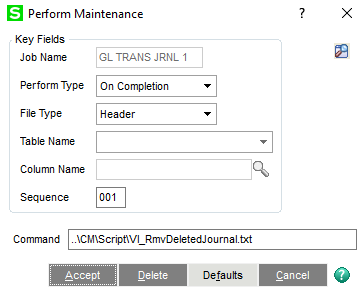
** In the Command box, we're using a relative path to our tiny program to make life easier.
- Take the attached file and place it in the ..\mas90\CM\Script folder. Although this is not a script, when you upgrade customer later, the Migration will bring everything in the Script folder over so you don't have to manually do it or remember where it was.
- Try in a copy company first. When you run the import, clicking Test will still behave as it does today where deleted journal JE000000 is retained. But when Accept is clicked, it should remove that deleted record from GL_TransactionJournalHeader for you.
Sorry I haven't tested this so let me know if it doesn't work. Also, again if you need it work on source journals other than JE then let me know and I will do this one properly as I hastily put this together.
------------------------------
Alnoor Cassim
Accounting Systems, Inc. (ASI)
------------------------------
Original Message:
Sent: 11-13-2024 16:07
From: Chuck Peddy
Subject: VI Test is creating a phantom deleted transaction
Thank you, my friend!
------------------------------
Chuck Peddy
Smartbridge Partners
------------------------------
Original Message:
Sent: 11-13-2024 15:47
From: Alnoor Cassim
Subject: VI Test is creating a phantom deleted transaction
Chuck - Yes correct. However instead of keying in a single command, in this case I think we'll need to point to a file that runs a tiny program that V/I will call. Let me see what I can come up. I'll report back.
------------------------------
Alnoor Cassim
Accounting Systems, Inc. (ASI)
Original Message:
Sent: 11-13-2024 15:33
From: Chuck Peddy
Subject: VI Test is creating a phantom deleted transaction
@Alnoor Cassim, I'm assuming that would be putting a command in the "Perform Maintenance" area of the VI Job configuration.
------------------------------
Chuck Peddy
Smartbridge Partners
Original Message:
Sent: 11-13-2024 12:22
From: Alnoor Cassim
Subject: VI Test is creating a phantom deleted transaction
Chuck - No you can't delete the "Deleted" record because scripts use the same business object as V/I. What can be done is to add perform logic to end of the actual V/I import (when you click Accept) that will directly open the GL_TransactionJournalHeader.m4t file (meaning not use the business object) and delete the "Deleted" record.
------------------------------
Alnoor Cassim
Accounting Systems, Inc. (ASI)
Original Message:
Sent: 11-13-2024 12:16
From: Chuck Peddy
Subject: VI Test is creating a phantom deleted transaction
I know that I can't delete using VI but can I use a script to delete a record? It's ALWAYS the same entry; JE000000.
------------------------------
Chuck Peddy
Smartbridge Partners
Original Message:
Sent: 11-12-2024 16:52
From: Kevin Moyes
Subject: VI Test is creating a phantom deleted transaction
Yes, we've seen the impact of this in a few business objects.
Ask Sage and they will say it is working as designed.
------------------------------
Kevin Moyes
Technical Systems Analyst
Munjal White Consulting Co.
Toronto ON