Sage 100

 View Only
Expand all | Collapse all

VI job to import into IM Transaction Entry for Transfers

  • 1.  VI job to import into IM Transaction Entry for Transfers

    Posted 10-29-2021 17:17
      |   view attached

    v2016.  Client has FIFO inventory.  During  manual data entry, if the qty to transfer > QOH, the program prompts


    I have an import job that imports the qty from the source file.  If you look at the job log, you see the following, and the qty is accepted.

    The client does not want those lines to import.  I gave it a shot by putting a condition on the Transaction Qty, but it doesn't work.  Is there a way to have the job fail or skip the desired records?


    ------------------------------
    Barbara Goldstein
    Sr. Consultant
    DSD Business Systems
    San Jose CA
    800.627.9032 x221
    ------------------------------

    Attachment(s)

    pdf
    VI_ImportJobDefinition.pdf   54 KB 1 version


  • 2.  RE: VI job to import into IM Transaction Entry for Transfers

    Posted 10-29-2021 17:21
    Can you get the warehouse QoH into a Temp field (file assign...), and add a condition to the quantity field based on that?

    ------------------------------
    Kevin Moyes
    Technical Systems Analyst
    Munjal White Consulting Co.
    Toronto ON
    ------------------------------


  • 3.  RE: VI job to import into IM Transaction Entry for Transfers

    Posted 10-29-2021 18:35
    No, I can only pull from IM_TransactionHeader or IM_Warehouse.

    ------------------------------
    Barbara Goldstein
    Sr. Consultant
    DSD Business Systems
    San Jose CA
    800.627.9032 x221
    ------------------------------


  • 4.  RE: VI job to import into IM Transaction Entry for Transfers

    Posted 10-30-2021 01:19
    Could always put in the condition for the quantity that the coBusiness'Lines'LastErrorMsg$ is blank or not equal to that particular message.  Although to reliably use this, you would need to clear the property before the transaction quantity is set.  I would imagine that the returned value when being set is probably a -1 since it is setting a warning.  I can't recall off the top of my head if you can refer to the variable in the condition field but I can check it in the morning.

    ------------------------------
    David Speck II
    Tennessee Software Solutions
    ------------------------------


  • 5.  RE: VI job to import into IM Transaction Entry for Transfers

    Posted 10-30-2021 13:28
    Edited by David Speck II 10-30-2021 13:29
    Looks like the SetValue occurs AFTER the condition is evaluated so you can't refer the LastErrorMsg or returned value in the condition of the same field you want to test. 

    If you don't mind a bit of perform logic, you could either use the After Assign event or use Calculated as the operation and handle everything in the field properties of the transaction quantity field.

    Below are two variants using perform logic in the calculation of the TransactionQty field.  Both require changing the "x" within the brackets of the IMP$[] variable at the beginning to a number that represents the column position in the source file that you want to use for the transaction quantity.

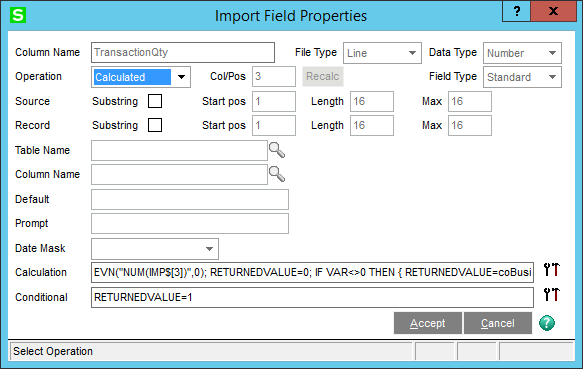
    This first one will first attempt to set the value BUT if the business object returns anything other than 1, it will reset it to 0, set and use the RETURNEDVALUE variable in the Condition to control whether or not the import log reports it as assigned or not assigned.
    Calculation:
    EVN("NUM(IMP$[3])",0); RETURNEDVALUE=0; IF VAR<>0 THEN { RETURNEDVALUE=coBusiness'Lines'SetValue("TransactionQty",VAR); coBusiness'Lines'SetValue("TransactionQty",0) }​

    Condition:

    RETURNEDVALUE=1


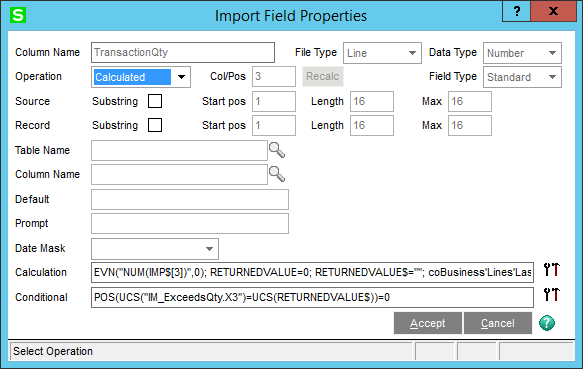
    This second one will first attempt to set the value BUT if the business object's LastErrorNum is "IM_ExceedsQty.X3", then it will reset it to 0, set and use the RETURNEDVALUE$ variable in the Condition to control whether or not the import log reports it as assigned or not assigned
    Calculation:
    EVN("NUM(IMP$[3])",0); RETURNEDVALUE=0; RETURNEDVALUE$=""; coBusiness'Lines'LastErrorNum$=""; IF VAR<>0 THEN { RETURNEDVALUE=coBusiness'Lines'SetValue("TransactionQty",VAR); RETURNEDVALUE$=coBusiness'Lines'LastErrorNum$; coBusiness'Lines'SetValue("TransactionQty",0) }​
    Condition:
    POS(UCS("IM_ExceedsQty.X3")=UCS(RETURNEDVALUE$))=0​

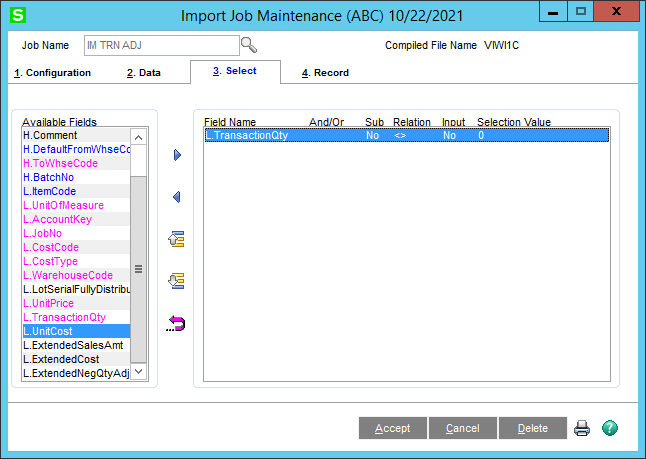
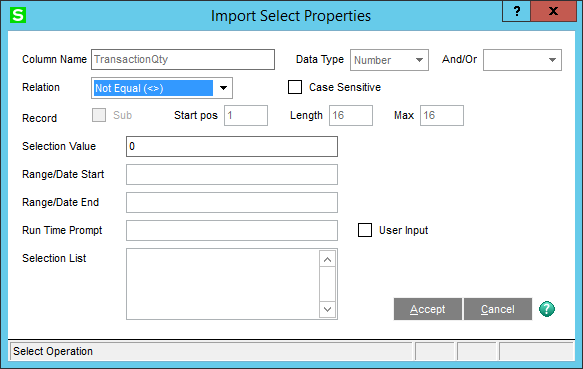
    Both rely on the following selection criteria to not select the line if the transaction quantity ends up being 0.

    ------------------------------
    David Speck II
    Tennessee Software Solutions
    ------------------------------


  • 6.  RE: VI job to import into IM Transaction Entry for Transfers

    Posted 11-03-2021 14:01

    Thank you, David!  I'm having problems, though.  I changed the value of IMP$[5] as column 5 is the column for the qty, but getting this:


    ------------------------------
    Barbara Goldstein
    Sr. Consultant
    DSD Business Systems
    San Jose CA
    800.627.9032 x221
    ------------------------------


  • 7.  RE: VI job to import into IM Transaction Entry for Transfers

    Posted 11-03-2021 14:17
    Barb - does your line of code end with a '?' or a '}'

    ------------------------------
    Randy Marion
    ------------------------------


  • 8.  RE: VI job to import into IM Transaction Entry for Transfers

    Posted 11-03-2021 14:24
    Barb - I do not think you curly braces match up like they should .... a syntax error every time!
    EVN("NUM(IMP$[3])",0); RETURNEDVALUE=0; RETURNEDVALUE$=""; coBusiness'Lines'LastErrorNum$=""; IF VAR<>0 THEN { RETURNEDVALUE=coBusiness'Lines'SetValue("TransactionQty",VAR); RETURNEDVALUE$=coBusiness'Lines'LastErrorNum$; coBusiness'Lines'SetValue("TransactionQty",0) }​​

    Copy and paste the above.

    ------------------------------
    Randy Marion
    ------------------------------


  • 9.  RE: VI job to import into IM Transaction Entry for Transfers

    Posted 11-03-2021 14:50
    It would seem the expression checker removes the curly braces but I do suspect Barbara has a question mark at the end of her calculation when there shouldn't be.  If I force a syntax error, I get the following.  No question mark in site.


    ------------------------------
    David Speck II
    Tennessee Software Solutions
    ------------------------------


  • 10.  RE: VI job to import into IM Transaction Entry for Transfers

    Posted 11-03-2021 14:55
    I guess I never ran across the Expression Checker helping me out like that.  Don't you just love it when computers want to think for us?  So, Barb could just remove the '?'

    ------------------------------
    Randy Marion
    ------------------------------


  • 11.  RE: VI job to import into IM Transaction Entry for Transfers

    Posted 11-03-2021 15:09
    I believe so.

    ------------------------------
    David Speck II
    Tennessee Software Solutions
    ------------------------------


  • 12.  RE: VI job to import into IM Transaction Entry for Transfers

    Posted 11-03-2021 16:56
    Funny, I didn't see the question mark except for in the Syntax error message.  I had even copy/pasted from David's post into Notepad which looked good also.  In any event, I copy/pasted Randy's text string and it worked!  I have a bit more testing to do, but looking good!  Thank You!

    ------------------------------
    Barbara Goldstein
    Sr. Consultant
    DSD Business Systems
    San Jose CA
    800.627.9032 x221
    ------------------------------


  • 13.  RE: VI job to import into IM Transaction Entry for Transfers

    Posted 11-03-2021 17:14
    That is funny, don't be too tough on yourself about it though.  Many a syntax error has been caused by the slip of a pinky or thumb ... BTW - mine was just a copy/paste of David's ... Did you say earlier that you needed it changed to IMP$[5]?  I think my paste said [3] --- 

    --
    Randy Marion * Software Systems Engineer *


  • 14.  RE: VI job to import into IM Transaction Entry for Transfers

    Posted 11-03-2021 19:19
    Thanks Randy, I appreciate the sentiment.  BTW, I changed it to IMP$[5].

    ------------------------------
    Barbara Goldstein
    Sr. Consultant
    DSD Business Systems
    San Jose CA
    800.627.9032 x221
    ------------------------------