Sage 100

 View Only
  • 1.  VI job import filter, ODBC source and a runtime parameter

    Posted 01-23-2026 17:20

    Question, can this be done in VI?

    I want to create an IM Transfer transaction, sourced from a single SO.  The idea is to have an ODBC query of the SO detail table to get the items and quantities needed.  The problem is filtering the ODBC query results to a single SO# (without editing the query each time).

    Is there a way to use a runtime prompt TEMP field (for the user to type in the SO#), and somehow code tab 4 Skip logic to use that TEMP field as the Value?

    I am guessing this kind of situation has come up in the past, but I cannot find anything here (or on Sage City).


    ------------------------------
    Kevin Moyes
    Technical Systems Analyst
    Munjal White Consulting Co.
    Toronto ON
    ------------------------------


  • 2.  RE: VI job import filter, ODBC source and a runtime parameter

    Posted 01-24-2026 10:52

    I thought I read somewhere that runtime prompts using a temp fields was being added to VI in the v2026 release.  Probably wishful dreaming, though.


    ------------------------------
    Jeff Schwenk
    Owner
    Bottomline Software, Inc.
    Waynesboro VA
    (540) 221-4444

    Improving bottom lines for over 25 years!
    ------------------------------


  • 3.  RE: VI job import filter, ODBC source and a runtime parameter

    Posted 01-26-2026 10:51

    The question I have is how to use the temp field for applying the filter...


    ------------------------------
    Kevin Moyes
    Technical Systems Analyst
    Munjal White Consulting Co.
    Toronto ON
    ------------------------------


  • 4.  RE: VI job import filter, ODBC source and a runtime parameter

    Posted 01-24-2026 13:29

    HI Kevin,  so the ODBC connection is reading the Sales Order Detail, correct?   You should be able to put that in the SQL statement in the ODBC connection


    ------------------------------
    Bob Osborn
    Senior Consultant
    DSD
    7142645278
    ------------------------------


  • 5.  RE: VI job import filter, ODBC source and a runtime parameter

    Posted 01-26-2026 10:54

    Thanks for the suggestion Robert.  I have edited those ODBC queries often, but I'd never ask normal users to edit the SQL query there, and the SO number will be different each time the VI job is run.

    The goal is to have something with a normal user interface, to allow for the ODBC query to be filtered.


    ------------------------------
    Kevin Moyes
    Technical Systems Analyst
    Munjal White Consulting Co.
    Toronto ON
    ------------------------------


  • 6.  RE: VI job import filter, ODBC source and a runtime parameter

    Posted 01-25-2026 23:30

    You could use a UDT with a single row 7-character key for the sales order and join that to the sales order detail table in the ODBC Table selection. They edit the UDT and not the V/I import job.


    ------------------------------
    Dan Burleson
    Software Consultant
    Connex Software
    Corvallis OR
    541-829-1054
    ------------------------------


  • 7.  RE: VI job import filter, ODBC source and a runtime parameter

    Posted 01-26-2026 10:49

    Thanks for the idea Dan.  I'd probably go with an SO header UDF checkbox, with overridden SQL filter, over a UDT (which I find awkward to work with).


    ------------------------------
    Kevin Moyes
    Technical Systems Analyst
    Munjal White Consulting Co.
    Toronto ON
    ------------------------------


  • 8.  RE: VI job import filter, ODBC source and a runtime parameter

    Posted 01-28-2026 14:10

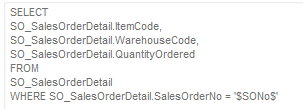
    This is possible by using perform logic on the "On Execution" event to override the SQL$ variable.  The easiest way to do this would be to put a placeholder in the SQL statement's WHERE clause, something like this.

    SELECT 
       * 
    FROM 
       SO_SalesOrderDetail 
    WHERE 
       SalesOrderNo = '$SONo$' 

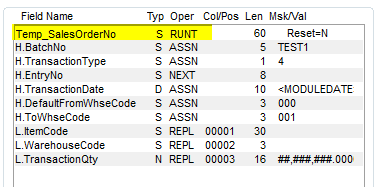
    You'll then replace the $SONo$ text string using the SUB function with the value in the runtime assigned variable, which starts as OPTION1$ and increments for each field on the Data tab that uses a runtime assignment.

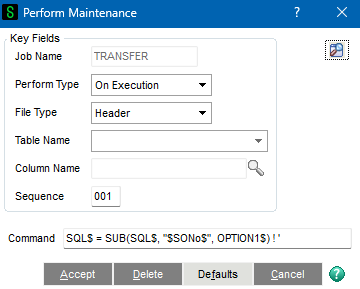
    The actual perform logic can be entered inline in the field as long as it contains a ' character and Sage 100 will EXECUTE it instead of PERFORM'ing it.  So it should look something like this.  Keep in mind that thee SUB function is case-sensitive so make sure you get the case of your placeholder correct.

    SQL$ = SUB(SQL$, "$SONo$", OPTION1$) ! ' 


    ------------------------------
    David Speck II
    Blytheco LLC
    ------------------------------


  • 9.  RE: VI job import filter, ODBC source and a runtime parameter

    Posted 01-29-2026 06:58

    Wow!


    ------------------------------
    Jeff Schwenk
    Owner
    Bottomline Software, Inc.
    Waynesboro VA
    (540) 221-4444

    Improving bottom lines for over 25 years!
    ------------------------------


  • 10.  RE: VI job import filter, ODBC source and a runtime parameter

    Posted 01-29-2026 10:39

    That is excellent David, thank you so much!

    This just tested successfully in v2025 Standard.

    Modified query:
    Fields:
    Perform logic:
    Results of import... ABC data:
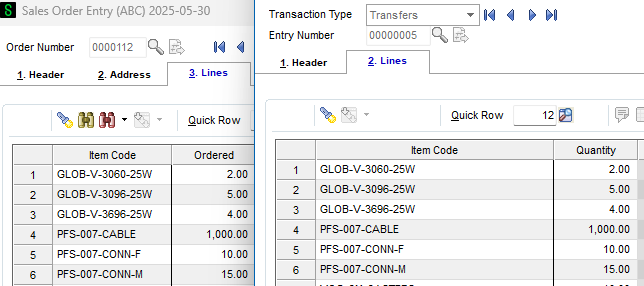
    Perfect!


    ------------------------------
    Kevin Moyes
    Technical Systems Analyst
    Munjal White Consulting Co.
    Toronto ON
    ------------------------------