Thanks David,
(I just post the code that way because it is easier for anyone to read... in the VI job it's one line).
The DebugPrint method worked well, and helped me find the right LineKey value, but I can't seem to figure out how to use it.
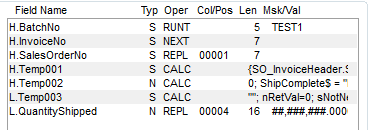
I was hoping the last line (above) would put the query value into the Temp Field, to then use in the LineKey value, but no luck.
The suggestion of _obj'GetKeyPadded$() gives the wrong line's edit key.
I've tried GetEditKey (job crashes).
Same with SetKeyValue x2 and SetKey (crash).
I have to use an "L" temp field (KeyAssigns doesn't do anything good)...
The sValueToUse is the correct (and cleaned) LineKey value... do you have any ideas on how I can use it?
I want the above Record Detail to be updating invoice LineKey 000001 (which was added by the header Temp002 calculation... 3 SO lines), instead of the job trying to set the quantity for LineKey 000005.
------------------------------
Kevin Moyes
Technical Systems Analyst
Munjal White Consulting Co.
------------------------------
Original Message:
Sent: 10-21-2022 14:59
From: David Speck II
Subject: VI invoice import, source file does not contain all SO lines
If using the code above, it was intended to be used in a temp field's calculation, so there shouldn't be any line breaks, it should all be on one line with the semi-colon separate each separate command.
As for outputting to the trace window, IIRC, coScript isn't a valid object handle in a VI job and there is no guarantee that coBusiness'ScriptObject will be valid either so the best way to go about it is to use %SYS_SS'ScriptObject'DebugPrint()
------------------------------
David Speck II
Tennessee Software Solutions
------------------------------
Original Message:
Sent: 10-20-2022 13:06
From: Kevin Moyes
Subject: VI invoice import, source file does not contain all SO lines
Thanks David.
Copy / paste of that into my test job didn't work, but I see what you're trying to do and it is certainly an idea worth pursuing.
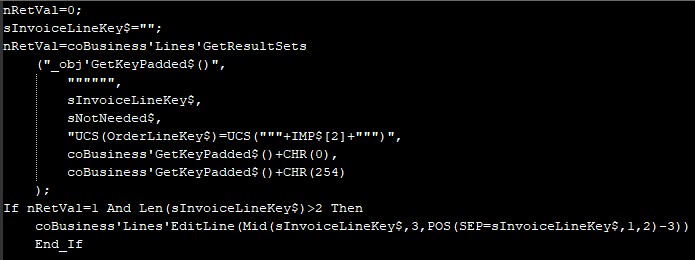 A lot of this syntax is new to me, but I get the general idea.
Do you know how I could add a DebugPrint (or pop-up message) to troubleshoot? This (below syntax guess) is giving me an error 65... and I want to check if the GetResultSets is at least finding the line key.

------------------------------
Kevin Moyes
Technical Systems Analyst
Munjal White Consulting Co.
Original Message:
Sent: 10-20-2022 01:50
From: David Speck II
Subject: VI invoice import, source file does not contain all SO lines
You could use GetResultSets in a line level temp field to locate a line by the OrderLineKey in your source after using the CopyLinesFromSalesOrder in a header level temp field. You could also do this with perform logic either inline or in a text file. There is a method in SO_InvoiceDetail_bus called BackOrder which looks like it would do what you want after you have shipped the lines you want to ship from your source file but it will only work when the header class is SO_Shipping_bus not SO_Invoice_bus.
So you could use the pre-total script to loop through the lines for ones where quantity shipped and quantity backordered is zero and back order them and restrict the script to when the start program begins with VI or you could use ProvideX in the header level temp field after CopyLinesFromSalesOrder to loop through the lines and back order every line first and then proceed to handling the lines that need to ship.
The GetResultSets should look something like this. You should only care about getting the full line key back so it doesn't really matter what is returned in the fourth argument. If the Lines' EditLine gives you issues, you could probably replace it with SetKey since GetResultSets should be returning the full key (InvoiceNo$ + LineSeqNo$ + LineKey$ or whatever primary the detail memory table uses).
nRetVal=0; sInvoiceLineKey$=""; nRetVal=coBusiness'Lines'GetResultSets("_obj'GetKeyPadded$()","""""",sInvoiceLineKey$,sNotNeeded$,"UCS(OrderLineKey$)=UCS("""+IMP$[2]+""")",coBusiness'GetKeyPadded$()+CHR(0),coBusiness'GetKeyPadded$()+CHR(254)); If nRetVal=1 And Len(sInvoiceLineKey$)>2 Then coBusiness'Lines'EditLine(Mid(sInvoiceLineKey$,3,POS(SEP=sInvoiceLineKey$,1,2)-3)) End_If
------------------------------
David Speck II
Tennessee Software Solutions