Sage 100

 View Only
Expand all | Collapse all

VI Import of Paperless Office Additional Email Addresses

  • 1.  VI Import of Paperless Office Additional Email Addresses

    Posted 04-14-2022 13:06
    v2019.  I need to import several hundred "additional" email addresses for emailing AR statements using paperless office.  I believe the email addresses are stored in AR_CustomerDocumentContacts, however, I do not see this table listed in VI when I create a new job.

    ------------------------------
    Doug Higgs
    Midwest Commerce Solutions, Inc
    (312) 315-0960
    Chauffeur, Chef, and Personal Assistant to Sprinkles
    ------------------------------


  • 2.  RE: VI Import of Paperless Office Additional Email Addresses

    Posted 04-14-2022 13:14

    I Think the file you want is AR_CustomerDocuments there is a field for Contact Code in that table.


    Don't miss out on the 2022 Basic Crystal Reports for Sage 100 online Training: View the details

    Don't miss out on the 2022 Intermediate Crystal Reports for Sage 100 online Training: View the details


    David Overholt

    DWD Technology Group, Inc.

    9921 Dupont Circle Drive West, Suite 300 | Fort Wayne, IN 46825

    260.423.2414 main

    800.232.8913 toll free

    sagesupport@dwdtechgroup.com

    www.dwdtechgroup.com


  • 3.  RE: VI Import of Paperless Office Additional Email Addresses

    Posted 04-14-2022 13:19
    Using a contact code instead of an "additional" email address entry makes it easier to update the address later.

    ------------------------------
    Kevin Moyes
    Technical Systems Analyst
    Munjal White Consulting Co.
    ------------------------------


  • 4.  RE: VI Import of Paperless Office Additional Email Addresses

    Posted 04-14-2022 14:06
    @David Overholt  Additional email addresses are definitely stored in ​AR_CustomerDocumentContacts.  @Kevin Moyes  Why does creating a contact code and adding the email address to the contact code make it easier to update the address later?  Do you mean update the email addresses the document is sent?  Why would this be easier.  @Alnoor Cassim or @David Speck II Is there a way to expose AR_CustomerDocumentContacts for a VI import?
    ​​​

    ------------------------------
    Doug Higgs
    Midwest Commerce Solutions, Inc
    (312) 315-0960
    Chauffeur, Chef, and Personal Assistant to Sprinkles
    ------------------------------


  • 5.  RE: VI Import of Paperless Office Additional Email Addresses

    Posted 04-14-2022 14:16
    AR_CustomerDocumentContacts appears to be exposed as the lines ("L.") record when importing into AR_CustomerDocuments.


    If modifying existing records in AR_CustomerDocumentContacts, you will need the LineKey, if importing new ones, you shouldn't need it.  Since both additional emails and additional contacts are stored in AR_CustomerDocumentContacts, I don't think there is much to gain from using contacts vs just emails.  If you were to set up generic contact codes that are based on position/department vs an individual person, then I could see where an import into AR_CustomerContact could be easier but if using individual contacts, you would still need to import these changes into AR_CustomerDocumentContacts through AR_CustomerDocuments.

    ------------------------------
    David Speck II
    Tennessee Software Solutions
    ------------------------------


  • 6.  RE: VI Import of Paperless Office Additional Email Addresses

    Posted 04-14-2022 14:35
    @Doug Higgs @Kevin Moyes makes a valid point.  Maintaining to the customer contact record is easier than maintaining the paperless settings.  Fewer clicks.  Set up an A'P contact record instead of making the ap email an additional record.

    ------------------------------
    Jeff Schwenk
    Bottomline Software, Inc.
    ------------------------------


  • 7.  RE: VI Import of Paperless Office Additional Email Addresses

    Posted 04-14-2022 14:58
    @David Speck II  Thank you!.  It didn't occur to me the AR_CustomerDocumentContacts would be part of the data of the AR_CustomerDocument  in VI.  I guess it is similar to SO_InvoiceHeader having SO_InvoiceDetail fields.  ​

    ------------------------------
    Doug Higgs
    Midwest Commerce Solutions, Inc
    (312) 315-0960
    Chauffeur, Chef, and Personal Assistant to Sprinkles
    ------------------------------


  • 8.  RE: VI Import of Paperless Office Additional Email Addresses

    Posted 04-14-2022 15:21
    @Doug Higgs - That is correct it is treated as the Detail table of a standard header/detail table pair. Part of this means if you are updating an existing email, you must do a REPLACE on L.LineKey. You cannot unfortunately Assign it or Calc it or anything else. Anything other than Replace is treated as if you didn't include L.LineKey which means a new line record will be added.​

    ------------------------------
    Alnoor Cassim

    Email: alnoor@asifocus.com
    Ph:
    ------------------------------


  • 9.  RE: VI Import of Paperless Office Additional Email Addresses

    Posted 04-14-2022 15:37
    @Alnoor Cassim  Got it.  Thank you!  Fortunately, I am only creating new records so also creating new line keys and sequence numbers and not having to be concerned with keys to update.​

    ------------------------------
    Doug Higgs
    Midwest Commerce Solutions, Inc
    (312) 315-0960
    Chauffeur, Chef, and Personal Assistant to Sprinkles
    ------------------------------


  • 10.  RE: VI Import of Paperless Office Additional Email Addresses

    Posted 04-15-2022 13:00
    I finished this project and it's working great.  I needed to create duplicate records of S/O Invoice records for A/R Statements because they want to start sending customer statements via email.  I used Crystal to export the existing So invoices then used VI to import the new AR statement records.

    Interesting that the standard header/detail table pair doesn't exist or isn't visible in VI Export..... it only exists in VI Import.


    ------------------------------
    Doug Higgs
    Midwest Commerce Solutions, Inc
    (312) 315-0960
    Chauffeur, Chef, and Personal Assistant to Sprinkles
    ------------------------------


  • 11.  RE: VI Import of Paperless Office Additional Email Addresses

    Posted 04-15-2022 13:12
    Doug - Start you export with AR_CustomerDocumentContacts as the primary table. Then you should be able to see AR_CustomerContact as a linked table in the Data tab. If you also need fields from AR_Customer you can go to Configuration tab, click on Link button and add the key expression for AR_Customer then it will show up on Data tab.

    ------------------------------
    Alnoor Cassim

    Email: alnoor@asifocus.com
    Ph:
    ------------------------------


  • 12.  RE: VI Import of Paperless Office Additional Email Addresses

    Posted 04-15-2022 13:17
    Here is something from the Wayback Machine....  Though for a different topic, it may provide a clue on how to create an export for missing tables.....

    https://community.90minds.com/communities/community-home/digestviewer/viewthread?GroupId=13&MID=435829&CommunityKey=4593d843-4557-43ff-ba4d-6240681ed696&tab=digestviewer

    ------------------------------
    Jeff Schwenk
    Bottomline Software, Inc.
    ------------------------------


  • 13.  RE: VI Import of Paperless Office Additional Email Addresses

    Posted 04-15-2022 13:21
    Thanks @Jeff Schwenk and @Alnoor Cassim  This is great information.  It's interesting to me that the setups are not consistent.  On a VI import the header/detail pair exists, and on the VI export the user needs to link the header and detail.  I wonder if there is a reason for this.
    ​​

    ------------------------------
    Doug Higgs
    Midwest Commerce Solutions, Inc
    (312) 315-0960
    Chauffeur, Chef, and Personal Assistant to Sprinkles
    ------------------------------


  • 14.  RE: VI Import of Paperless Office Additional Email Addresses

    Posted 04-15-2022 20:42
    Just a SWAG on my part, but perhaps Sage wants/needs to control what you can import so that you don't hose the tables with bad data.  On the other hand, allowing you to link tables provided more flexibility exporting (a la Crystal, Excel, etc).

    ------------------------------
    Jeff Schwenk
    Bottomline Software, Inc.
    ------------------------------


  • 15.  RE: VI Import of Paperless Office Additional Email Addresses

    Posted 04-16-2022 09:16
    That's as good an explanation as any.  Thanks Jeff.

    ------------------------------
    Doug Higgs
    Midwest Commerce Solutions, Inc
    (312) 315-0960
    Chauffeur, Chef, and Personal Assistant to Sprinkles
    ------------------------------


  • 16.  RE: VI Import of Paperless Office Additional Email Addresses

    Posted 04-14-2022 14:36
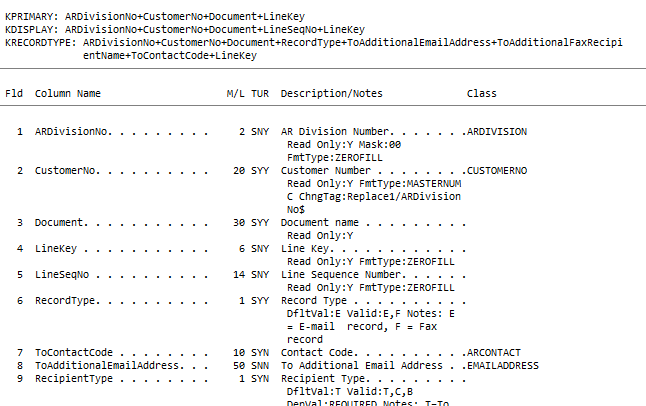
    It's easier due to the shape of the data.
    For a contact, the settings only link to the ContactCode for the customer (eg. STMT), where you could import an updated email address easily, with user-friendly key fields for that table.
    For an additional email address, it is recorded directly in the AR_CustomerDocumentContacts table, with no user friendly key for future updates... meaning you'd have to do a query, find the rows you want, edit them, and import that data...

    ------------------------------
    Kevin Moyes
    Technical Systems Analyst
    Munjal White Consulting Co.
    ------------------------------


  • 17.  RE: VI Import of Paperless Office Additional Email Addresses

    Posted 04-14-2022 14:54
    @Kevin Moyes  If I create and use the contact code then I have 2 imports instead of 1 to add new email addresses.  I first have to import to the contact table.  Then I have to link the AR_CustomerContact table to the AR_CustomerDocumentContacts by importing the contact codes to​ AR_CustomerDocumentContacts.

    ------------------------------
    Doug Higgs
    Midwest Commerce Solutions, Inc
    (312) 315-0960
    Chauffeur, Chef, and Personal Assistant to Sprinkles
    ------------------------------


  • 18.  RE: VI Import of Paperless Office Additional Email Addresses

    Posted 04-14-2022 15:04
    Edited by Kevin Moyes 04-14-2022 15:05
    Correct... and you can chain the jobs together to make it easier.  Done this way is a bit more effort up front, but saves a big headache for future updates.

    I had one customer who wanted to add an internal CC, and made the mistake of importing as Additional records... hundreds of rows... then they changed their mind.  There is no easy way to remove the Additional address, but if it was a contact code, I could have just imported a blank email address to the contact codes.

    ------------------------------
    Kevin Moyes
    Technical Systems Analyst
    Munjal White Consulting Co.
    ------------------------------


  • 19.  RE: VI Import of Paperless Office Additional Email Addresses

    Posted 04-14-2022 15:17
    Thank you @Kevin Moyes !  As always, I appreciate your opinions.


    ------------------------------
    Doug Higgs
    Midwest Commerce Solutions, Inc
    (312) 315-0960
    Chauffeur, Chef, and Personal Assistant to Sprinkles
    ------------------------------


  • 20.  RE: VI Import of Paperless Office Additional Email Addresses

    Posted 04-14-2022 16:10
    Normally, there isn't an easy way to remove records, however, you can use the method I detail in the following post to use VI to delete records.  In this case, as long as you have the LineKey, along with the rest of the primary key fields, you can delete it.  
    https://www.sagecity.com/us/sage100_erp/f/sage-100-business-object-interface/125437/im_pricecode_bus-doesnt-have-a-delete-function/334945#334945

    ------------------------------
    David Speck II
    Tennessee Software Solutions
    ------------------------------