Sage 100

 View Only
Expand all | Collapse all

VI import into IM_TransactionHeader - transaction date

  • 1.  VI import into IM_TransactionHeader - transaction date

    Posted 09-22-2021 19:38
    Edited by Barbara Goldstein 09-22-2021 19:39
      |   view attached
    I have an import into IM_TransactionHeader to import IM Transfer data. If the source file has a Transaction Date column, the job runs successfully. If I try to assign a date like <MODULEDATE>, which is the default when you create a job using the IM_TransactionHeader, it fails. Is there something I need to do in the setup of this field? Note: I also get the error if I make the field a runtime assign and key in 9/22/2021 (or 9/22/21 or 092221 . . .).


    ------------------------------
    Barbara Goldstein
    Sr. Consultant
    DSD Business Systems
    San Jose CA
    800.627.9032 x221
    ------------------------------

    Attachment(s)


  • 2.  RE: VI import into IM_TransactionHeader - transaction date

    Posted 09-23-2021 08:17
    Have you tried the YYYYMMDD format as a runtime assign?

    ------------------------------
    alan niergarth
    Velosio LLC
    ------------------------------


  • 3.  RE: VI import into IM_TransactionHeader - transaction date

    Posted 09-23-2021 08:29

    Are batches turned on?  The message invalid header will happen if batches are turned on and you are not assigning a batch number


    Thanks

    David Overholt

    DWD Technology Group, Inc.

    9921 Dupont Circle Drive West, Suite 300 | Fort Wayne, IN 46825

    260.423.2414 main

    800.232.8913 toll free

    sagesupport@dwdtechgroup.com

    www.dwdtechgroup.com


  • 4.  RE: VI import into IM_TransactionHeader - transaction date

    Posted 09-23-2021 15:04
      |   view attached
    @David Overholt, yes, batches are turned on.  With your suggestion, I found a Sage KB that describe how to configure the batch number field (i.e. make it "Assign" and leave everything else blank).  The import now succeeds.  One thing I noticed is that it is creating failed header records because it's reading the column headers in Row 1.  I thought if I put in a selection criterion for the first text in cell A1, it would skip the whole row, but it isn't doing that.


    ------------------------------
    Barbara Goldstein
    Sr. Consultant
    DSD Business Systems
    San Jose CA
    800.627.9032 x221
    ------------------------------


  • 5.  RE: VI import into IM_TransactionHeader - transaction date

    Posted 09-23-2021 15:19
    If those header cells have line feeds, Sage won't like that.  Add "Skip" conditions for each potential value.

    ------------------------------
    Kevin Moyes
    Technical Systems Analyst
    Munjal White Consulting Co.
    Toronto ON
    ------------------------------


  • 6.  RE: VI import into IM_TransactionHeader - transaction date

    Posted 09-23-2021 15:52

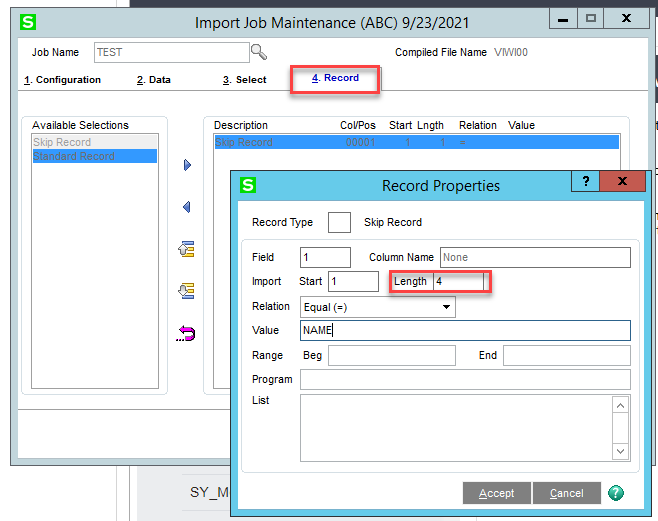
    I'm not sure what you mean by selection criteria, do you mean a conditional on the first column? That won't skip the first line. Instead go to Tab #4 and double click on Skip Record and set it to skip the value in field #1 in my screen shot below I'm skipping if the first column has "NAME" as the first 4 characters (be sure to set the length appropriately – it defaults to a length of 1 character.


    Thanks

    David Overholt

    DWD Technology Group, Inc.

    9921 Dupont Circle Drive West, Suite 300 | Fort Wayne, IN 46825

    260.423.2414 main

    800.232.8913 toll free

    sagesupport@dwdtechgroup.com

    www.dwdtechgroup.com


  • 7.  RE: VI import into IM_TransactionHeader - transaction date

    Posted 09-23-2021 17:39
    Yes @David Overholt, that's what I meant to communicate.  That's what I did.  I'll test out @Kevin Moyes theory about line feeds next.  Thanks!​​

    ------------------------------
    Barbara Goldstein
    Sr. Consultant
    DSD Business Systems
    San Jose CA
    800.627.9032 x221
    ------------------------------


  • 8.  RE: VI import into IM_TransactionHeader - transaction date

    Posted 09-23-2021 17:49
    There's are suggestion for the MOD Squad - Add a check box selection option on Tab ONE of a VI import to SKIP the first line of the import file!!!  Can't add up the number of times I have to delete the header line of imports before importing.  Yes, record selection works, but how much easier it could be to add the check box option......

    ------------------------------
    Jeff Schwenk
    FORMER 90M Board Member -140,000,000 is a TERRIBLE thing to waste!!!
    Bottomline Software, Inc.
    Waynesboro VA
    540-221-4444
    ------------------------------


  • 9.  RE: VI import into IM_TransactionHeader - transaction date

    Posted 09-23-2021 18:00
    My big ask for VI improvements would be for CSV imports to intelligently understand quote wrapped fields (to ignore quoted commas and quoted CRLF).  Skipping header rows works with a couple clicks, but dealing with these things is a nightmare!

    ------------------------------
    Kevin Moyes
    Technical Systems Analyst
    Munjal White Consulting Co.
    Toronto ON
    ------------------------------


  • 10.  RE: VI import into IM_TransactionHeader - transaction date

    Posted 09-23-2021 18:14
    Agreed.  That is why my default go to import is a tab delimited file.  Still not perfect, but much easier to manage.

    ------------------------------
    Jeff Schwenk
    FORMER 90M Board Member -140,000,000 is a TERRIBLE thing to waste!!!
    Bottomline Software, Inc.
    Waynesboro VA
    540-221-4444
    ------------------------------


  • 11.  RE: VI import into IM_TransactionHeader - transaction date

    Posted 09-23-2021 18:22

    Tab or "|" (pipe)


    Alan Niergarth
    Principal Consultant
    O: 513-334-0736 | C: 513-515-7715