Sage 100

 View Only
Expand all | Collapse all

VI import (AP invoices) without VendorNo in the file

  • 1.  VI import (AP invoices) without VendorNo in the file

    Posted 05-04-2022 17:48
    I'm working on an import strategy for a new client.  They have a large number of vendors, which use an external key that won't fit in the Sage VendorNo field, so we'll be storing that external key in a UDF.  The problem is, the import data for creating AP invoices will only have that external key, not the Sage VendorNo.

    What I'm looking for is an import strategy that works in one step. 
    • I could write a script to scroll through a CSV, do the lookup, then have them import the processed output (with VendorNo added by the script), but that is an extra step I'd like to avoid.
    • I think the incoming starting data is in Excel, so doing a VLookup would also be possible... but again, that is an extra step.

    I tested a Button script to change the VendorNo (after setting to a temp value, knowing I can't trigger a UDF event script in VI until after the key fields are set), but while it seems SetValueNoValidate on VendorNo could create the correct record, it also leaves an orphaned header record using the temp vendor, which is a deal-breaker.

    I was thinking to use a Column Pre-Validate script on VendorNo, and in that script access a different column value in the import data (for the UDF key to do a lookup / override of VendorNo), but I have no idea how I'd pass the second column value into the script.

    My next idea is to try using the too-big-key-field-value in the VI job (skip source data truncation) as VendorNo, then replace it in a Column Pre-Validate script... but I'm wondering if the "value" will be truncated in memory before it gets to the script.

    If someone has done this kind of thing already, I'd appreciate any tips.

    ------------------------------
    Kevin Moyes
    Technical Systems Analyst
    Munjal White Consulting Co.
    ------------------------------


  • 2.  RE: VI import (AP invoices) without VendorNo in the file

    Posted 05-04-2022 17:57
    I think @Alnoor Cassim has written perform logic to look up the key based on another field.​

    ------------------------------
    Robert Wood
    Robert.wood@90minds.com
    90 Minds, Inc.
    ------------------------------


  • 3.  RE: VI import (AP invoices) without VendorNo in the file

    Posted 05-04-2022 18:19
    Similar issue with SO.

    https://community.90minds.com/communities/community-home/digestviewer/viewthread?GroupId=13&MessageKey=d76142ca-3301-4911-af35-2f9df390e810&CommunityKey=4593d843-4557-43ff-ba4d-6240681ed696&tab=digestviewer

    ------------------------------
    Jeff Schwenk
    Bottomline Software, Inc.
    ------------------------------


  • 4.  RE: VI import (AP invoices) without VendorNo in the file

    Posted 05-04-2022 18:47
    Thanks @Robert Wood
    Do you know where I might find an example of that PL?
    I can only find the prevent-duplicate-invoice PL, which I've used before... and it isn't something I can adapt on my own.

    ------------------------------
    Kevin Moyes
    Technical Systems Analyst
    Munjal White Consulting Co.
    ------------------------------


  • 5.  RE: VI import (AP invoices) without VendorNo in the file

    Posted 05-04-2022 19:19
    Not off the top of my head. It's just something that he's done before.

    ------------------------------
    Robert Wood
    Robert.wood@90minds.com
    90 Minds, Inc.
    ------------------------------


  • 6.  RE: VI import (AP invoices) without VendorNo in the file

    Posted 05-04-2022 18:27
    Looks like I can't even attach a script to VendorNo in AP_InvoiceHeader... and of course I notice this after writing the script.  :-(


    ------------------------------
    Kevin Moyes
    Technical Systems Analyst
    Munjal White Consulting Co.
    ------------------------------


  • 7.  RE: VI import (AP invoices) without VendorNo in the file

    Posted 05-05-2022 02:21
    Edited by Dan Burleson 05-05-2022 04:07
    A single step could be to use an Excel Power Query (".xlsx") to resolve the vendor number (it can join a CSV and a UDT) and a small AutoOpen VBA macro (".xlsm") could open, refresh, and save the query workbook and then launch the V/I job.
    ------------------------------
    Dan Burleson
    Software Consultant
    Connex Software
    ------------------------------


  • 8.  RE: VI import (AP invoices) without VendorNo in the file

    Posted 05-05-2022 11:20
    You can add it to another field as a placeholder, then modify the placeholder record in CM_ScriptSettings to change the field to the VendorNo (or whatever the target field is), then recompile your scripts.  In most cases, this should work, I've used it on SO_SalesOrderDetail.ItemCode and AR_Customer.CustomerNo before with success.

    ------------------------------
    David Speck II
    Tennessee Software Solutions
    ------------------------------


  • 9.  RE: VI import (AP invoices) without VendorNo in the file

    Posted 05-05-2022 08:08
    @Kevin Moyes - I have done this on the AR side - Customers and Sales invoices, but the same concept.  I have a customer UDF that contains the key value the import file will contain and I look up the customer number to actually use for the AR invoice.  In my case, we use a delimited text file and they do not use AR Divisions, so the division field is simply assigned '00' and I do so After Assign perform logic that looks up the UDF, finds the Cust No and then simply put the found Cust No data in the imp$[] array, at the end of course.  Then use that array position for the AR CustomerNo field.

    In my case, if the PL cannot find the customer in AR, I have additional logic to go ahead and add them.  Would this approach work for you?​

    ------------------------------
    Randy Marion
    ------------------------------


  • 10.  RE: VI import (AP invoices) without VendorNo in the file

    Posted 05-05-2022 11:18
    I was going to suggest something similar, perform logic on either after read or before assign of the vendor no.  The perform logic would just have to check if you have an object handle for AP_Vendor_Svc, if not, get it and store it in a variable that will be checked on each record, if the variable is not zero, then do a GetResultSets with a where clause on your UDF.  Then parse the results and either put the value in a temp field, another variable, or overwrite an array index in the IMP$[] array, could always use 99 to be safe, then point your VendorNo field to this column with the Replace operation.

    ------------------------------
    David Speck II
    Tennessee Software Solutions
    ------------------------------


  • 11.  RE: VI import (AP invoices) without VendorNo in the file

    Posted 05-05-2022 11:59
    Edited by Kevin Moyes 05-05-2022 12:30
    I've never used GetResultSets...but should learn.  Bret's post on SageCity looks to have helpful examples.  Do you know of a reference that explains what each of the  parameters are used for?

    Edit... I found this SC post with more info on the parameters.

    ------------------------------
    Kevin Moyes
    Technical Systems Analyst
    Munjal White Consulting Co.
    ------------------------------


  • 12.  RE: VI import (AP invoices) without VendorNo in the file

    Posted 05-05-2022 12:22
    Edited by David Speck II 05-05-2022 12:34
    File Layouts and Program Information - SY_Service (sage.com)
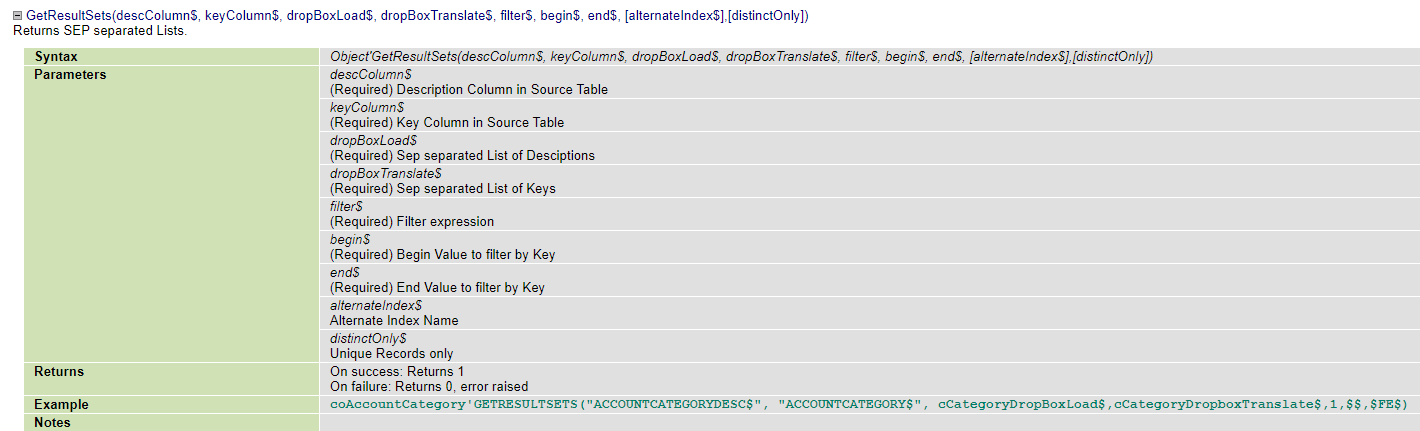

    When looking on the FLOR, look for system classes under the BaseSystem group before Library Master.  For whatever reason, the ones under Library Master are the plain versions and don't have much detail on the parameters.

    Something like this should work.  
    IF NOT(nAP_Vendor_Svc) THEN { nAP_Vendor_Svc = NEW("AP_Vendor_Svc",%SYS_SS) }; IF nAP_Vendor_Svc THEN { IF IMP$[1]<>"" THEN { retExists=nAP_Vendor_Svc'GetResultSets("VendorNo$","QUO+QUO",sVendorNo$,sBlank$,"UCS(UDF_Vendor_Key$)=UCS("+QUO+SUB(sVendorKey$,QUO,QUO+QUO)+QUO+")",CHR(0), CHR(254)); IF retExists THEN { sVendorNo$=MID(sVendorNo$,POS(SEP=sVendorNo$)+1); sVendorNo$=MID(sVendorNo$,1,POS(SEP=sVendorNo$)-1); IMP$[99]=sVendorNo$ } } }

    EDIT: Corrected the filter in the GetResultSets method to use the correct variable value enclosed in double quotes and to escape double quotes in the value if they exist.


    ------------------------------
    David Speck II
    Tennessee Software Solutions
    ------------------------------


  • 13.  RE: VI import (AP invoices) without VendorNo in the file

    Posted 05-05-2022 17:47

    Success #2, without the UDT (querying APDivisionNo too, just for fun):

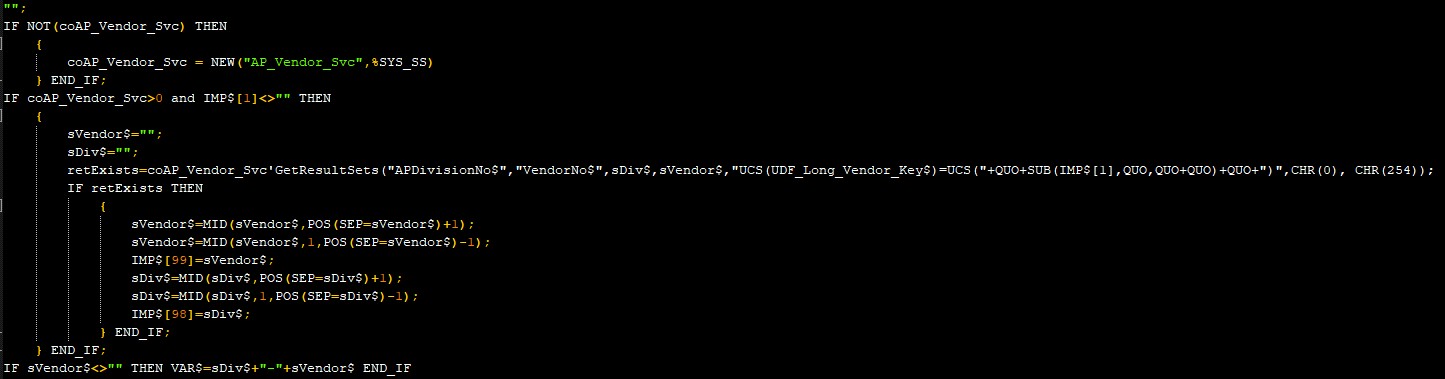
    "";IF NOT(coAP_Vendor_Svc) THEN { coAP_Vendor_Svc = NEW("AP_Vendor_Svc",%SYS_SS) } END_IF; IF coAP_Vendor_Svc>0 and IMP$[1]<>"" THEN { sVendor$=""; sDiv$=""; retExists=coAP_Vendor_Svc'GetResultSets("APDivisionNo$","VendorNo$",sDiv$,sVendor$,"UCS(UDF_Long_Vendor_Key$)=UCS("+QUO+SUB(IMP$[1],QUO,QUO+QUO)+QUO+")",CHR(0), CHR(254)); IF retExists THEN { sVendor$=MID(sVendor$,POS(SEP=sVendor$)+1); sVendor$=MID(sVendor$,1,POS(SEP=sVendor$)-1); IMP$[99]=sVendor$; sDiv$=MID(sDiv$,POS(SEP=sDiv$)+1); sDiv$=MID(sDiv$,1,POS(SEP=sDiv$)-1); IMP$[98]=sDiv$; } END_IF; } END_IF;IF sVendor$<>"" THEN VAR$=sDiv$+"-"+sVendor$ END_IF

    Indented for easy reading:

    I'm not sure I understand how to clean the returned values fully (especially if I had included more columns), but I can figure that out later.

    A great big "Thank You" to all who replied. :-)
    I'd have struggled on this for a while without help.


    ------------------------------
    Kevin Moyes
    Technical Systems Analyst
    Munjal White Consulting Co.
    ------------------------------


  • 14.  RE: VI import (AP invoices) without VendorNo in the file

    Posted 05-05-2022 18:17
    GetResultSets will return a 1 IF at least one record was found to match your criteria and a 0 if no records were found.

    The variables passed to GetResultSets in the third and fourth arguments will return a delimited list of values from each record that matched the criteria.  The delimiter is the SEP character in ProvideX, or ASCII # 138 so you can use CHR(138) in ProvideX and VBScript but in ProvideX, it is easier to just use the SEP constant.

    The variables will be prefixed with a single space followed by the SEP character and then the values from each record will follow.  It will also have a trailing SEP character.

    So if only one record is returned, you can just grab the first value, ​​by using the MID function combined with the POS function to locate the SEP characters.  This is done in two steps, first to locate the first one and then to locate the second one.  I suppose you could always just start by going after the third character onward but since you never know if Sage will change something it what gets returned, I just made it a habit to look for each occurrence of the SEP character.

    If you want to know how many records matched, you can count how many times the SEP character occurs in the variable and subtract 1 from it.  in ProvideX,  you can use the POS function to scan for the all occurrences of the SEP character by passing a 1 in the second argument and a 0 in the third argument.  In VBScript, I find it easier to just use the Split function on the variable using the SEP character as the delimiter and then you use UBound against the resulting array.

    ------------------------------
    David Speck II
    Tennessee Software Solutions
    ------------------------------


  • 15.  RE: VI import (AP invoices) without VendorNo in the file

    Posted 05-05-2022 18:31
    I forgot to mention, if you need a numeric field returned with GetResultSets, you have to wrap it in the STR function in the first or second argument.

    If you need to return multiple columns, pick a delimiter that makes sense and won't occur in the data normally, my go to is ASCII # 31 (Unit Separator).  ASCII # 30 is Row/Record Separator.  You can then parse the results on each delimiter to get the piece of data you are after.  So lets say you wanted the vendor key in the one variable and the vendor name and address fields in the other, you could do it using the following.
    retExists=nAP_Vendor_Svc'GetResultSets("APDivisionNo$+CHR(31)+VendorNo$","VendorName$+CHR(31)+AddressLine1$+CHR(31)+AddressLine2$+CHR(31)+AddressLine3$+CHR(31)+City$+CHR(31)+State$+CHR(31)+ZipCode$+CHR(31)+CountryCode$",sKeyValues,sFieldValues$,"UCS(VendorStatus$)=UCS(""A"")",CHR(0),CHR(254))​
    ​Another interesting fact about what you can pass in the first and second arguments is that it can be any valid evaluable ProvideX code, so using EVS, XEQ, or an object method or property, like _obj'GetKey$() or _obj'GetKeyPadded$().  All ProvideX classes should have a variable called _obj that is the local handle for the object.  So when GetResultSets evaluates _obj'GetKey$(), it does so using whatever object GetResultSets is being used on.  Just keep in mind that was you pass to it has to be able to be evaluated and return a value, you can not do variable assignments.  The exception is if you use the XEQ function to CALL ProvideX code in a file, in which case you can have whatever logic you want in the file and choose what to return to the XEQ function.​

    ------------------------------
    David Speck II
    Tennessee Software Solutions
    ------------------------------


  • 16.  RE: VI import (AP invoices) without VendorNo in the file

    Posted 05-05-2022 19:04
    @David Speck II  Is there a maximum character size for variables such as sVendor$?  For example, can GetResultSets return a string of a million separated values?​

    ------------------------------
    Doug Higgs
    Midwest Commerce Solutions, Inc
    (312) 315-0960
    Chauffeur, Chef, and Personal Assistant to Sprinkles
    ------------------------------


  • 17.  RE: VI import (AP invoices) without VendorNo in the file

    Posted 05-05-2022 19:08
    Not sure but I found this.


    ------------------------------
    David Speck II
    Tennessee Software Solutions
    ------------------------------


  • 18.  RE: VI import (AP invoices) without VendorNo in the file

    Posted 05-05-2022 19:34
    Thanks.  It looks like the record size is 10240 bytes so 10240 characters. If this limit doesn't include the delimiter which it probably does, then 10240 / 7 = 1462 seven character vendor numbers can be retrieved. Seems small so I may be missing something.​

    ------------------------------
    Doug Higgs
    Midwest Commerce Solutions, Inc
    (312) 315-0960
    Chauffeur, Chef, and Personal Assistant to Sprinkles
    ------------------------------


  • 19.  RE: VI import (AP invoices) without VendorNo in the file

    Posted 05-05-2022 19:36
    It's a return string, not a record... with David highlighting that having a max 2GB size.

    ------------------------------
    Kevin Moyes
    Technical Systems Analyst
    Munjal White Consulting Co.
    ------------------------------


  • 20.  RE: VI import (AP invoices) without VendorNo in the file

    Posted 05-05-2022 20:29
    OK.  The max size of a return string populated with 7 character maximum vendor numbers will allow approximately 2B / 7 = 286M vendors numbers on one GetResultSets function call.  Should be plenty.  😉

    ------------------------------
    Doug Higgs
    Midwest Commerce Solutions, Inc
    (312) 315-0960
    Chauffeur, Chef, and Personal Assistant to Sprinkles
    ------------------------------


  • 21.  RE: VI import (AP invoices) without VendorNo in the file

    Posted 05-05-2022 19:18

    That's very helpful David.  Thanks again.
    Since I'm visual, I used visible characters to make the data shape clearer (with a button script).

    • The separator used in the first and second arguments are how elements of the return set are delimited.
      • So with multiple elements, I split using my delimiter, and use the index of the column I need.
    • chr(138) is how records are separated, with a starting chr(32)+chr(138) and ending chr(138).
    • To get the number of rows, I need to count the chr(138)'s (less 1)... or split on chr(138) and look at the array's ubound (which should be the true record count since the 0 index record would be the leading space / chr(32)).
    Perfect!


    ------------------------------
    Kevin Moyes
    Technical Systems Analyst
    Munjal White Consulting Co.
    ------------------------------


  • 22.  RE: VI import (AP invoices) without VendorNo in the file

    Posted 05-05-2022 11:29
    @Randy Marion
    That sounds like it could work.  I don't think we'll be using APDivisions, so loading the PL on that field could work.  The piece I'm missing is the PL syntax to do the lookup and return the VendorNo.​  I know how to do it in a UDS, but not PL.
    I've also seen PL set up to run in a calculated Temp field, but only IF logic and basic BOI commands (not a loop), and that made me think about having the key in a UDT.  That way, if I could get the right PL syntax for opening the UDT and doing a Find / GetValue, that might work.

    This code is a complete guess, but I'm curious if something like this could work:
    IF NOT(coUDTVendorKey) THEN {
    coUDTVendorKey = NEW("CM_UDT_svc","AP_UDT_VENDOR_KEY",%SYS_SS)
    }
    retExists = coUDTVendorKey'Find(IMP$[01])
    IF retExists THEN { sVendor$ = ""; coUDTVendorKey'GetValue(VendorNo$,sVendor$); IMP$[99]=sVendor$ }


    ------------------------------
    Kevin Moyes
    Technical Systems Analyst
    Munjal White Consulting Co.
    ------------------------------


  • 23.  RE: VI import (AP invoices) without VendorNo in the file

    Posted 05-05-2022 11:51
    If you put the PL in a temp field or as an executable PL without a file using the Perform button, then you would need to use a compound statement as you are correct, you can't loop in a temp field.  the semi-colon (";") is the compound statement indicator/delimiter for ProvideX.  

    If using IF THEN ELSE, make sure to properly position statement within curly brackets or END_IF.  IMHO, the curly brackets are easier to use when using editing software that highlights starting and ending characters like parenthesis, brackets, and curly brackets.  Makes it easier to track logic beyond a single level.

    Your code is close but you need to swap the position of %SYS_SS and "AP_UDT_VENDOR_KEY" in the NEW function.  Here is you code with slight modifications to run as a single compound statement.
    IF NOT(coUDTVendorKey) THEN { coUDTVendorKey = NEW("CM_UDT_svc",%SYS_SS,"AP_UDT_VENDOR_KEY") }; IF coUDTVendorKey AND IMP$[01]<>"" THEN { retExists = coUDTVendorKey'Find(IMP$[01]); IF retExists THEN { sVendor$ = ""; coUDTVendorKey'GetValue(VendorNo$,sVendor$); IMP$[99]=sVendor$ } }​
    If you put this in a temp field, you need to add a default value for the temp field based on the data type of the temp field followed by a semi-colon.  If the temp field is a number, use 0 as the default value, if it is a string, use two double quotes as a blank string.  Within your compound statement, you can optionally set the VAR or VAR$ variable to a value if you want it placed in the temp field so it shows up in the log.  If it is a string emp field, you can append to it with a delimiter for each operation, so you could output the handle to the UDT, then the value in IMP$[1], then the result of the Find method, and finally, the value of sVendor$.  Just make sure to wrap numeric values in the STR function.

    If you want to bypass the UDT, use GetResultSets with the AP_Vendor_Svc object and you can accomplish this with a compound statement as well.

    ------------------------------
    David Speck II
    Tennessee Software Solutions
    ------------------------------


  • 24.  RE: VI import (AP invoices) without VendorNo in the file

    Posted 05-05-2022 13:47
    Success!  I got the UDT lookup to work... with some minor adjustments to your sample.  Thanks a ton David!!!
    "";IF NOT(coUDTVendorKey) THEN { coUDTVendorKey = NEW("CM_UDT_svc",%SYS_SS,"AP_UDT_VENDOR_KEY") } END_IF; IF coUDTVendorKey > 0 AND IMP$[1]<>"" THEN { retExists = coUDTVendorKey'Find(IMP$[1]); IF retExists THEN { sVendor$ = ""; coUDTVendorKey'GetValue("UDF_Vendor_No$",sVendor$); IMP$[99]=sVendor$} } END_IF END_IF; IF sVendor$<>"" THEN VAR$=sVendor$ END_IF
    Next I try GetResultSets...

    ------------------------------
    Kevin Moyes
    Technical Systems Analyst
    Munjal White Consulting Co.
    ------------------------------


  • 25.  RE: VI import (AP invoices) without VendorNo in the file

    Posted 05-05-2022 14:11


    @Kevin Moyes - This is what I am doing ... more old school code than business objects.  Of course, you will need to tweak things for your purposes, but the look up code is basically this.  You might wonder why I wrote it with src and dst col variables, but I did not have control of creation of the text file being sent to me and they kept changing columns around. 

    Also, you will notice that the 'where' clause in the select is commented out.  This was because it was not working like I wanted it too and I ended up just going through the whole customer table and using an 'if' statement to find my match then breaking the select loop.  Anyway, this finds the custno and puts it in imp$[47] for later use.

    You will also see some hardcoded customer numbers '1169' and'3110' that you can completely delete.  Special circumstances for this job

    Hope this helps, Randy​​

    ------------------------------
    Randy Marion
    ------------------------------


  • 26.  RE: VI import (AP invoices) without VendorNo in the file

    Posted 05-05-2022 15:16
    Thanks, that's a nice example @Randy Marion.  I'm sure knowing the PL syntax for opening a table and running a select ... from ... where statement, then looping through results will come in useful at some point. 
    I think the temp field + GetResultSets is a bit cleaner for this specific project (if I can get it to work), but I will certainly take a look at your code when I get a chance.

    ------------------------------
    Kevin Moyes
    Technical Systems Analyst
    Munjal White Consulting Co.
    ------------------------------


  • 27.  RE: VI import (AP invoices) without VendorNo in the file

    Posted 05-05-2022 14:20
    I thought at one point, it didn't like combining curly brackets and END_IF, you should only have to use one or the other and I would keep it consistent throughout.
    So either 
    IF a=b THEN a$="Yes" ELSE a$="No" END_IF
    or 
    IF a=b THEN { a$="Yes" } ELSE { a$="No" }

    I find the curly brackets are much easier to keep track of when several layers are involved.

    ------------------------------
    David Speck II
    Tennessee Software Solutions
    ------------------------------


  • 28.  RE: VI import (AP invoices) without VendorNo in the file

    Posted 05-05-2022 14:25
    @David Speck II - I generally use the curly braces as well.  If you happen to be using the editor 'vi' or 'vim', a simple keystroke will show you the matching brace.  Very helpful when there is a lot of nesting...​

    ------------------------------
    Randy Marion
    ------------------------------


  • 29.  RE: VI import (AP invoices) without VendorNo in the file

    Posted 05-05-2022 15:04
    Without this End_If (after the conditional object creation) the PL only worked on the first line of the import file... adding it fixed that problem.


    ------------------------------
    Kevin Moyes
    Technical Systems Analyst
    Munjal White Consulting Co.
    ------------------------------


  • 30.  RE: VI import (AP invoices) without VendorNo in the file

    Posted 05-05-2022 15:14
    That is strange behavior...well, as long as it works...don't "fix" it I guess.

    ------------------------------
    David Speck II
    Tennessee Software Solutions
    ------------------------------


  • 31.  RE: VI import (AP invoices) without VendorNo in the file

    Posted 05-05-2022 15:25
    Indeed.  Assigning the value to VAR$ at the end made it very clear when looking at the import log. 
    VAR$=sVendor$
    Perhaps the PL compiler treats inline commands (in a calculated field) slightly differently than if the PL is in a file.
    *shrug*
    As long as it works.

    ------------------------------
    Kevin Moyes
    Technical Systems Analyst
    Munjal White Consulting Co.
    ------------------------------