Original Message:
Sent: 07-02-2025 08:19
From: Brett Zimmerman
Subject: V2025 Issues
Who has already proceeded with v2025 Upgrades including SI (Sage Intelligence)? It sounds like @Beth Bowers had to perform the extra steps but @Dana Halpin did not, so how is everyone else faring?
------------------------------
Brett Zimmerman
Net at Work
Greater Boston Area
------------------------------
Original Message:
Sent: 06-09-2025 14:28
From: Jeff Schwenk
Subject: V2025 Issues
I haven't tried this yet, but just wondering. If you install v2025 on a workstation running v2024, is the SI 2.0 backwards compatible to 2024. In other words, can I run v2024 SI reports using the SI 2.0?
Asking for another friend (I have several believe it or not)
TIA
------------------------------
Jeff Schwenk
Owner
Bottomline Software, Inc.
Waynesboro VA
(540) 221-4444
Improving bottom lines for over 25 years!
Original Message:
Sent: 05-21-2025 11:49
From: Jeff Schwenk
Subject: V2025 Issues
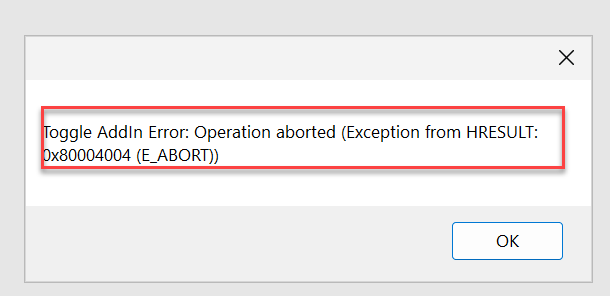
This started popping up when exiting Excel AFTER I installed the v2025 client on a WIN 11 workstation. Office 2019 is installed on the workstation.
Nothing was found on KB (not surprising based on my search skills).
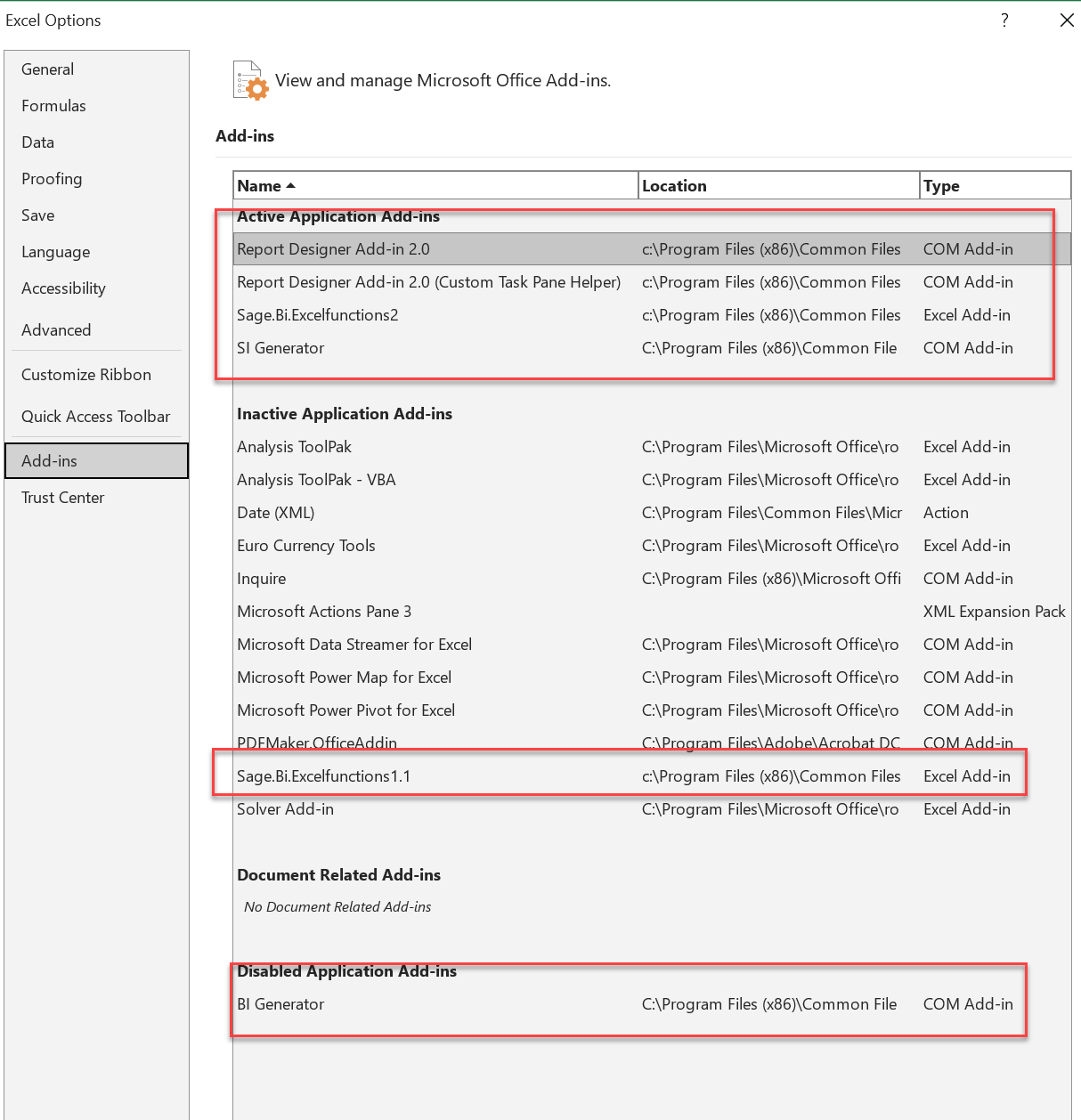
New add ins are installed (second screenshot) below.
Not critical yet, more of a heads up wondering if others have encountered it.
------------------------------
Jeff Schwenk
Owner
Bottomline Software, Inc.
Waynesboro VA
(540) 221-4444
Improving bottom lines for over 25 years!
Original Message:
Sent: 05-03-2025 23:17
From: Doug Higgs
Subject: V2025 Issues
Cubs beat the Brewers today. Unfortunately I have a bad cold so trying to rest and wait it out
------------------------------
Doug Higgs
Midwest Commerce Solutions, Inc
(312) 315-0960
Chauffeur, Chef, and Personal Assistant to Sprinkles
Original Message:
Sent: 05-03-2025 23:14
From: Jeff Schwenk
Subject: V2025 Issues
Doug,
It is Saturday night. Aren't the Cubbies playing??
Thanks for the outreach. I activated the IM module and the problem disappeared.
------------------------------
Jeff Schwenk
Owner
Bottomline Software, Inc.
Waynesboro VA
(540) 221-4444
Improving bottom lines for over 25 years!
Original Message:
Sent: 05-03-2025 22:26
From: Doug Higgs
Subject: V2025 Issues
Try rebuilding IM and SO key files. See the link below
https://communityhub.sage.com/us/sage100/f/distribution-manufacturing-and-internet-modules/35302/program-entered-cannot-be-found
------------------------------
Doug Higgs
Midwest Commerce Solutions, Inc
(312) 315-0960
Chauffeur, Chef, and Personal Assistant to Sprinkles
Original Message:
Sent: 05-03-2025 21:48
From: Jeff Schwenk
Subject: V2025 Issues
Conversion issue or v2025 issue.
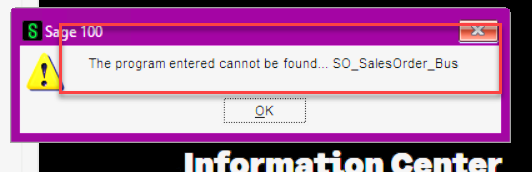
Attempted to open SO entry in one of my companies in v2025. Error below encountered. SO works fine in other companies. I copied that company's MASXXX from v2024 and reconverted it. No improvement. Not much in the KB.
All musings are appreciated.
Thanks in advance.
------------------------------
Jeff Schwenk
Owner
Bottomline Software, Inc.
Waynesboro VA
(540) 221-4444
Improving bottom lines for over 25 years!
Original Message:
Sent: 05-01-2025 15:26
From: David Overholt
Subject: V2025 Issues
Here is a note on our first foray into 2025 using client data:
We did a test upgrade to version 2025 for a client that is just using GL and Accounts Payable modules. They are vanilla and on version 2015. The Upgrade checklist for 2025 only lists upgrading from version 2019 and newer, but being the daredevils we are, we decided to see what would happen if we tried going directly from their 2015 version. During the migration process, we got an error message (attached). Prepare failed .... Failed to create table SY_OfficeUserMap: Dictionary not found. We went back and upgraded from 2015 to version 2020 and then upgraded from 2020 to 2025 and everything went just fine.
------------------------------
David Overholt
Programmer/Project Manager
DWD Technology Group
Fort Wayne IN
(260) 399-8655