Sage 100

 View Only
  • 1.  v2022 Workstation Install Error

    Posted 07-07-2022 11:36
    Older WIN 10 workstation.  Logged on workstation as administrator, right click on autorun.exe to run as administrator.

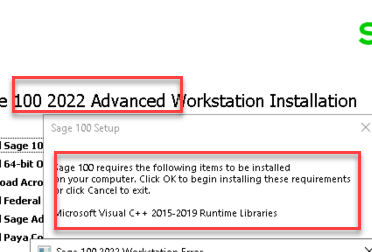
    Message pops up to install run time Libraries.  Less than a minute later, program terminates with message to contact the administrator.

    Does anyone know where these runtime files are located.   Perhaps by running outside of Sage, it will process.  Otherwise, I might give issue to their IT staff to deal with.

    TIA

    ------------------------------
    Jeff Schwenk
    Bottomline Software, Inc.
    ------------------------------


  • 2.  RE: v2022 Workstation Install Error

    Posted 07-07-2022 11:42
    Jeff, 
    look in the WKSetup folder under prerequistes.
    ..\2022\mas90\wksetup\Prerequisites\VCRuntimes  (i think this is the one referenced in the error

    ------------------------------
    David Overholt
    DWD Technology Group
    ------------------------------


  • 3.  RE: v2022 Workstation Install Error

    Posted 07-07-2022 12:24
    I just installed these to my system.  These should do the trick. ;)

    You will be required to reboot after you install them both and no you do not need to reboot between each install.   Have a great kind of day!!! :)

    ------------------------------
    Carmen Cruz
    Sage Consultant
    CompuData
    ------------------------------


  • 4.  RE: v2022 Workstation Install Error

    Posted 07-07-2022 12:29
      |   view attached
    Ok since it choked on the first upload lets do the entire set in a Zipfile.  Do not use the 2017 since that is now been replaced with the new file in there that takes from 2015-2022 versions.

    ------------------------------
    Carmen Cruz
    Sage Consultant
    CompuData
    ------------------------------

    Attachment(s)


  • 5.  RE: v2022 Workstation Install Error

    Posted 07-07-2022 12:45
    No dice.  Fatal error encountered.  Kicking it over to their IT people.


    ------------------------------
    Jeff Schwenk
    Bottomline Software, Inc.
    ------------------------------


  • 6.  RE: v2022 Workstation Install Error

    Posted 07-07-2022 15:10
    @Jeff Schwenk
    I had a similar issue a few weeks ago.  See
    https://community.90minds.com/discussion/sage-100-erp-setup-has-failed

    Ultimately, I skipped installing VC++ and ran the "Sage 100 2022.msi" instead of the exe so I could bypass the prerequisite check. ​

    ------------------------------
    Doug Higgs
    Midwest Commerce Solutions, Inc
    (312) 315-0960
    Chauffeur, Chef, and Personal Assistant to Sprinkles
    ------------------------------


  • 7.  RE: v2022 Workstation Install Error

    Posted 07-07-2022 16:23
    @Doug Higgs  Thx.  I did that as well but was unsuccessful.  It is in the hands of the IT gods now!!!​

    ------------------------------
    Jeff Schwenk
    Bottomline Software, Inc.
    ------------------------------


  • 8.  RE: v2022 Workstation Install Error

    Posted 07-07-2022 17:42
    @Jeff Schwenk  What message did you get when you ran Sage 100 2022.msi​ ?​

    ------------------------------
    Doug Higgs
    Midwest Commerce Solutions, Inc
    (312) 315-0960
    Chauffeur, Chef, and Personal Assistant to Sprinkles
    ------------------------------


  • 9.  RE: v2022 Workstation Install Error

    Posted 07-07-2022 18:00
    Sorry, don't recall.  I had resolved that if it didn't work, I was moving on.  IT is hot on the trail......

    ------------------------------
    Jeff Schwenk
    Bottomline Software, Inc.
    ------------------------------