Another way you might be able to get this to work for stubborn ALE's where the VI link doesn't work is to create a calculated field in the ALE and don't enter a mask, set the justification and width to something that makes sense for your field and then in the calculation field, use a function called FNREAD$ combined with the TBL function.
TBL(STR(MakeForSalesOrderNo)<>"","",FNREAD$(STR(MakeForSalesOrderNo),"SO_SalesOrderHeader","1",0,"BillToName"))
The TBL function is used in this example like Excel's IF function, if the first argument evaluates to True, the third argument is processed, if False, the second argument is processed.
The FNREAD$ function takes five arguments.
- Field or value to use to scan the target table for a record where the primary index key matches the value. I tend to wrap this in the STR function to make sure there won't be any data type errors.
- The target table name.
- Not sure about this but it seems to only work when passing "1" to it.
- I believe this is the index number which is zero based, so kPrimary is 0.
- The target field.
Hopefully this will work for you.
------------------------------
David Speck II
Tennessee Software Solutions
------------------------------
Original Message:
Sent: 08-26-2022 16:32
From: Kevin Moyes
Subject: v2022 PU1 PM Work Ticket ALE Customization
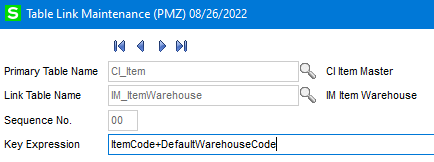
The problem is not the field name, it is something in the PM ALE. This works, even with the "DefaultWarehouseCode" field used in the link to the IM_ItemWarehouse file.
------------------------------
Kevin Moyes
Technical Systems Analyst
Munjal White Consulting Co.
------------------------------
Original Message:
Sent: 08-26-2022 16:12
From: Jeff Schwenk
Subject: v2022 PU1 PM Work Ticket ALE Customization
Who was the genius to give the SONumber field a different name in BM?? Hello, can I speak to the person in charge of quality control? Hello? Hello???? Dial tone...... Or maybe provide the ability for linking different field names....
------------------------------
Jeff Schwenk
Bottomline Software, Inc.
(540) 221-4444
Original Message:
Sent: 08-26-2022 15:36
From: Kevin Moyes
Subject: v2022 PU1 PM Work Ticket ALE Customization
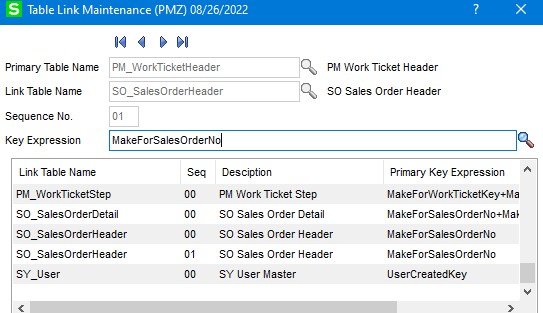
I just tried and the field list for adding columns to the ALE doesn't add the newly linked table. It would not surprise me if the problem was PM specific.
Edit:
The link actually already existed... so I added a duplicate, which didn't help.
------------------------------
Kevin Moyes
Technical Systems Analyst
Munjal White Consulting Co.
Original Message:
Sent: 08-26-2022 15:27
From: David Speck II
Subject: v2022 PU1 PM Work Ticket ALE Customization
No. The way the link is supposed to work is the column you specify in the Key Expression field is supposed to be a column in the table in the "Primary Table Name" field and it needs to match the primary index of the table in the "Link Table Name" field. Since SO_SalesOrderHeader's primary index only consist of SalesOrderNo, the MakeForSalesOrderNo should be the right column for the Key Expression.
What value did you enter in the Sequence field?
Have you DFDM your JT_WorkTicketHeader table to make sure sales order numbers are in the MakeForSalesOrderNo column?
------------------------------
David Speck II
Tennessee Software Solutions
Original Message:
Sent: 08-26-2022 15:17
From: Jeff Schwenk
Subject: v2022 PU1 PM Work Ticket ALE Customization
Not quite there. The new link is not an option in the ALE (I am using the Wizard, not custom field in work ticket entry). Does the key expression MakeForSalesOrderNo field.have to exist in the SO Header table? Only SOnumber does. So if I match on MakeForSalesOrderNo there is no match. Where am I going off the rails?
------------------------------
Jeff Schwenk
Bottomline Software, Inc.
(540) 221-4444
Original Message:
Sent: 08-26-2022 13:22
From: Jeff Schwenk
Subject: v2022 PU1 PM Work Ticket ALE Customization
Thank you. An oldie but goodie. Much appreciated.
Happy Friday.
------------------------------
Jeff Schwenk
Bottomline Software, Inc.
(540) 221-4444
Original Message:
Sent: 08-26-2022 12:24
From: David Speck II
Subject: v2022 PU1 PM Work Ticket ALE Customization
Creating the job export is not what creates the link. I believe this is what you are looking for. I don't have access to the same environment as you at the moment but IIRC, you should be able to link to SO_SalesOrderHeader using the MakeForSalesOrderNo field.
(Tutorial) Adding additional tables to Lookups | Sage 100 (90minds.com)
------------------------------
David Speck II
Tennessee Software Solutions