Sage 100

 View Only
  • 1.  v2022 Premium UG from v2019 Reboots without prompting

    Posted 05-01-2023 10:28
    Edited by Wayne Schulz 05-01-2023 10:29

    During the process of installing Sage 100 2022 Premium on a server that already had Sage 100 2019 Premium

    Heads up, this spontaneous reboot while installing Microsoft prerequisites is still a thing.
    I hadn't seen it in a long while, and it just happened on a large Sage 100 site.

    I believe it's an issue with one of the Microsoft pre-requisites that does NOT prompt for a reboot
    It happens at the "now installing prerequisites"


    ------------------------------
    Wayne Schulz
    wayne@s-consult.com
    Schulz Consulting
    (860) 516-8990
    Moodus, CT
    ------------------------------


  • 2.  RE: v2022 Premium UG from v2019 Reboots without prompting

    Posted 05-01-2023 11:02

    If I see a .NET component about to be installed, I expect a reboot... and always schedule software installs on servers at a time when it is safe to reboot (...partly because we disable UAC with the registry hack before installing Sage server, which requires a reboot).


    ------------------------------
    Kevin Moyes
    Technical Systems Analyst
    Munjal White Consulting Co.
    ------------------------------


  • 3.  RE: v2022 Premium UG from v2019 Reboots without prompting

    Posted 05-01-2023 14:12
    Here is what I do peeps.  I install all the Pre-Requisites first.  I have all of them and I believe there is a link on MOTM.   If Sage has any left to install it is very few and I never have to reboot.  I also install .Net 4.8 as well and have the downloads for that.  If all this stuff is already installed on the server and server updates have been completed then your ready to install Premium.  When you don't have everything that even what Sage does not include I find that Premium becomes a bigger challenge.  Make her happy up front and she will play nice.  Just sayin.  If anyone needs links from me you can always find me.  

    Have a great day, 

    Carmen Cruz
    Sage Consultant
    carmen.cruz@compudata.com
    215-969-1000 Ext. 279
    www.compudata.com
    Work Smarter... Together 

    CompuData, Inc. • 325 Chestnut St, Ste 700 • Philadelphia • PA • 19106


  • 4.  RE: v2022 Premium UG from v2019 Reboots without prompting

    Posted 05-02-2023 07:56

    Great advice though it doesn't overcome the issue of needing to have all users off the server during the time that the prerequisites are installed - either individually or by Sage auto-install.

    I don't believe it's Sage's install routine that is triggering the sporadic reboot but is one of the Microsoft prerequisites.

    Business Case:
    I'm on a really simple upgrade though the accounting department refuses to be off the system during working hours, every move I make is shadowed by 2-3 IT people who actually do the work.  It's not as cookie cutter as it may seem to require a formal IT department to be in working at 6 am or 6 pm to work around the end users who refuse to vacate the system. And, yes I know, Intacct will solve that. And after Intacct, there will be something else that solves what Intacct decided not to improve upon. I guess with enough time and money anything is possible.


    ------------------------------
    Wayne Schulz
    wayne@s-consult.com
    Schulz Consulting
    (860) 516-8990
    Moodus, CT
    ------------------------------


  • 5.  RE: v2022 Premium UG from v2019 Reboots without prompting

    Posted 05-03-2023 12:27

    We no longer do the installations during normal working hours, and get all users out of Sage 100 before attempting any installs.  We have been "bitten too many times" where we were under the impression everything was installed that was needed, and it "still" rebooted on us.  BTW, I'd love that "Registry Hack" @Kevin Moyes if your willing to share.  


    ------------------------------
    Madeline Stefanou
    RKL eSolutions, LLC
    ------------------------------


  • 6.  RE: v2022 Premium UG from v2019 Reboots without prompting

    Posted 05-03-2023 12:45

    The UAC controls that Windows present only affect the warnings, not the actual "protection".
    Set registry value EnableLUA to 0 (zero) and reboot to properly disable UAC for software install.
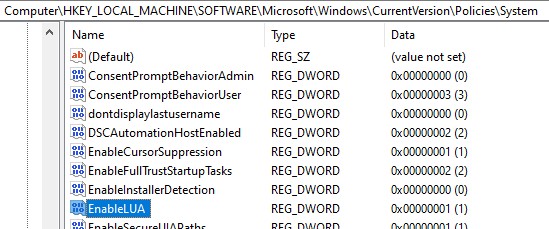
    Reference:
    https://social.technet.microsoft.com/wiki/contents/articles/13953.windows-server-2012-deactivating-uac.aspx
    This article applies to Server 2012, but we've been doing it on more modern versions of Windows Server too, for 100% of our Sage 100 server installs.


    ------------------------------
    Kevin Moyes
    Technical Systems Analyst
    Munjal White Consulting Co.
    ------------------------------


  • 7.  RE: v2022 Premium UG from v2019 Reboots without prompting

    Posted 05-03-2023 13:08

    Do you re-enable UAC (or change the registry back) once you've installed Sage 100?


    ------------------------------
    Wayne Schulz
    wayne@s-consult.com
    Schulz Consulting
    (860) 516-8990
    Moodus, CT
    ------------------------------


  • 8.  RE: v2022 Premium UG from v2019 Reboots without prompting

    Posted 05-03-2023 13:26

    Yes, usually.  It only needs to be disabled during the software install... and often Windows Updates will change it back automatically (reminding you to reboot, when you log in next).


    ------------------------------
    Kevin Moyes
    Technical Systems Analyst
    Munjal White Consulting Co.
    ------------------------------