Accounting Systems, Inc. (ASI)
Original Message:
Sent: 03-06-2024 12:17
From: Brett Zimmerman
Subject: v2021.1 Prod Mgmt - How do I put a released work order on hold?
Updated info from Karen M. at Sage:
- The 'Hold' function only works for 'Firm Planned' work orders in the Work Order module, and only 'Open' work tickets in Production Mgmt. It is not intended to be used for Released work orders or Released work tickets.
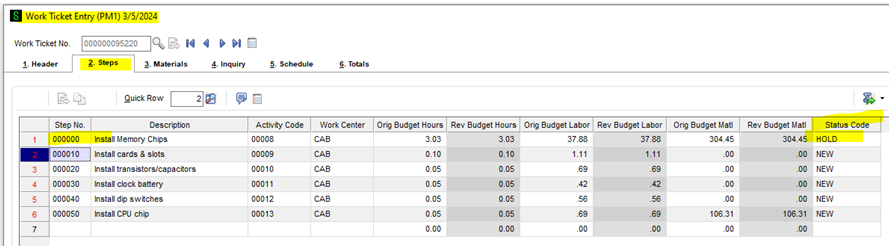
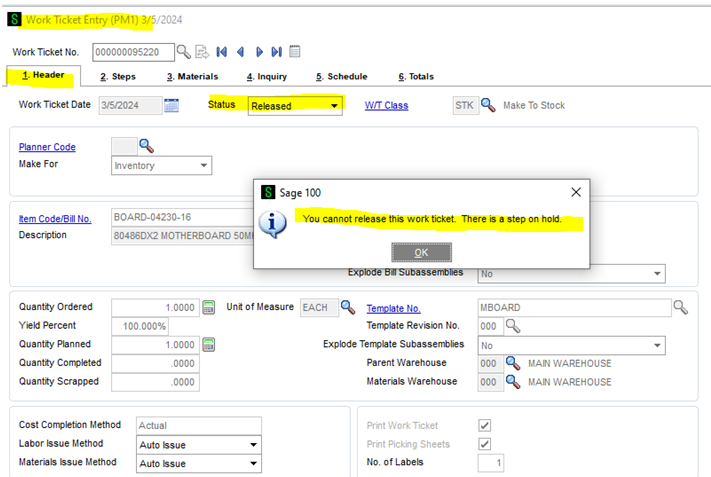
- It was also suggested to re-consider trying to use the Status Code function. For example, if you change the Status Code on Step 000000 to HOLD and Accept the work ticket, upon changing the status to Released you'll get "You cannot release this work ticket. There is a step on hold".
------------------------------
Brett Zimmerman
Net at Work
Greater Boston Area
------------------------------
Original Message:
Sent: 03-04-2024 10:37
From: Brett Zimmerman
Subject: v2021.1 Prod Mgmt - How do I put a released work order on hold?
Thanks, @Karen O'Lane: https://community.90minds.com/idea/pm-ability-to-place-work-ticket-on-hold
------------------------------
Brett Zimmerman
Net at Work
Greater Boston Area
Original Message:
Sent: 02-09-2024 11:35
From: Kevin Moyes
Subject: v2021.1 Prod Mgmt - How do I put a released work order on hold?
Sounds like a good Ideation90 suggestion.
------------------------------
Kevin Moyes
Technical Systems Analyst
Munjal White Consulting Co.
Toronto ON
Original Message:
Sent: 02-09-2024 11:24
From: Susan Pawlowic
Subject: v2021.1 Prod Mgmt - How do I put a released work order on hold?
Once a work ticket has been released, there is no way to place it on hold. You would need to either delete it (if no transactions have been processed) or short-complete it and enter a new one when ready to proceed. The status codes don't have any functionality other than being informational. And yes, I expressed my astonishment to Scanco prior to PM being rewritten by Sage, but I haven't had a talk with Sage about it. Then again none of my clients have asked for it.
------------------------------
Susan Pawlowic
Sage 100 Solutions Architect
RKL eSolutions, LLC
spawlowic@rklesolutions.com
(717) 735-9109 Ext. 4352
Original Message:
Sent: 02-09-2024 11:14
From: Brett Zimmerman
Subject: v2021.1 Prod Mgmt - How do I put a released work order on hold?
Thanks, @Susan Pawlowic. Well that sounds like an overlooked shortcoming. Do you have any suggestions as to how to prevent transactions from being posted against a Released work ticket?
------------------------------
Brett Zimmerman
Net at Work
Greater Boston Area
Original Message:
Sent: 02-09-2024 08:53
From: Susan Pawlowic
Subject: v2021.1 Prod Mgmt - How do I put a released work order on hold?
Using the status codes will not prevent users from processing transactions against the work ticket, but if there is a process in place where HOLD status work tickets don't appear on reports and/or are excluded from being printed, etc., it might be able to be worked into a process flow.
------------------------------
Susan Pawlowic
Sage 100 Solutions Architect
RKL eSolutions, LLC
spawlowic@rklesolutions.com
(717) 735-9109 Ext. 4352
Original Message:
Sent: 02-07-2024 11:47
From: Brett Zimmerman
Subject: v2021.1 Prod Mgmt - How do I put a released work order on hold?
So I was told to change the Status Code on the Steps to 'Hold', and that if you put Step 000000 on hold that should put the entire Work Ticket on hold. Haven't tried it yet but asked the client to check it out. Also located the attached. Still curious if anyone has better info.
------------------------------
Brett Zimmerman
Net at Work
Greater Boston Area