Sage 100

 View Only
Expand all | Collapse all

v2020 Premium Install

  • 1.  v2020 Premium Install

    Posted 03-15-2021 18:52
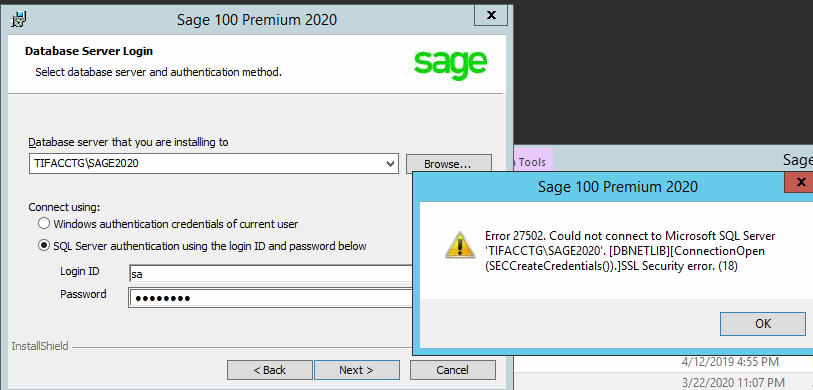
    I'm upgrading customer from Providex to Premium.  IT created a new Instance within SQL Server (we don't generally install to the default instance).  During the initial install where I indicate the Database Server (TIFACCTG/SAGE2020)
    and use sa and pw, I get this message.
    I'm able to connect to the instance from SQL Mgmt Studio.  TLS 1.2 is the only TLS enabled.
    Could there be something wrong with the way IT (who is not a SQL DBA) created the instance?
    I also tried for giggles using Windows Authentication and it gave me the same error.
    Server has been rebooted.  Server is 2012 R2, SQL is 2017
    There are some FYISoft databases in the Default Instance already so it's not a new install of SQL.
    Help????

    ------------------------------
    Nancy Hanson
    Blytheco LLC
    Eagan MN
    ------------------------------


  • 2.  RE: v2020 Premium Install

    Posted 03-15-2021 19:10


    ------------------------------
    Kevin Moyes
    Technical Systems Analyst
    Munjal White Consulting Co.
    Toronto ON
    ------------------------------


  • 3.  RE: v2020 Premium Install

    Posted 03-15-2021 19:21


    ------------------------------
    Kevin Moyes
    Technical Systems Analyst
    Munjal White Consulting Co.
    Toronto ON
    ------------------------------


  • 4.  RE: v2020 Premium Install

    Posted 03-15-2021 19:40
    Edited by Nancy Hanson 03-15-2021 19:42
    Thanks Kevin
    Remote connections were enabled & TCP/IP was enabled.
    Force Encryption also was already set to No.
    For add'l giggles, I tried using the default Instance TIFACCTG for the database server and it failed on that too.  So it doesn't appear to be the specific Instance.
    Any other ideas?
    N

    ------------------------------
    Nancy Hanson
    Blytheco LLC
    Eagan MN
    ------------------------------


  • 5.  RE: v2020 Premium Install

    Posted 03-15-2021 19:42
    Is the Windows firewall on?

    ------------------------------
    Phil McIntosh
    President
    Friendly Systems, Inc.
    Asheville NC
    678.273.4010 ext 5
    ------------------------------


  • 6.  RE: v2020 Premium Install

    Posted 03-15-2021 19:48
    Phill
    No, not on this machine.  If they have an external Firewall, but I'm installing Sage on the Same Server as SQL, would an external Firewall affect it?
    I did create rules per the Sage KB for TCP, UDP Ports and Dynamic Ports but guessing they really don't matter since the Firewall is off?

    ------------------------------
    Nancy Hanson
    Blytheco LLC
    Eagan MN
    ------------------------------


  • 7.  RE: v2020 Premium Install

    Posted 03-15-2021 19:51
    If it is off then it can't be that.

    ------------------------------
    Phil McIntosh
    President
    Friendly Systems, Inc.
    Asheville NC
    678.273.4010 ext 5
    ------------------------------


  • 8.  RE: v2020 Premium Install

    Posted 03-15-2021 20:06
    Are Allow Remote Connections enabled on the instance properties?  Is the SQL service running for the new server\instance?

    ------------------------------
    Doug Higgs
    Midwest Commerce Solutions, Inc
    (312) 315-0960
    Assistant to the Traveling Secretary
    ------------------------------


  • 9.  RE: v2020 Premium Install

    Posted 03-15-2021 20:25
    Doug
    Yes & Yes

    ------------------------------
    Nancy Hanson
    Blytheco LLC
    Eagan MN
    ------------------------------


  • 10.  RE: v2020 Premium Install

    Posted 03-15-2021 23:05
    Did you change the Windows account under which the SQL instance is running?  That should only be done using SQL Config manager (so permissions are set properly).

    ------------------------------
    Kevin Moyes
    Technical Systems Analyst
    Munjal White Consulting Co.
    Toronto ON
    ------------------------------


  • 11.  RE: v2020 Premium Install

    Posted 03-17-2021 19:23
    Thanks everyone for the suggestions.  After trying Kevin's last suggestion regarding the Windows Account (didn't work), I asked IT to spin up a new server.  He spun up a 2016 (vs 2012 R2) and I think the same version of SQL and it all installed just fine.  My internal IT person thought about the OLE DB Driver but I wasn't comfortable installing on their production server.  

    This can be moved to General Support.
    Thanks
    Nancy


    ------------------------------
    Nancy Hanson
    Blytheco LLC
    Eagan MN
    ------------------------------