@Kevin Moyes - The issue was even more sinister than that. When attempting to use PO cancel codes, I encounter this message.
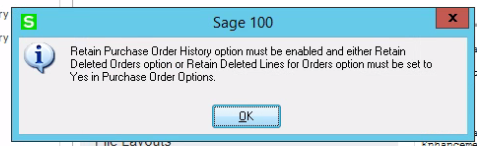
So based on the verbiage, I open PO set up options, go to the history panel. and set the two lower options to yes.
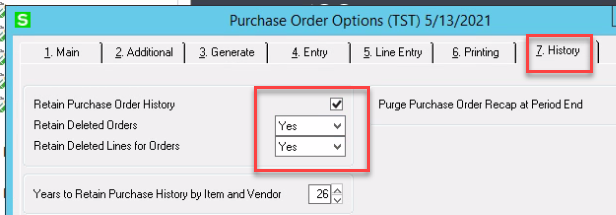
Still get the first message. Do it a couple more times just in case three times is a charm. Nada.
Rebuild the PO key tables as a SWAG reaction. Nada.
Search the KB, find the above mentioned KB opened in 2017. Notice that a workaround mentioned is "Setup Retain Deleted Orders in Sales Order Options, History tab to Prompt"
Hmmm, open SO options. Verified that those options set to prompt.
Try again. Same message.
WTF
Notice that the SO options were set to PROMPT! What heck, worth a try. So I set the PO history retention to prompt to match SO options
Another WTF moment. I can ACCESS the cancellation codes.
Earth to Sage - for annual revenue of at least $105MM, WHY does it take at best 4 years to fix issues?????
yes, @Beth Bowers - Spray the bag with Lysol and put it away!! I will go back to my crossword started at 7 AM.
------------------------------
Jeff Schwenk
FORMER 90M Board Member
Bottomline Software, Inc.
Waynesboro VA
540-221-4444
------------------------------
Original Message:
Sent: 05-13-2021 09:55
From: Beth Bowers
Subject: v2019 - Purging Obsolete Purchase Orders.
Does this mean I can stop breathing into the paper bag?
------------------------------
Beth Bowers
Mom to Samson, Peanut, ChiChi, Canton, Cagney and Daisy (NO Oxford comma - shriek!)
Tennessee Software Solutions
269-445-1625
------------------------------
Original Message:
Sent: 05-13-2021 08:42
From: Jeff Schwenk
Subject: v2019 - Purging Obsolete Purchase Orders.
@Beth Bowers - You can put those Nitroglycerin pills back in the medicine cabinet!!!!!! I tested the purge at the other cluster client (pre OBS - 6885 open PO's, 18146 history PO's). After running the utility, there were 708 open PO's and 18146 history PO's. SUCCESS!!!
The one difference I noted was the this client had cancellation codes activated! So I will activate cancellation codes with the first client and cross my fingers.
In the words of our former leader Pascal (how many leaders since have there been), I must fucus on the mission of OUTSTANDING client support! They deserve nothing less!
But honestly, I get confused between his and P.T Barnum's line - "There's a sucker born every minute"..........
------------------------------
Jeff Schwenk
FORMER 90M Board Member
Bottomline Software, Inc.
Waynesboro VA
540-221-4444
Original Message:
Sent: 05-13-2021 08:26
From: Jeff Schwenk
Subject: v2019 - Purging Obsolete Purchase Orders.
Thought about that last night as a "MacGyver" reseller trick. And I may be forced to that level of desperation yet! But then, do Beth and I have the ONLY clients in the 14,000 user Sageverse (Per Phuong and probably dropping as I type) that can't get their act together by implementing good SOP's?
Is there a "hack" to the data dictionaries that would allow one to import the completion status code? Several years ago when I first brought up the topic, there was not. Purging obsolete PO's was a workable way to adjust. Now this!
And speaking of "hacked", let's do some math regarding the 14K number. If we assume that the annual maintenance fee for each customer is $7,500 (which is probably low), annual revenue to Sage is $105,000,000! Just how much of that customer appreciation love money is invested in the product development?????? But I digress.....
------------------------------
Jeff Schwenk
FORMER 90M Board Member
Bottomline Software, Inc.
Waynesboro VA
540-221-4444
Original Message:
Sent: 05-13-2021 07:35
From: Doug Higgs
Subject: v2019 - Purging Obsolete Purchase Orders.
Backup the PO History tables, run the purge obsolete POs then restore PO history?
------------------------------
Doug Higgs
Midwest Commerce Solutions, Inc
(312) 315-0960
Assistant to the Traveling Secretary
Original Message:
Sent: 05-13-2021 07:19
From: Jeff Schwenk
Subject: v2019 - Purging Obsolete Purchase Orders.
Please try it and let me know what I am doing wrong.!!! I spent several hours on this last night copying production company files to the Test company and purging. The good news is the code works consistently. The bad news is that it is a cluster....... I have another client that is a disaster in open PO category with 80 pages of purchases clearing mismatches. I am currently testing v2021 so I can test this observation there.
So this begs the question, HOW do you clean up Open PO's when it is beyond repair? Oh, I how I yearn for the good old days when you could import a completion code into PO status with a completion date then simply run period end closing.
------------------------------
Jeff Schwenk
FORMER 90M Board Member
Bottomline Software, Inc.
Waynesboro VA
540-221-4444
Original Message:
Sent: 05-13-2021 05:45
From: Beth Bowers
Subject: v2019 - Purging Obsolete Purchase Orders.
OMG, for real? I have people purge obsolete POs all the time.... CRAP!!!!!!
------------------------------
Beth Bowers
Mom to Samson, Peanut, ChiChi, Canton, Cagney and Daisy (NO Oxford comma - shriek!)
Tennessee Software Solutions
269-445-1625
Original Message:
Sent: 05-12-2021 23:52
From: Jeff Schwenk
Subject: v2019 - Purging Obsolete Purchase Orders.
Update - Found a program under the PO Utilities to create PO history. This eliminated the issue of having fewer PO's in history than in Open PO's (see above). So I tried purging open obsolete PO's again. Selected all PO's prior to 12/31/2019. Ran. When I looked at open po's the count was done to 863 Good. Then I looked at PO history. The count after creating PO history was 3566. the after running Obsolete purge matched the Open PO number of 863. Per the help text below, there is no mention that the purge obsolete PO's also deletes the records in the PO history table.
Am I reading this wrong?
But the bigger issue is how do I get rid of the nearly 2K records in Open PO without deep sixing the PO history table?
Client is a recent ROR with A LOT of procedural issues. The purchases clearing report is 59 pages long with a balance of 3MM. Totally set up incorrectly.....
Select Purchase Order Utilities menu > Purge Obsolete Purchase Orders.
NoteThis task is not available if Receipt of Goods Entry, Receipt of Invoice Entry, Return of Goods Entry, or Material Requisition Issue Entry is in progress.
Use Purge Obsolete Purchase Orders to remove all obsolete purchase orders whose purchase order date, last receipt date, last issue date, or last invoice date are on or prior to the entered date to provide additional file space in the Open Purchase Order file. A purchase order is obsolete if the following date properties are on or prior to the purge date entered:
- Purchase order date
- Last receipt date
- Last issue date
- Last purchase order date
- Last invoice date
Warning Back up your data before performing this purge
------------------------------
Jeff Schwenk
FORMER 90M Board Member
Bottomline Software, Inc.
Waynesboro VA
540-221-4444