Sage 100

 View Only
Expand all | Collapse all

User cannot print when using Sage through published/remote app

  • 1.  User cannot print when using Sage through published/remote app

    Posted 01-28-2026 12:29

    When printing anything, get the following error: The database login failed.  Error in file {blah blahfile name}.rpt.  Unknown Database Connector Error.  There's nothing wrong with the form, Sage is being run as an administrator.  This only happens from the remote app.  What is wrong with not being able to communicate with the SQL server DB?  Sage 100 Premium v. 2022.3


    ------------------------------
    Jane Scanlan
    Partner
    Next Level Manufacturing Consulting Group
    ------------------------------


  • 2.  RE: User cannot print when using Sage through published/remote app

    Posted 01-28-2026 12:52

    Did someone mess with the MAS_Reports password?


    ------------------------------
    Phil McIntosh
    Friendly Systems
    ------------------------------


  • 3.  RE: User cannot print when using Sage through published/remote app

    Posted 01-28-2026 13:30

    I don't think so.  Is there a way to check that?  


    ------------------------------
    Jane Scanlan
    Partner
    Next Level Manufacturing Consulting Group
    ------------------------------


  • 4.  RE: User cannot print when using Sage through published/remote app

    Posted 01-28-2026 13:33

    I think all you can do is reset it using the SQL Settings Utility.  You might also want to check with IT to make sure they don't set MAS_User or MAS_Reports to any password policy that expires passwords, and that they know not to change either password in SQL - only use the Sage utility which changes it in both Sage and SQL at the same time.


    ------------------------------
    Phil McIntosh
    Friendly Systems
    ------------------------------


  • 5.  RE: User cannot print when using Sage through published/remote app

    Posted 01-28-2026 13:34

    If printing works for anyone at all, the SQL credentials are fine.

    I'd try connecting to a full remote desktop connection (vs remote app), and see if it works that way.

    There is a Sage KB article on the remote app settings, if you haven't already gone through that.


    ------------------------------
    Kevin Moyes
    Technical Systems Analyst
    Munjal White Consulting Co.
    Toronto ON
    ------------------------------


  • 6.  RE: User cannot print when using Sage through published/remote app

    Posted 01-28-2026 14:00
    Edited by Jane Scanlan 01-28-2026 14:03

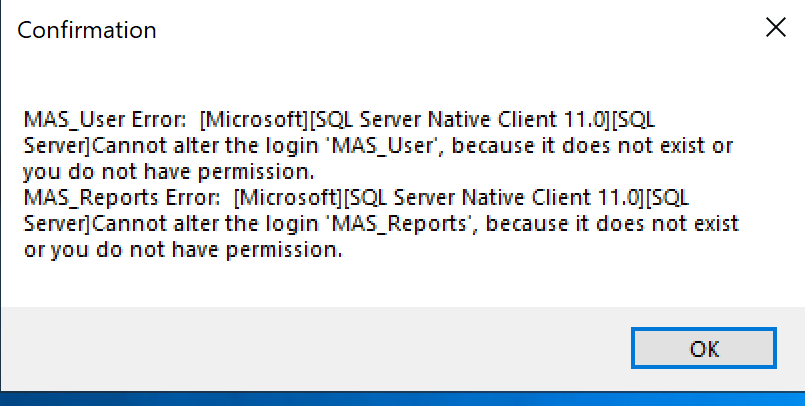
    Same problem with full desktop.  I have the remote app settings doc from Sage.  Trying to reset the MAS_User and MAS_Reports passwords but I don't have enough permission to do that.  Working with their IT ... :( ... so many roadblocks.  


    ------------------------------
    Jane Scanlan
    Partner
    Next Level Manufacturing Consulting Group
    ------------------------------


  • 7.  RE: User cannot print when using Sage through published/remote app

    Posted 01-29-2026 00:10

    I wonder if somehow the MAS_User and MAS_Reports are orphaned ? They appear to be the same in the SQL Security, but are not in fact the same at the database level. 

    Was the database recently restored/recovered? 


    ------------------------------
    George Khairallah
    CTO / Co-Founder | gotomyerp / Zaptiva / CFOTech
    george.k@gotomyerp.com | 877-888-5525
    https://gotomyerp.com
    ------------------------------


  • 8.  RE: User cannot print when using Sage through published/remote app

    Posted 01-29-2026 08:33

    Hi @Jane Scanlan - it really helps to have the sa password. Only once has a client NOT provided that to me (they had actually disabled the sa account).

    To check the current MAS_Reports password you can either use SSMS (SQL Server Management Studio) and attempt to login with that user name and password, or another way is in Crystal you can Set Datasource Location and use an OLE DB (ADO) connection to get to a login prompt. If you see a list of tables, you have the right password.

    image


    ------------------------------
    Cullen Lowe | Senior Business Consultant

    Kissinger Associates, Inc.
    Office: 800-562-5456 x255 | Mobile: 717-460-3755
    cullenl@kissingerassoc.com | kissingerassoc.com
    ------------------------------


  • 9.  RE: User cannot print when using Sage through published/remote app

    Posted 01-29-2026 09:16

    Jane 

    This is what I would try if it's still an issue. To test try and open SQL with the MAS_Report user and password. If that doesn't work, then reset the password in the Sage SQL Utility. 

    There are a few other things that you can try if that doesn't work. One time I had to change the password in SQL permissions & the Sage utility. Also check to make sure that the MAS Reports hasn't been locked out due to many attempts.  Other times, under permissions I had to make sure MAS_Reports was able to access that database. 

    Hopefully you got it, but those are some additional items you can try. 


    ------------------------------
    Tina Leonard
    RKL eSolutions, LLC
    AZ
    ------------------------------


  • 10.  RE: User cannot print when using Sage through published/remote app

    Posted 01-29-2026 11:09

    @Robert Wood, please move this out of Urgent.  


    ------------------------------
    Brett Zimmerman
    Net at Work
    Greater Boston Area
    ------------------------------


  • 11.  RE: User cannot print when using Sage through published/remote app

    Posted 01-30-2026 10:02

    We have done all, and I mean ALL the things in this thread, and more than once, as well as many other things.  I even updated the published app because their IT firm who set it up in the first place didn't have the "always use the following command .." option in place.  I have some additional info below to maybe shed some light as this user also gets the same error when accessing Sage from a full desktop RDP:

    • When I access Sage to their Sage server - full desktop - I can print/preview anything Crystal.
    • When the end user uses Sage from the full desktop RDP - he cannot print/preview anything Crystal.

    • When I access Sage from the published App - I can't print/preview anything Crystal.
    • When the end user accesses Sage from the remote App - he can't print/preview anything Crystal.


    ------------------------------
    Jane Scanlan
    Partner
    Next Level Manufacturing Consulting Group
    ------------------------------


  • 12.  RE: User cannot print when using Sage through published/remote app

    Posted 01-30-2026 10:11

    In the Sage SQL settings, perhaps try the IP Address (instead of the server name)?


    ------------------------------
    Kevin Moyes
    Technical Systems Analyst
    Munjal White Consulting Co.
    Toronto ON
    ------------------------------