Sage 100

 View Only
Expand all | Collapse all

Upgrade Notes for version 2021

  • 1.  Upgrade Notes for version 2021

    Posted 11-13-2021 13:11
    At some point when version 2021 was released, I remember Jeff and Wayne talking about a document to have all issues and fixes… Was that document ever created??? Where can I find it??? I am trying to get all the hotfixes for version 2021….

    ------------------------------
    Lourdes Sobrino
    LU² DSD Puerto Rico
    Guaynabo Puerto Rico
    787.485.9638
    ------------------------------


  • 2.  RE: Upgrade Notes for version 2021

    Posted 11-13-2021 14:13
    Go the the downloads section  for the full release of v2021 and also to the v2021.2 PU update page.  All the hotfixes listed under the FULL download MAY appear under the what's new section.  They may be duplicated under the PU2 page as well.  I do not know if this is the complete list of hotfixes or not.


    ------------------------------
    Jeff Schwenk
    FORMER 90M Board Member -140,000,000 is a TERRIBLE thing to waste!!!
    Bottomline Software, Inc.
    Waynesboro VA
    540-221-4444
    ------------------------------


  • 3.  RE: Upgrade Notes for version 2021

    Posted 11-15-2021 10:07
    The download page for the latest PU "should" have all the hotfixes you need for that patch level.

    ------------------------------
    Kevin Moyes
    Technical Systems Analyst
    Munjal White Consulting Co.
    Toronto ON
    ------------------------------


  • 4.  RE: Upgrade Notes for version 2021

    Posted 11-15-2021 09:44
    http://cdn.na.sage.com/docs/en/customer/100erp/Documentation.htm

    ------------------------------
    Wayne Schulz
    Schulz Consulting
    860-516-8990
    ------------------------------


  • 5.  RE: Upgrade Notes for version 2021

    Posted 11-16-2021 15:49
    Edited by Michael McDonald 11-16-2021 15:49
    I'm looking for a list of File/Field name (ODBC table) changes from v2019 to v2021. Someone suggested that those changes are listed in the SAGE 100 v2021 Installation and Administrator's Guide. I cannot find the list. Can someone point in the right direction?

    ------------------------------
    Michael McDonald - Consultant
    Michael T McDonald CPA
    616-813-8887 - mike@mcdcpa.com
    ------------------------------


  • 6.  RE: Upgrade Notes for version 2021

    Posted 11-16-2021 16:28
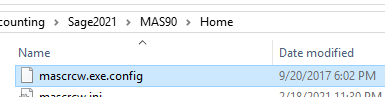
    The report conversion reference does not appear to have changed since 2017.

    ------------------------------
    Kevin Moyes
    Technical Systems Analyst
    Munjal White Consulting Co.
    Toronto ON
    ------------------------------


  • 7.  RE: Upgrade Notes for version 2021

    Posted 11-16-2021 19:51
    Edited by Michael McDonald 11-16-2021 19:54
    Thanks for your reply @Kevin Moyes. My client's internal IT staff has connected SAGE 100 to some in-house developed database via SAGE ODBC. Here is what he just asked about SAGE 100 v2021:

    "Thanks Mike, that (looking at the [TABLE] section in the mascrcw.ini file) helps.  Looks like the table and values are the same so that's probably not the issue.  I installed the 2021 client on another test machine so I can test the lookup using the newer ProviderX ODBC driver, but that didn't seem to help either.  I'm not sure how else I can troubleshoot this without getting our Vendor (SAGE) of this software involved.  Maybe if I could browse the new MAS 2021 database I could confirm the fields are mapped correctly?  Is there any way to do that?"
     

    Any idea how the client IT guy can browse the new SAGE 100 v2021 database?  

    ------------------------------
    Michael McDonald - Consultant
    Michael T McDonald CPA
    616-813-8887 - mike@mcdcpa.com
    ------------------------------


  • 8.  RE: Upgrade Notes for version 2021

    Posted 11-16-2021 20:16
    What is the exact problem?  Are they unable to pull data out of Sage to their database?  Are they trying to write back?  Are they able to pull data into Excel/Access?  Are they using a Providex ODBC driver that is different than the one Sage uses?  Is their database 64 bit and they only loaded the 32 bit ODBC version?

    ------------------------------
    Jeff Schwenk
    FORMER 90M Board Member -140,000,000 is a TERRIBLE thing to waste!!!
    Bottomline Software, Inc.
    Waynesboro VA
    540-221-4444
    ------------------------------


  • 9.  RE: Upgrade Notes for version 2021

    Posted 11-17-2021 08:32
    Edited by Michael McDonald 11-17-2021 08:33
    @Jeff Schwenk The IT guy sent this message first:

    "Do you know if the table names or fields changed at all with the 2021 upgrade or perhaps the ODBC driver? We use ODBC data sources so we can do lookups in the SAGE database from another server. These don't seem to be working with the 2021 database"

    I installed SAGE 100 v2021 on the application server using the 32-bit option. The IT guy performed a workstation setup on a Windows 10 machine. I don't know if he selected 32-bit or 64-bit? Is it possible to have a mix-match between the SAGE installation and Workstation setup?  ​

    ------------------------------
    Michael McDonald - Consultant
    Michael T McDonald CPA
    616-813-8887 - mike@mcdcpa.com
    ------------------------------


  • 10.  RE: Upgrade Notes for version 2021

    Posted 11-17-2021 09:05
    Does he know what he is doing?  I don't think he can install 64 by mistake.

    Have you verified that Sage 2021 runs on his workstation?
    Does an excel query work from that workstation.

    Someone posted a month or so ago a program that installed the Sage ODBC without installing the entire client.  This might benefit them.

    Usually when I get a call that something isn't working and I didn't install the workstation client, the first step is to uninstall the client, reboot and reinstall the client and test.  Impossible to determine what the IT guy did/didn't do.

    ------------------------------
    Jeff Schwenk
    FORMER 90M Board Member -140,000,000 is a TERRIBLE thing to waste!!!
    Bottomline Software, Inc.
    Waynesboro VA
    540-221-4444
    ------------------------------


  • 11.  RE: Upgrade Notes for version 2021

    Posted 11-17-2021 09:26
    Just for the benefit of people who may search this in the future: 

    Another possible cause of this would be if the customer upgraded from Standard/Advanced to Premium.
    In Premium ( SQL ) The SOTAMAS90 goes away so if the IT was still trying to use a SOTAMAS90 that could be an issue.

    Resolution for a Premium user is they must now use the native SQL ODBC drivers ( and NOT SOTAMAS90).
    Additionally, once they go to Premium they will no longer receive the prompt to select Sage User/Company ( either need to code this or create multiple ODBC connections to the different company codes )

    ------------------------------
    Wayne Schulz
    Schulz Consulting
    860-516-8990
    ------------------------------


  • 12.  RE: Upgrade Notes for version 2021

    Posted 11-17-2021 12:43
    @Jeff Schwenk latest e-mail from the IT guy with more details:

    "The two tables our document management system performs lookups on are:

     AP_InvoiceHistoryHeader

    AP_InvoiceHeader

     It looks like I can query them and they return the fields from the table, but no data.  Are you able to confirm there is data in those two tables?"

    I have access to a workstation that I used to upgrade to SAGE 100 v2021, How do I test if that workstation can query the SAGE ODBC database and return data?


    ------------------------------
    Michael McDonald - Consultant
    Michael T McDonald CPA
    616-813-8887 - mike@mcdcpa.com
    ------------------------------


  • 13.  RE: Upgrade Notes for version 2021

    Posted 11-17-2021 12:52
    Sounds like PII is active in AR.  Or some other security setting


    ------------------------------
    Jeff Schwenk
    FORMER 90M Board Member -140,000,000 is a TERRIBLE thing to waste!!!
    Bottomline Software, Inc.
    Waynesboro VA
    540-221-4444
    ------------------------------


  • 14.  RE: Upgrade Notes for version 2021

    Posted 11-17-2021 13:11
    AR PII is on demand for inactive customers only.


    ------------------------------
    Kevin Moyes
    Technical Systems Analyst
    Munjal White Consulting Co.
    Toronto ON
    ------------------------------


  • 15.  RE: Upgrade Notes for version 2021

    Posted 11-17-2021 13:15
    Printing anything proves basic ODBC functionality. 
    If your external application is 64-bit and it is Advanced / Standard, be sure to install the 64-bit ODBC drivers.
    Google ODBCView for a simple query tool that works with any functional DSN.
    Getting fields and tables but no data seems like ODBC permissions are enabled.

    ------------------------------
    Kevin Moyes
    Technical Systems Analyst
    Munjal White Consulting Co.
    Toronto ON
    ------------------------------


  • 16.  RE: Upgrade Notes for version 2021

    Posted 11-17-2021 15:35
    @Jeff Schwenk and @Kevin Moyes thanks for your help. It turns out that my client is using the document management software called "DocStar". They have DocStar configured to read the ODBC driver for these two tables:

    AP_InvoiceHistoryHeader and  AP_InvoiceHeader

    ​The SAGE 100 user code "doc" did not convert from v2019 to v2021 with the v 2019 assigned company code "ROY". I went into User Maintenance in v2021  and added company "ROY" to user 'doc". The data started flowing. ​

    ------------------------------
    Michael McDonald - Consultant
    Michael T McDonald CPA
    616-813-8887 - mike@mcdcpa.com
    ------------------------------


  • 17.  RE: Upgrade Notes for version 2021

    Posted 11-17-2021 15:44
    The devil is in the details...

    ------------------------------
    Jeff Schwenk
    FORMER 90M Board Member -140,000,000 is a TERRIBLE thing to waste!!!
    Bottomline Software, Inc.
    Waynesboro VA
    540-221-4444
    ------------------------------