Everything you add, one step at a time, has to be removed, one step at a time. Nothing is automatic.
Munjal White Consulting Co.
Original Message:
Sent: 11-11-2024 12:47
From: Jeff Schwenk
Subject: Update or Replace a User Defined Script - v2024
So this is a bit like cleaning up the printer files, user records, etc. You can delete but the details remain.
------------------------------
Jeff Schwenk
Owner
Bottomline Software, Inc.
Waynesboro VA
(540) 221-4444
------------------------------
Original Message:
Sent: 11-11-2024 12:32
From: Kevin Moyes
Subject: Update or Replace a User Defined Script - v2024
No. UDS maintenance Delete only removes the script header, not the event triggers, or the compiled VBS.
If you recompile without the UDS entry it "should" effectively disable the removed script, but the event entries will still be there.
------------------------------
Kevin Moyes
Technical Systems Analyst
Munjal White Consulting Co.
Toronto ON
Original Message:
Sent: 11-11-2024 12:26
From: Jeff Schwenk
Subject: Update or Replace a User Defined Script - v2024
Does the delete button remove this?
------------------------------
Jeff Schwenk
Owner
Bottomline Software, Inc.
Waynesboro VA
(540) 221-4444
Original Message:
Sent: 11-11-2024 12:05
From: Kevin Moyes
Subject: Update or Replace a User Defined Script - v2024
The parts of an event script are:
- The named script in UDS maintenance.
- The event triggers (in the table or panel).
- The compiled VBS (which is made using the two above "ingredients", with integrity confirmed by the CRC).
------------------------------
Kevin Moyes
Technical Systems Analyst
Munjal White Consulting Co.
Toronto ON
Original Message:
Sent: 11-11-2024 11:58
From: Jeff Schwenk
Subject: Update or Replace a User Defined Script - v2024
How do you delete all remnants of the UDS so one can start anew?
------------------------------
Jeff Schwenk
Owner
Bottomline Software, Inc.
Waynesboro VA
(540) 221-4444
Original Message:
Sent: 11-11-2024 11:31
From: Kevin Moyes
Subject: Update or Replace a User Defined Script - v2024
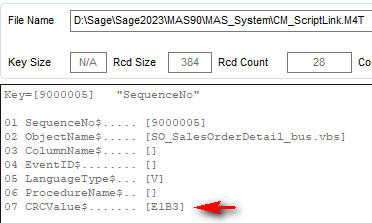
BTW, the reason you can't edit the compiled scripts directly is that Sage stores a CRC value of the compiled file. Manual edits change the CRC, basically disabling that script logic for the entire business object.
------------------------------
Kevin Moyes
Technical Systems Analyst
Munjal White Consulting Co.
Toronto ON
Original Message:
Sent: 11-11-2024 11:26
From: Kevin Moyes
Subject: Update or Replace a User Defined Script - v2024
The best way is to edit the source text file (but never the compiled VBS)... external text editors are fine, but if you do that always open the edited script in UDS maintenance to verify syntax (button) before you recompile. After the edits, compile the scripts for that object.
There is no need to delete / add back. You might not have added the script back using the same name, breaking the event triggers. Try adding the event triggers back.
For setting paths, always use relative paths, so you can recompile scripts from a workstation or the server (with a bonus of not having to relink after an upgrade).

------------------------------
Kevin Moyes
Technical Systems Analyst
Munjal White Consulting Co.
Toronto ON