Sage 100

 View Only
  • 1.  Unable to print R_DiredtDepositStub.rpt. Your file waiting to be printed was deleted.

    Posted 12-30-2025 15:01

    Client is on 2022.6.  They have over 50 companies, and are processing payroll today for all of them.  The error allows a check to Print/PDF All, but when they do the same for the DD Stubs, the stubs print, then the error occurs.  This is only happening in one company.  Multiple users have experienced the same result, including me, who is on the server.  Sage KB has a less than useful KB regarding the same error with AP check printing (they point to Adobe). They are unable to update the Check/Electronic Payment Register because Sage "thinks" the forms haven't been printed.  Anyone run into this?


    ------------------------------
    Barbara Goldstein
    Sr. Consultant
    DSD Business Systems
    ------------------------------


  • 2.  RE: Unable to print R_DiredtDepositStub.rpt. Your file waiting to be printed was deleted.

    Posted 12-30-2025 15:58
    Edited by Alnoor Cassim 12-30-2025 16:26

    Have you already looked at the Sage KB article on this error related to the user documents folder: Sage KB ID 225924450087610


    ------------------------------
    Alnoor Cassim
    Accounting Systems, Inc. (ASI)
    ------------------------------


  • 3.  RE: Unable to print R_DiredtDepositStub.rpt. Your file waiting to be printed was deleted.

    Posted 12-30-2025 16:51

    Thanks, Alnoor.  I hadn't until now, but what's strange about this is that all their companies store checks and DD stubs in the same folders.  They are on SPC, and we control permissions and haven't changed anything permissions-related.  They ran PR successfully on 12/15/25.  I think there's something more they haven't told me, so I'll need to investigate further by getting someone on the line with me.


    ------------------------------
    Barbara Goldstein
    Sr. Consultant
    DSD Business Systems
    ------------------------------


  • 4.  RE: Unable to print R_DiredtDepositStub.rpt. Your file waiting to be printed was deleted.

    Posted 12-30-2025 16:54

    See if they have any new employees on DD.  Maybe the pre-note isn;t set to approved or the pre-note date is not correct.


    ------------------------------
    Doug Higgs
    Midwest Commerce Solutions, Inc
    (312) 315-0960
    Chauffeur, Chef, and Personal Assistant to Sprinkles
    ------------------------------


  • 5.  RE: Unable to print R_DiredtDepositStub.rpt. Your file waiting to be printed was deleted.

    Posted 12-30-2025 17:01

    I'm told no one is getting a DD stub for the first time.  And this user has processed PR for several other companies today.  


    ------------------------------
    Barbara Goldstein
    Sr. Consultant
    DSD Business Systems
    ------------------------------


  • 6.  RE: Unable to print R_DiredtDepositStub.rpt. Your file waiting to be printed was deleted.

    Posted 12-30-2025 18:06

    Hi, Barbara.

    I had a similar issue with Adobe this week that disrupted the payroll check printing process.  I didn't have the error message but I did have issue with Adobe thwarting the update process.

    You may have already done these things, but I will offer up what helped in our situation.

    • Disabled Enhanced Security and Protected Mode at startup in Adobe Security (Enhanced) settings.
    • Enabled "Run as Administrator" in the Properties of the Adobe icon.
    • Modified permissions in the folders listed below on the workstation having the issue.
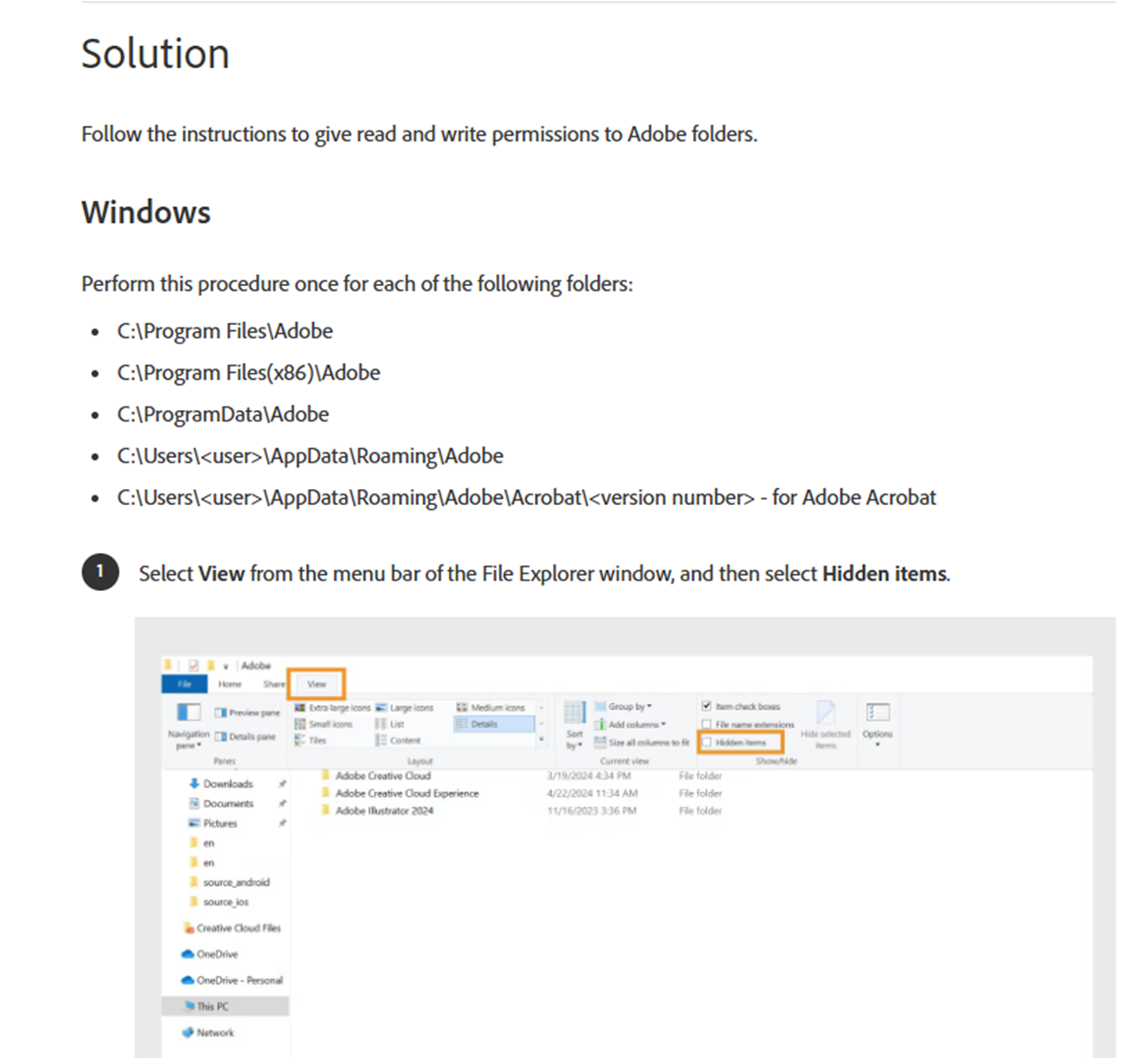
    Hope this helps.

    Scotia


    ------------------------------
    Scotia Saunders
    Keystone Business Solutions
    scotia@teamkbs.com
    ------------------------------


  • 7.  RE: Unable to print R_DiredtDepositStub.rpt. Your file waiting to be printed was deleted.

    Posted 12-30-2025 18:35

    Thanks Scotia.  The problem is solved, although I don't know why this worked:  I noticed that only one of 3 stubs made it to Paperless. We reprinted each DD stub separately, and were then able to print/update the Registers.  I guess something got stuck somewhere.🤷‍♂️

    You can take this out of Urgent Support.


    ------------------------------
    Barbara Goldstein
    Sr. Consultant
    DSD Business Systems
    ------------------------------