Glad it worked for you too! Not sure what's in the file but at this point, I didn't push for a thorough explanation :D
Original Message:
Sent: 10-21-2024 17:07
From: Madeline Stefanou
Subject: Unable to Initialize PDF Converter
O. M. G. @Amber Prayfrock that worked. That really worked. I copied the PL_CommonUtility.pvc from my local v2023.1 onto their system, and it now works. THANK YOU, I'm so glad you responded.
------------------------------
Madeline Stefanou
RKL eSolutions, LLC
------------------------------
Original Message:
Sent: 10-21-2024 16:49
From: Amber Prayfrock
Subject: Unable to Initialize PDF Converter
@Madeline Stefanou, I worked with Don Wiser on my old case 8010186588. He ended up giving me a copy of his 2023.1 ..\MAS90\PL\PL_CommonUtility.pvc, based on Solution ID 240916215409323 that he was looking at. Let me know if you want the same copy or if you want to use one of yours with the client's system.
------------------------------
Amber Prayfrock, Blytheco
Original Message:
Sent: 10-21-2024 12:11
From: Madeline Stefanou
Subject: Unable to Initialize PDF Converter
@David Overholt set to Edge for PDF Documents, no change.
@Doug Higgs in Registry Editor the paperless office version 650 has full permission for everyone
@Doug Higgs the "cdintf650.dll" does exist in C:\Windows\SysWow64 folder. I even registered it again...
@Alnoor Cassim I made the "windows 8 compatible" and your other suggestions, no go.
------------------------------
Madeline Stefanou
RKL eSolutions, LLC
Original Message:
Sent: 10-21-2024 11:16
From: Doug Higgs
Subject: Unable to Initialize PDF Converter
Also check the permissions on the registry key and be sure everyone has full control.
------------------------------
Doug Higgs
Midwest Commerce Solutions, Inc
(312) 315-0960
Chauffeur, Chef, and Personal Assistant to Sprinkles
Original Message:
Sent: 10-21-2024 10:58
From: Amber Prayfrock
Subject: Unable to Initialize PDF Converter
I did try that as well, between the C:\Windows\System32 and SysWow64 folders. I have re-opened my case with Sage that I started back in August letting them know I tried everything they suggested in Solution ID: 223924450035032.
------------------------------
Amber Prayfrock, Blytheco
Original Message:
Sent: 10-21-2024 10:52
From: Doug Higgs
Subject: Unable to Initialize PDF Converter
The message "not registered but is installed" could be referring to one of the Amyuni driver DLLs that get installed and registered. I am not sure what DLLs get installed however it may be worth finding out and then manually registering them using regsvr32.
------------------------------
Doug Higgs
Midwest Commerce Solutions, Inc
(312) 315-0960
Chauffeur, Chef, and Personal Assistant to Sprinkles
Original Message:
Sent: 10-21-2024 08:13
From: Amber Prayfrock
Subject: Unable to Initialize PDF Converter
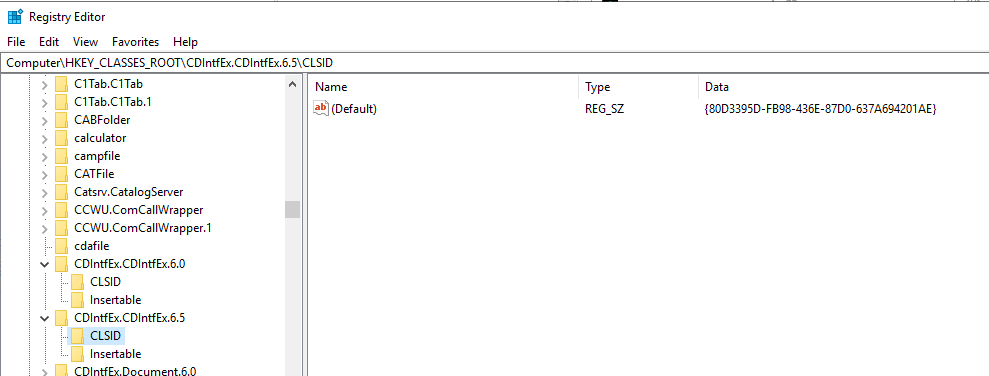
I am still seeing the message that the Converter is "not registered but is installed" after UAC was disabled via regedit and server rebooted yesterday. I also see that the key that Alnoor mentioned for the v6.5 driver does have a value...not the one that Alnoor referenced but one that does match another Sage 100 v2023 client of mine. I'll start a case with Sage next to see what else we can look at.
------------------------------
Amber Prayfrock, Blytheco
Original Message:
Sent: 10-18-2024 13:13
From: Kevin Moyes
Subject: Unable to Initialize PDF Converter
We disable UAC for 100% of server software installations. If client IT wants it back on after that, we don't object... but for the initial install we insist.
For workstation installation issues we disable UAC when troubleshooting (reinstall...).
------------------------------
Kevin Moyes
Technical Systems Analyst
Munjal White Consulting Co.
Toronto ON
Original Message:
Sent: 10-18-2024 13:08
From: Doug Higgs
Subject: Unable to Initialize PDF Converter
Most of the servers I see have UAC disabled.
------------------------------
Doug Higgs
Midwest Commerce Solutions, Inc
(312) 315-0960
Chauffeur, Chef, and Personal Assistant to Sprinkles
Original Message:
Sent: 10-18-2024 13:02
From: Kevin Moyes
Subject: Unable to Initialize PDF Converter
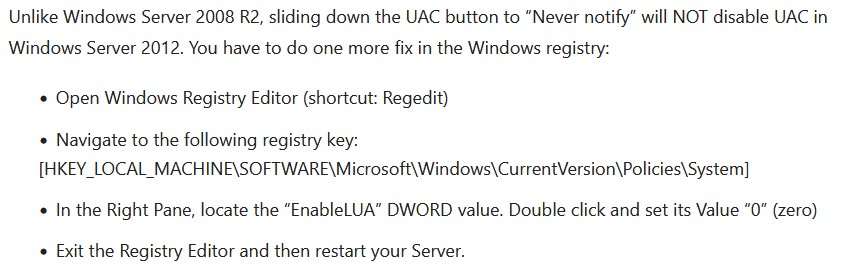
Background on the UAC registry hack (from a random Google search result):
It started in Server 2012 when M$ changed how UAC works... and they may have changed it since, but doing this does seem to help in many cases involving software not installing properly.
------------------------------
Kevin Moyes
Technical Systems Analyst
Munjal White Consulting Co.
Toronto ON
Original Message:
Sent: 10-18-2024 12:22
From: Amber Prayfrock
Subject: Unable to Initialize PDF Converter
Thanks, Alnoor. I am asking IT to reboot the server with the registry key change to try this Sunday again and will report back.
------------------------------
Amber Prayfrock, Blytheco
Original Message:
Sent: 10-18-2024 12:17
From: Alnoor Cassim
Subject: Unable to Initialize PDF Converter
Amber that status means, for v2023 that uses Amyuni 6.50, that it's trying to read this registry key:
HKEY_CLASSES_ROOT\CDIntfEx.CDIntfEx.6.5\CLSID
It then tries to read this GUID in the (Default) string: {50C727B5-0DD5-4F3A-8DF4-F7A9FF0C2431}
If there is no value in the string you get the error. Having said that, it sounds like the UAC edit with reboot is the way to go.
------------------------------
Alnoor Cassim
Accounting Systems, Inc. (ASI)
Original Message:
Sent: 10-18-2024 09:45
From: Amber Prayfrock
Subject: Unable to Initialize PDF Converter
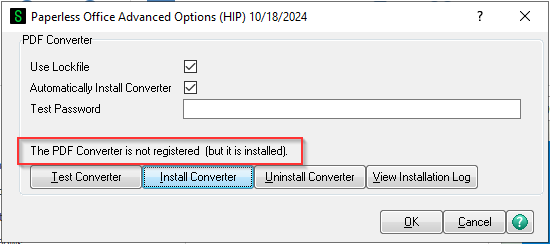
Madeline - do you see this status with your Sage 100 PDF Converter? I have the same issue with a 2023 test install on a Windows 2019 server and the only thing we haven't tried yet was the regedit for UAC. Deleting the printer drivers themselves did not help.
------------------------------
Amber Prayfrock, Blytheco
Original Message:
Sent: 10-17-2024 16:09
From: Kevin Moyes
Subject: Unable to Initialize PDF Converter
Windows wants to turn UAC back on, but as long as you rebooted with it at 0, UAC is effectively disabled until you reboot again, and you should not have it block any software install activities.
------------------------------
Kevin Moyes
Technical Systems Analyst
Munjal White Consulting Co.
Toronto ON
Original Message:
Sent: 10-17-2024 15:01
From: Madeline Stefanou
Subject: Unable to Initialize PDF Converter
@Kevin Moyes suggested the User Account Control hack through Registry. And I believe that is my problem. When I set the EnableLUA Value manually to "0" and reboot, it resets it 1; and when I then look at UAC, it says "pending update"; so it looks like it says "NEVER" but it doesn't actually. I've asked IT to resolve this; then once done, if it does not fix the issue, I will cycle back through these suggestions. THANK YOU!
------------------------------
Madeline Stefanou
RKL eSolutions, LLC
Original Message:
Sent: 10-17-2024 14:30
From: Alnoor Cassim
Subject: Unable to Initialize PDF Converter
I like Doug's idea of deleting any / all Amyuni Document Converter drivers. I would also suggest changing your Sage icon temporarily so that in the Compatibility tab you are set the Compatibility level to Windows 8 (and you can mark Run as Admin from there as well). Now start up, run PL_AdvancedOptions_UI, do Uninstall Converter first (which Install Converter calls but cleaner this way), then Install Converter, then Test. If it works or you get a better error message, I'm thinking what you should do next is is go to Control Panel / Programs & Features and click Turn Windows Features On and add some of the older Windows components that are not selected by default on a brand new Windows Server o/s (e.g. .NET Framework 3.5). Another and probably better way to do this by manually installing some of the EXEs under \mas90\WkSetup\Prerequisites
------------------------------
Alnoor Cassim
Accounting Systems, Inc. (ASI)