It auto-displays the 3rd decimal, when it applies. If you are desperate to have the 3rd decimal show 100% of the time, you could try to edit the M4L directly. Sage doesn't allow you to control that.
------------------------------
Kevin Moyes
Technical Systems Analyst
Munjal White Consulting Co.
Toronto ON
------------------------------
Original Message:
Sent: 06-27-2023 11:44
From: Doug Higgs
Subject: UDF Precision
The issue is when the UDF is 3 decimal places only 2 decimal places display on the panel. I'm OK with 3 decimal UDFs. I'm not OK with a 3 decimal UDF only displaying 2 decimal places when I add it to a panel. How do I display the 3 decimals when the UDF is added to a screen panel?
------------------------------
Doug Higgs
Midwest Commerce Solutions, Inc
(312) 315-0960
Chauffeur, Chef, and Personal Assistant to Sprinkles
------------------------------
Original Message:
Sent: 06-27-2023 11:34
From: Kevin Moyes
Subject: UDF Precision
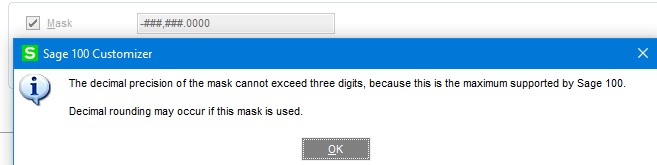
Numeric UDF's have always been limited to 3 decimals as far as I know. After seeing this warning, I've never even tried.
------------------------------
Kevin Moyes
Technical Systems Analyst
Munjal White Consulting Co.
Toronto ON
Original Message:
Sent: 06-27-2023 10:03
From: Jeff Schwenk
Subject: UDF Precision
Looks like it has been an issue for some time now.......
Why can't a numeric UDF with four decimal places b | Sage 100 (90minds.com)
------------------------------
Jeff Schwenk
Bottomline Software, Inc.
(540) 221-4444