Sage 100

 View Only
  • 1.  Twilight Zone Worthy - Sage 100 2024 ADV 64 Bit PU 1- Unable to connect to Server

    Posted 08-29-2024 18:04
      |   view attached

    This is starting to get creepy!!  This is the second time occurring in the past two weeks.  The first has not been resolved.  I upgraded client to 2024 ADV 64 bit.  EVERYTHING was functioning normally for over a week.  Then wham, ALL user sessions crash.  When they launch from the icon, this is the message everyone gets.
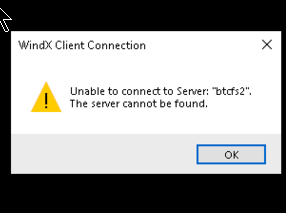
    Sage runs fine from the server,

    Server has been rebooted several times.

    Inbound and outbound Firewall ports have been opened

    Inbound/outbound firewall is open for pvxwin32.exe AND pvxwin64.exe.

    I can ping port 9730.

    I have tried using the IP address in place of the server name.

    I have renamed locate.pvk and sessions.pvk

    As a temporary workaround, Sage runs fine in MAS90 mode.

    It is eerie that in both instances, Sage crashed while I was on the server.  It is eerie that Sage was installed as 64-bit.  I did not use the utility to switch.  It is eerie that both blew on a Thursday afternoon after running without issue for 10 + days.

    The last thing that comes to mind is an AV issue.  IT for the first client has been a butt wad and has not been helpful in reviewing the exclusions and possible blacklist program.  We are contacting IT support for the second client.

    Has anyone found themselves in this twilight zone?

    Thoughts?


    ------------------------------
    Jeff Schwenk
    Owner
    Bottomline Software, Inc.
    Waynesboro VA
    (540) 221-4444
    ------------------------------


  • 2.  RE: Twilight Zone Worthy - Sage 100 2024 ADV 64 Bit PU 1- Unable to connect to Server

    Posted 08-29-2024 18:21

    Try an ODBC query?  Cannot connect to server is typically network related, but you've checked all the things at the top of my list.  If a query works, but Sage does not, it implies a program / port / firewall issue...


    ------------------------------
    Kevin Moyes
    Technical Systems Analyst
    Munjal White Consulting Co.
    Toronto ON
    ------------------------------


  • 3.  RE: Twilight Zone Worthy - Sage 100 2024 ADV 64 Bit PU 1- Unable to connect to Server

    Posted 08-29-2024 19:41

    Excel query works as expected


    ------------------------------
    Jeff Schwenk
    Owner
    Bottomline Software, Inc.
    Waynesboro VA
    (540) 221-4444
    ------------------------------


  • 4.  RE: Twilight Zone Worthy - Sage 100 2024 ADV 64 Bit PU 1- Unable to connect to Server

    Posted 08-30-2024 08:14

    Is Windows Defender running on the server? We had some serious performance issues that we couldn't resolve, not the messages you're seeing, but in this case the IT guys were very helpful. Together we discovered that Windows Defender also needs to be setup to exclude Sage files.


    ------------------------------
    Cullen Lowe | Senior Business Consultant

    Kissinger Associates, Inc.
    Office: 800-562-5456 x255 | Mobile: 717-460-3755
    cullenl@kissingerassoc.com | kissingerassoc.com
    ------------------------------


  • 5.  RE: Twilight Zone Worthy - Sage 100 2024 ADV 64 Bit PU 1- Unable to connect to Server

    Posted 09-01-2024 00:41

    Go open Application Server Config and look to see on the Server tab if the server name is still Sage 100. Maybe IT changed it to btcfs2. I have run into this a handful of times. If that's the case then here is one way to get it back the default entry. 

    1. In Server tab I assume there is a Delete or Remove button to delete the entry for bftcfs2. Do that then close App Server Config
    2. Note the local drive for the \mas90 folder. Let's say it's D:\Apps\Sage\Mas90
    3. In File Explorer goto D:\Apps\Sage\Mas90\Home and run pvxwin64. Click OK at the message.
    4. At the prompt type this:
      o = new("Sy_installation", %sys_ss)
      print o'ConfigureMas200("D:\Apps\Sage\Mas90")
    5. It should return a 1. Now type BYE to close the window.
    6. Open App Server Config and verify it looks OK. This means the Server tab has defaults and the 2 entries in the Apps tab have the correct pathing.


    If it's not that then I would bet sessions.pvk is corrupted again. So rename it again so a new empty one can get created and then copy of that good one around for the future. Also, add .PVK files to the list of antivirus exclusions if not already there. Also, as @Cullen Lowe mentioned, if Windows Defender is the anitvirus of choice, then add the Sage exclusions there.

    We have also ran into situation where WebRoot was running and properly configured with AV exclusions but then discovered Windows Defender was also running concurrently because WebRoot had not registered itself in Windows as the default AV application. IT wanted to leave it that way but we had them configure Defender with the Sage exclusions and then they were ok.


    ------------------------------
    Alnoor Cassim
    Accounting Systems, Inc. (ASI)
    ------------------------------


  • 6.  RE: Twilight Zone Worthy - Sage 100 2024 ADV 64 Bit PU 1- Unable to connect to Server

    Posted 08-30-2024 10:42

    How to list open ports and application using them in windows?

    Maybe a port conflict? 


    ------------------------------
    Wayne Schulz
    wayne@s-consult.com
    Schulz Consulting
    (860) 516-8990
    Moodus, CT
    ------------------------------


  • 7.  RE: Twilight Zone Worthy - Sage 100 2024 ADV 64 Bit PU 1- Unable to connect to Server

    Posted 09-01-2024 12:06

    Hi, 

       Have you tried using the IP address rather than the server name?  Could be a DNS issue..


    ------------------------------
    Bob Osborn
    Consultant
    ACI Consulting
    ------------------------------


  • 8.  RE: Twilight Zone Worthy - Sage 100 2024 ADV 64 Bit PU 1- Unable to connect to Server

    Posted 10-24-2024 20:12

    Epilogue

    After trying to engage client's IT person since this started, we finally had a meeting with Sage support.  After less than ten minutes, we ascertained that the file wall setting needed to apply the PUBLIC setting below.  I had configured it to only apply the DOMAIN setting.  My thinking was that it would be more secure to exclude the private/public setting because the ONLY connection was through the Domain.  Bad assumption!  I wish I could have those seven weeks back!


    ------------------------------
    Jeff Schwenk
    Owner
    Bottomline Software, Inc.
    Waynesboro VA
    (540) 221-4444
    ------------------------------