Original Message:
Sent: 03-05-2026 11:45
From: David Speck II
Subject: (Tutorial) Adding additional tables to Lookups
You do need to have all of the primary key fields in the target table available in the primary table to link to the target table.
You could use a sourced UDF in IM_ItemVendor to pull the PrimaryPurchaseAddressCode from the VendorNo source but this can potentially get stale since it won't be updated automatically when a user changes a vendor's primary purchase address.
Instead, you can make use of the FNREAD$ (for string fields) and FNREAD (for numeric fields) functions in a new calculated field. For string fields/values, clear the value in the Mask field, it will warn you that it is invalid, just click OK. Use the following calculation to return the PurchaseName field from the PO_VendorPurchaseAddress table based on the item's vendor's primary address code. For the additional fields needed from PO_VendorPurchaseAddress, add a new calculated field for each and replace the "PurchaseName" near the end with the field you want returned, don't include the"$" suffix for string fields in this argument.
FNREAD$(STR(dat.APDivisionNo$) + PAD(STR(dat.VendorNo$), VendorNo.Length, "R", CHR(0)) + STR(FNREAD$(STR(dat.APDivisionNo$) + STR(dat.VendorNo$), "AP_Vendor", "1", 0, "PrimaryPurchaseAddressCode")), "PO_VendorPurchaseAddress", "1", 0, "PurchaseName")
------------------------------
David Speck II
Blytheco LLC
------------------------------
Original Message:
Sent: 03-04-2026 09:13
From: Brett Zimmerman
Subject: (Tutorial) Adding additional tables to Lookups
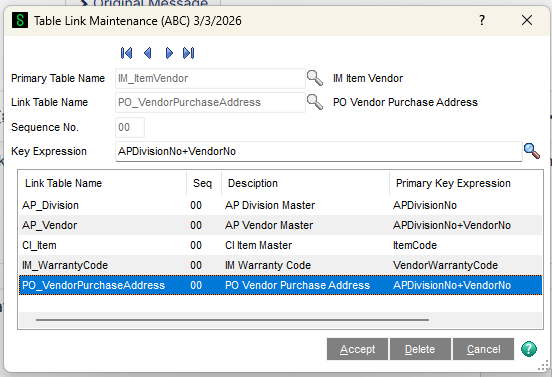
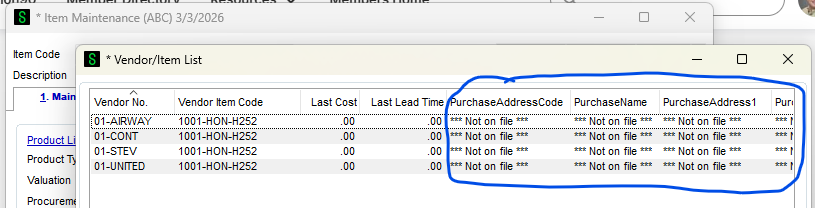
I just created the below 'link' via VI Export Job Maint (PO_VendorPurchaseAddress for IM_ItemVendor), but the new tables' fields are all showing as 'not on file' in my ALE (below). Is that because I would need to also include PrimaryPurchaseAddressCode in my Key Expression? (although that field doesn't exist in IM_ItemVendor). So it seems like it's not feasible to pull in Vendor Purchase Address/contact info into the 'Multiple Vendor Lookup' in Item Maint. Or am I missing a step?
------------------------------
Brett Zimmerman
Net at Work
Greater Boston Area
Original Message:
Sent: 08-01-2024 11:44
From: David Overholt
Subject: (Tutorial) Adding additional tables to Lookups
Thanks for the Shout-out Jeff,
Even a blind squirrel finds an acorn every now and then. 😊
Original Message:
Sent: 8/1/2024 11:14:00 AM
From: Jeff Schwenk
Subject: RE: (Tutorial) Adding additional tables to Lookups
Not to steal ANY of @David Speck II posts (they are truly amazing) but I want to give a shout out to @David Overholt for an oldie but still very goodie for his trail blazing work back in the day..
I'm trying to figure out the easiest way to lookup | Sage 100 (90minds.com)
------------------------------
Jeff Schwenk
Bottomline Software, Inc.
(540) 221-4444
Original Message:
Sent: 08-01-2024 10:48
From: Doug Higgs
Subject: (Tutorial) Adding additional tables to Lookups
I want to create a custom ALE in inventory inquiry to see Qty on SO and Qty on Backorder. The customer only uses warehouse 000. So the primary table is CI_Item and the link table is IM_ItemWarehouse. Is this possible? If so, what should the key expression be? I tried CI_Item+"000" and only 0.00 appears in the lookup for Qty on So and Qty on Backorder.
------------------------------
Doug Higgs
Midwest Commerce Solutions, Inc
(312) 315-0960
Chauffeur, Chef, and Personal Assistant to Sprinkles