Therese - I'm sure you're past it already but in case not, that Error 106 is unrelated. It means the sessions.pvk data file for the App Server is corrupted. With all users out of the system and App Server Config closed down:
1. In File Explorer go to \mas90\Home\Lib\_appserv
2. Rename the sessions.pvk file
3. In Windows, click on Start / Sage / choose Application Server Config. It will create brand new empty sessions.pvk
There is a Sage KB article on it and I'm sure it says to rename other files too which aren't necessary.
------------------------------
Alnoor Cassim
Email:
alnoor@asifocus.comPh: 949-689-9887
Orange County, CA
------------------------------
Original Message:
Sent: 07-14-2021 14:24
From: Therese Logeais
Subject: Trying to switch from APS to Paya. APS instructions say to uninstall but that is not an option
Now we're getting an error.
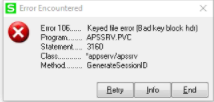
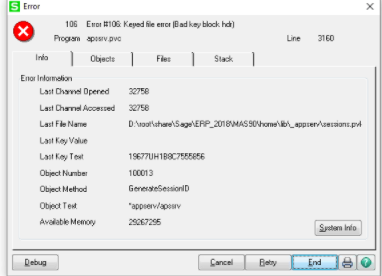
Would you want to join our session @Chris Love??
------------------------------
Therese Logeais, Technology Integrators
------------------------------
Original Message:
Sent: 07-14-2021 14:19
From: Therese Logeais
Subject: Trying to switch from APS to Paya. APS instructions say to uninstall but that is not an option
We looked on the portal and captured three pending invoice sales but that was it.
------------------------------
Therese Logeais, Technology Integrators
Original Message:
Sent: 07-14-2021 14:16
From: Chris Love
Subject: Trying to switch from APS to Paya. APS instructions say to uninstall but that is not an option
What's the message you're getting when you try to disable it? Have you confirmed there are not open authorizations on any SO Sales Orders, SO Invoices, AR Invoices, or AR Cash Receipts, Not sure if any open transactions are required to be deleted or posted prior to disabling even if the capture has been completed. I think once it's captured it shouldn't matter.
------------------------------
Chris Love
Accounting Systems, Inc. (ASI)
Original Message:
Sent: 07-14-2021 14:12
From: Therese Logeais
Subject: Trying to switch from APS to Paya. APS instructions say to uninstall but that is not an option
That didn't work. It wouldn't allow it.
------------------------------
Therese Logeais, Technology Integrators
Original Message:
Sent: 07-14-2021 14:11
From: Chris Love
Subject: Trying to switch from APS to Paya. APS instructions say to uninstall but that is not an option
Did you disable APS first and then try to uninstall? Make sure APS is disabled in all companies before you try to uninstall it. This can be done in Enable APS Payments setup task by unchecking the box for that company (or all companies). You may have to click OK to save the changes before trying to uninstall.
------------------------------
Chris Love
Accounting Systems, Inc. (ASI)