Sage 100

 View Only
Expand all | Collapse all

Trying to launch v2021 in MAS90 mode on a server that formerly housed v2017 Advanced

  • 1.  Trying to launch v2021 in MAS90 mode on a server that formerly housed v2017 Advanced

    Posted 04-11-2023 18:24

    I copied the v2021 MAS90 folder from their production server to an old server that is not in use and housed their v2017 Advanced system prior to upgrade.  I want to create a separate 2021 test environment so I can install an enhancement (Avatax).  When I try to launch it MAS90 style, it fails.

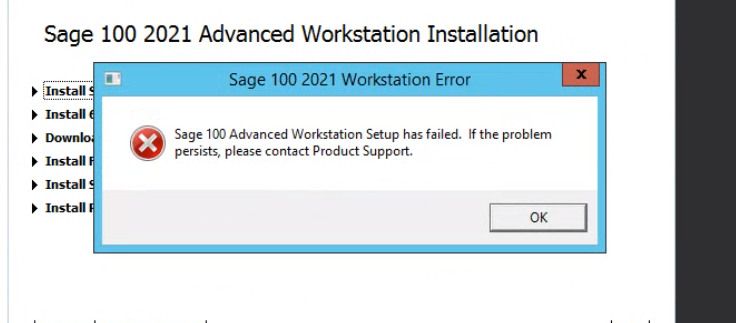
    I thought I'd try running WKSETUP to see what would happen and it just flat out failed.  Is there any way to get it to launch without doing a full-on install and migration?


    ------------------------------
    Barbara Goldstein
    Sr. Consultant
    DSD Business Systems
    ------------------------------


  • 2.  RE: Trying to launch v2021 in MAS90 mode on a server that formerly housed v2017 Advanced

    Posted 04-11-2023 18:34

    Install the Sage workstation client on the machine (to the Live version) and let the auto-update run once.  Then try MAS90 mode to the copy.


    ------------------------------
    Kevin Moyes
    Technical Systems Analyst
    Munjal White Consulting Co.
    ------------------------------


  • 3.  RE: Trying to launch v2021 in MAS90 mode on a server that formerly housed v2017 Advanced

    Posted 04-11-2023 18:45
    Edited by Barbara Goldstein 04-11-2023 18:44

    @Kevin Moyes  are you suggesting installing wkstation client on the production (2021) server?  There already is one installed there..


    ------------------------------
    Barbara Goldstein
    Sr. Consultant
    DSD Business Systems
    ------------------------------


  • 4.  RE: Trying to launch v2021 in MAS90 mode on a server that formerly housed v2017 Advanced

    Posted 04-11-2023 18:51

    The prompt you are showing is basically that machine (wherever you are running pvxwin32...) needs the auto-workstation update.  If you are trying to run MAS90 mode on the old server, it won't have the updated workstation components for v2021.
    The idea is to install the workstation component on the old server, to give the machine what it needs... even though you won't be using the Live copy, you use the functional workstation synch to do the common components install.


    ------------------------------
    Kevin Moyes
    Technical Systems Analyst
    Munjal White Consulting Co.
    ------------------------------


  • 5.  RE: Trying to launch v2021 in MAS90 mode on a server that formerly housed v2017 Advanced

    Posted 04-11-2023 19:29

    Won't run.


    ------------------------------
    Barbara Goldstein
    Sr. Consultant
    DSD Business Systems
    ------------------------------


  • 6.  RE: Trying to launch v2021 in MAS90 mode on a server that formerly housed v2017 Advanced

    Posted 04-11-2023 19:31

    You are trying to install from the Live version?  (Autorun.exe... Run As Administrator...).


    ------------------------------
    Kevin Moyes
    Technical Systems Analyst
    Munjal White Consulting Co.
    ------------------------------


  • 7.  RE: Trying to launch v2021 in MAS90 mode on a server that formerly housed v2017 Advanced

    Posted 04-11-2023 19:36

    No, from old server.


    ------------------------------
    Barbara Goldstein
    Sr. Consultant
    DSD Business Systems
    ------------------------------


  • 8.  RE: Trying to launch v2021 in MAS90 mode on a server that formerly housed v2017 Advanced

    Posted 04-11-2023 19:38

    That 100% will not work.  The workstation installer for Advanced needs the service, which won't be running on the old server.  That is why I suggested running the workstation install pointing at the Live copy (just for the workstation component install).

    At a certain point I'd wonder if it would be worth it to install the full version on the old server, and use your folder copy as a data source for the migration.


    ------------------------------
    Kevin Moyes
    Technical Systems Analyst
    Munjal White Consulting Co.
    ------------------------------


  • 9.  RE: Trying to launch v2021 in MAS90 mode on a server that formerly housed v2017 Advanced

    Posted 04-12-2023 13:53
    Edited by Carmen Cruz 04-12-2023 13:57

    Disregard this entry


  • 10.  RE: Trying to launch v2021 in MAS90 mode on a server that formerly housed v2017 Advanced

    Posted 04-12-2023 13:54
    Edited by Carmen Cruz 04-12-2023 13:55

    The folder you copied in did you copy it to exactly where it is talking about as the ProgramData folder is generally hidden by default?


    Carmen Cruz
    Sage Consultant
    carmen.cruz@compudata.com
    215-969-1000 Ext. 279
    www.compudata.com
    Work Smarter... Together 

    CompuData, Inc. • 325 Chestnut St, Ste 700 • Philadelphia • PA • 19106


    -------------------------------------------


  • 11.  RE: Trying to launch v2021 in MAS90 mode on a server that formerly housed v2017 Advanced

    Posted 04-12-2023 16:09
    Edited by Brett Zimmerman 04-12-2023 16:11


    I just had that 92996 error this morning.  There's a kb.  Granting full rights on the folders resolved it for me.


    How to resolve "One or more files could not be copied..." message received during Sage 100 Workstation Synchronization

    Created on 08-29-2018 / Last modified on 12-21-2022

    Summary

    How to resolve "One or more files could not be copied..." message received during Sage 100 Standard Workstation Synchronization.

    It is also possible that Sage 100 "workstation synchronization" will run every time that Sage 100 Standard is launched a product update or payroll update is installed - and examination of the log file created shows that the Copy Files failed or "one or more files could not be copied..." (but the message does not appear on screen when the Workstation Synchronization script attempts to run.

    Cause

    Beginning with Sage 100 Standard 2018.4 and higher, after the installation of a Product Update or an update to Payroll 2.x (Sage 100 Versions 2018 and higher), during initial workstation launch after update, Sage 100 will detect if updated files need to be copied to the Sage 100 Workstation and perform the copy. Should the update of any files fail, Sage 100 will display the following message:
    Note the name of the log file that is referenced, AutoUpdate.6.00.mas.log.txt or AutoUpdate 6.00.Payroll.Log.txt. Click OK

    Note: the name of the log file that is referenced, AutoUpdate.6.00.mas.log.txt or AutoUpdate 6.00.Payroll.Log.txt. Click OK.

    Failed copy attempts need to be resolved on the Sage 100 Workstation receiving the message to avoid errors or unexpected results. The most common reason for failed update attempts is that one or more files are in use or locked on the workstation. Under normal circumstances, this would be unexpected, but it can occur if orphaned pvxwin32.exe sessions or other external processes are running. Examining the log file mentioned in the message above, you will see a list of all the files copied, their location, and which one (s) failed.

    You may also have this issue occur if the log indicates "Create folder failed! Invalid procedure call or argument" which may be due to a missing/corrupt Temp folder or access is not available to the Windows temp location folder.

    Resolution

    Option I: Make sure user opening Sage 100 client has FULL permissions to 'C:\Program Files (x86)\Common Files\Sage\'
    1. Browse to C:\Program Files (x86)\Common Files\ (C:\ProgramData\ for version 2020 or higher) )folder
    2. Right-cick 'Sage' folder and select Properties\
    3. Select Security tab
    4. Click Advanced
    5. Verify the user has FULL control to current folder and subfolder and files
      NOTE: (if applicable) Give the current user Full control to folder
    6. Click OK until Properties window is closed
    7. Try opening Sage 100 workstation client again

    Option II:
    1. Close Sage 100 if it is running on the Workstation
    2. Rename or delete the following file(s) located in the Workstations
      • C:\Program Files (x86)\Common Files\Sage\Common Components (64 bit system)
      • C:\Program Files\Common Files\Sage\Common Components (32 bit system)
      • C:\ProgramData\Sage\Common Components\ (version 2020 or higher)
        • autoupdater.6.00.ini or autoupdater.6.10.ini
        • autoupdater6.00.payroll.ini or autoupdater.6.10.payroll.ini (if you have Payroll 2.0)
        • AutoUpdate.6.00.mas.Log.txt or AutoUpdate.6.10.mas.Log.txt
        • AutoUpdate.6.00.payroll.Log.txt or AutoUpdate.6.10.payroll.Log.txt (if you have Payroll 2.0)
    3. Restart (restart) the Workstation. This will clear unexpected processes that may be preventing one or more files from being updated
    4. Start Sage 100. Workstation Synchronization should begin. if no further errors are received, you can login to Sage 100 and process.

    In most cases the above will resolve the issue. If the above steps do not resolve the issue, you can manually attempt to update the problematic files.

    1. Take note of the file names that are not being updated (found in the AutoUpdate.6.00.mas.log.txt or AutoUpdate.6.00.Payroll.Log.txt file(s))
    2. On the Sage 100 Server, locate the ..\Mas90\Home\Lib\_repository folder. Inside you will see one or more folders for each Product Update and / or Payroll Version that was installed
    3. In the example above Sage 100 2018.4 (6.00.04.00) was the latest update installed. Search this folder for the file(s) that did not update (refer to the ..log.txt files), and manually copy them to the Sage 100 Workstation replacing the existing file
    Need help?
    Chat to one of our Sage Ambassadors now.
    Chat now

    Additional information

    Note: a similar copy error message can occur during an upgrade to 2020 or later if a an older version's MAS90 folder is copied to the new server without an installation done and you attempt to access that older MAS90 data by launching that pvxwin32.exe and then typing "run startup.m4p" (MAS90 /Standard mode) as the workstation synchronization could trigger and then an "error when copying files" message appear.

    In this case, you may need to create the Common Components folder manually on the new server used for Sage 100 2020+ in the location where pre-2020 install workstation synchronization looks for that data:

    • C:\Program Files (x86)\Common Files\Sage\Common Components (64 bit system)
    • C:\Program Files\Common Files\Sage\Common Components (32 bit system)
    • In Sage 100 2020+ the common components folder is relocated to C:\ProgramData\Sage\Common Components\

    Additional note: Antivirus software can also interfere with the Workstation Synchronization and cause the "one or more files could not be copied" (or no/incomplete results during Workstation Synchronization and it loops over and over).

    One specific example:antivirus software that creates a virtual location as a CONTAINMENT object (\VTROOT\C$\ location) when anything that does not have an exception (like the autoupdate script) run - for example: Comodo Client Security 12. Disabling the 'containment' piece of Comodo allowed the script to work and the files to get updated.

    Keywords

    <content>workstation synch hangs, files not copied</content>


    ------------------------------
    Brett Zimmerman
    Net at Work
    Greater Boston Area
    ------------------------------


  • 12.  RE: Trying to launch v2021 in MAS90 mode on a server that formerly housed v2017 Advanced

    Posted 04-12-2023 17:05

    Their 2017 was Standard.  2021 is Advanced.  On the 2017 server, there is no Common Components file under ..\ProgramData\Sage, like there is on the  v2021 server.  And the path to the MAS90 folder is different on each server.


    ------------------------------
    Barbara Goldstein
    Sr. Consultant
    DSD Business Systems
    ------------------------------


  • 13.  RE: Trying to launch v2021 in MAS90 mode on a server that formerly housed v2017 Advanced

    Posted 04-12-2023 17:45

    Got it!  Combination of Brett & Carmen input.  Thank You!


    ------------------------------
    Barbara Goldstein
    Sr. Consultant
    DSD Business Systems
    ------------------------------


  • 14.  RE: Trying to launch v2021 in MAS90 mode on a server that formerly housed v2017 Advanced

    Posted 04-12-2023 19:26
    I love success and glad I could help ;). Take care

    Carmen Cruz
    Sage Consultant
    carmen.cruz@compudata.com
    215-969-1000 Ext. 279
    www.compudata.com
    Work Smarter... Together 

    CompuData, Inc. • 325 Chestnut St, Ste 700 • Philadelphia • PA • 19106