Sage 100

 View Only
  • 1.  Transfer Document to a Different Batch
    Posted 03-20-2019 23:18

    ...

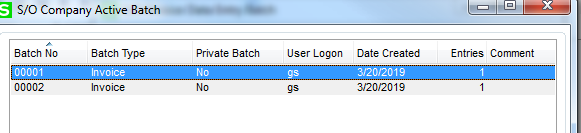
    Where the bleep is this feature!?

    Customer is asking where is the Transfer Document button in Sales Order Invoice Data Entry.

    ------------------------------
    Greg Stiles
    S & W Microsystems
    Torrance CA
    310.787.1010
    ------------------------------


  • 2.  RE: Transfer Document to a Different Batch
    Posted 03-20-2019 23:24
      |   view attached
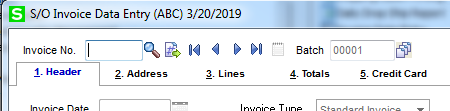
    Turn on Batch Entry, start a batch, take an invoice # and the batch icon turns to a Transfer.  Pix Attached.​

    ------------------------------
    Nancy Hanson
    Blytheco LLC
    Eagan MN
    ------------------------------


  • 3.  RE: Transfer Document to a Different Batch
    Posted 03-20-2019 23:26
    Edited by Greg Stiles 03-20-2019 23:27
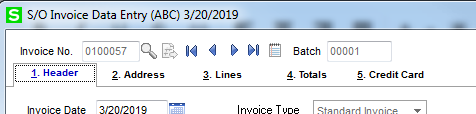
    I don't have that button!


    ------------------------------
    Greg Stiles
    S & W Microsystems
    Torrance CA
    310.787.1010
    ------------------------------


  • 4.  RE: Transfer Document to a Different Batch

    Posted 03-20-2019 23:28
      |   view attached
    Check your permissions?
    it normally looks like this picture attached until you select the next invoice # or type in an invoice #.
    ​​

    ------------------------------
    Nancy Hanson
    Blytheco LLC
    Eagan MN
    ------------------------------


  • 5.  RE: Transfer Document to a Different Batch
    Posted 03-20-2019 23:34
    Edited by Greg Stiles 03-20-2019 23:47
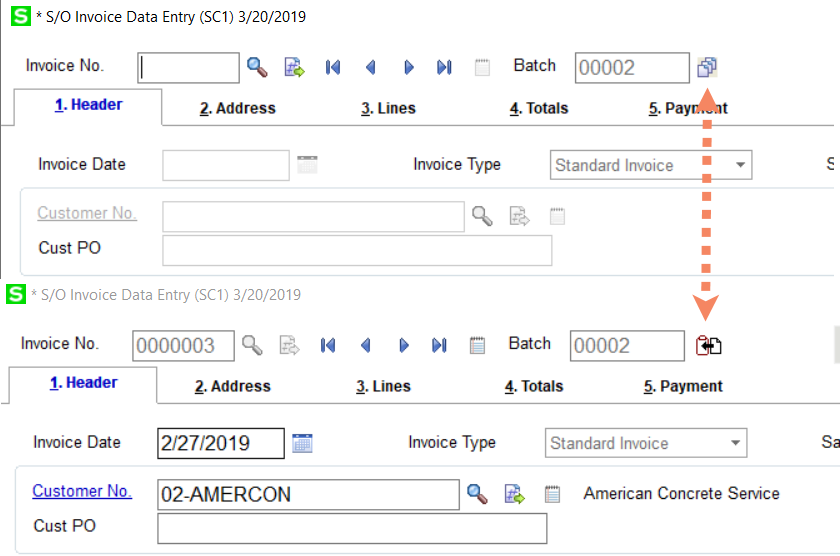
    Checked the Client system, they have the button. This is my own internal system, my user is admin, no button - weird!

    At least I can 'splain it to them and that's all that matters right now - LOL.

    Thanks @Nancy Hanson

    ------------------------------
    Greg Stiles
    S & W Microsystems
    Torrance CA
    310.787.1010
    ------------------------------


  • 6.  RE: Transfer Document to a Different Batch

    Posted 03-20-2019 23:35


    ------------------------------
    Alnoor Cassim

    Free Agent Developer and Consultant
    CallForHelp.biz
    Email: alnoor@callforhelp.biz
    Orange County, CA
    ------------------------------


  • 7.  RE: Transfer Document to a Different Batch

    Posted 03-20-2019 23:44


    LOL Like I said - weird!

    ------------------------------
    Greg Stiles
    S & W Microsystems
    Torrance CA
    310.787.1010
    ------------------------------


  • 8.  RE: Transfer Document to a Different Batch

    Posted 03-20-2019 23:55
    If you look at the screen in Customizer you should see BT_BATCHTRANSFER button after you move the regular BT_BATCH button out of the way (don't save it of course). If you don't, then which version are you on? If you do, any chance this is the same PvxPlus system from the other day or you have a mod that is overriding  (you can look in \mas90\Links to see if SO_Invoice_UI.pvc exists).

    ------------------------------
    Alnoor Cassim

    Free Agent Developer and Consultant
    CallForHelp.biz
    Email: alnoor@callforhelp.biz
    Orange County, CA
    ------------------------------


  • 9.  RE: Transfer Document to a Different Batch

    Posted 03-21-2019 01:51
    @Alnoor Cassim Update Panels to Current Level - DOH.

    To answer your questions though.
    The button does exist on my PXPlus client (and yes, it is the same one mentioned in another post)
    Didn't exist on my in-house 6.0 PU3 system (until I ran Update Panels to Current Level)

    Who did THAT upgrade  - {wags finger at self}  -  LOL

    ------------------------------
    Greg Stiles
    S & W Microsystems
    Torrance CA
    310.787.1010
    ------------------------------