Original Message:
Sent: 08-01-2025 10:40
From: Robert Osborn
Subject: Time import for Operations Management (without payroll)
------------------------------
Bob Osborn
Senior Consultant
DSD
7142645278
------------------------------
Original Message:
Sent: 07-31-2025 19:27
From: Lisa Dion
Subject: Time import for Operations Management (without payroll)
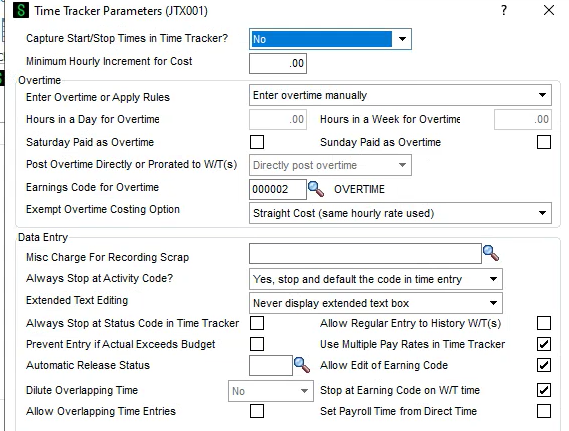
What is the Capture Start/Stop times setting?
------------------------------
Lisa Dion
Vrakas/Blum Computer Consulting, Inc. ldion@v-bcc.com
Original Message:
Sent: 07-31-2025 19:17
From: Robert Osborn
Subject: Time import for Operations Management (without payroll)
I decided to set up a report that will convert the CSV file that is given to me into a Tab Delimited file for Data Collector. I am doing this a a Labor import (not in/out) as I don't have that info.). I get it to import ok but in the edit screen it tells me I have an invalid end time. I don't have an end time at all as when labor is entered without punch in & out you don't put in start or end times. I can add them but it doesn't "like" anything I import.
Any suggestions? I can't find anything in the JO portal about this.
------------------------------
Bob Osborn
Senior Consultant
DSD
7142645278
Original Message:
Sent: 07-22-2025 18:02
From: Robert Osborn
Subject: Time import for Operations Management (without payroll)
HI Jane
The problem is that the file I am getting is nothing like what Data Collector is looking for. I will have to set up a routine to change the file data/format. It is coming from their Payroll Timeclock.
Original Message:
Sent: 7/22/2025 10:05:00 AM
From: Jane Scanlan
Subject: RE: Time import for Operations Management (without payroll)
Bob - Data Collector import doesn't require that all the fields are imported. There are a few required fields, and some are dependent on your customer's Time Tracker parameters (for example Start and End times).
A VI import can be problematic as it dynamically transacts to the work tickets. What I mean by that is if the batch of imported data is bad (all/most records), you need to one by one delete the records from Time Tracker Entry - because reinitializing the JT_DailyTimeEntry file does not remove the labor transactions from the work tickets. Data Collector does not dynamically transact to the work tickets when the source file is imported; after the source file is imported you can review/modify/delete the imported time before committing (updating) updating them to JT_DailyTimeEntry.
I only use Data Collector as my tool to import labor originating from an external system.
------------------------------
Jane Scanlan
Partner
Next Level Manufacturing Consulting Group
Original Message:
Sent: 07-21-2025 18:54
From: Robert Osborn
Subject: Time import for Operations Management (without payroll)
HI Jane, thanks much?! The issue I have here is that I can't get all this info in the import as it is coming from their Payroll Timeclock. But I was able to get the VI version working.
------------------------------
Bob Osborn
Senior Consultant
DSD
7142645278
Original Message:
Sent: 07-21-2025 11:50
From: Jane Scanlan
Subject: Time import for Operations Management (without payroll)
Attached is the import file format field requirements. Use of the Data Collector is documented in the user manual posted in the JobOps portal.
------------------------------
Jane Scanlan
Partner
Next Level Manufacturing Consulting Group
Original Message:
Sent: 07-21-2025 10:22
From: Robert Osborn
Subject: Time import for Operations Management (without payroll)
Hi @Jane Scanlan, I thought about it but I can't find any info on how to configure the import file for it. Do you have anything that shows this?
------------------------------
Bob Osborn
Senior Consultant
DSD
7142645278
Original Message:
Sent: 07-20-2025 14:08
From: Jane Scanlan
Subject: Time import for Operations Management (without payroll)
Bob - Data Collector is the import function that you should use for importing time. It is a far simpler tool than VI.
------------------------------
Jane Scanlan
Partner
Next Level Manufacturing Consulting Group
Original Message:
Sent: 07-19-2025 13:30
From: Robert Osborn
Subject: Time import for Operations Management (without payroll)
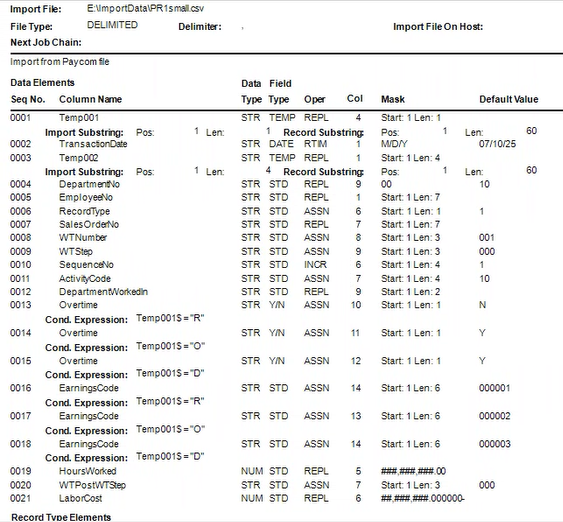
HI All, I was able to resolve the issues. Found one field that I was not importing. I also found that the end time is not required. The file comes from their payroll timeclock. The Temp001 is the Earning code which is R, O, D or V (regular, overtime, double overtime or Vacation which is skipped). Temp002 is not used.
------------------------------
Bob Osborn
Senior Consultant
DSD
7142645278