I found it and was posting back to you to say never mind. I was 12 minutes late. Thanks
Bottomline Software, Inc.
Original Message:
Sent: 05-24-2024 09:56
From: Kevin Moyes
Subject: Task Scheduler - v2022 ADV
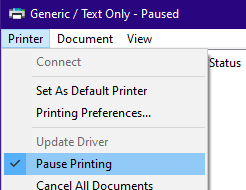
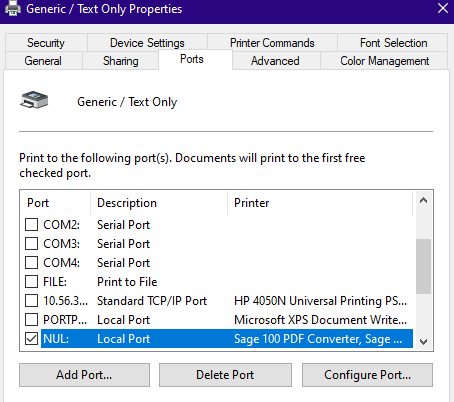
The printer is just to handle the Sage Task Scheduler's need to print something... you don't need the queue to do anything other than not cause problems for your task.
------------------------------
Kevin Moyes
Technical Systems Analyst
Munjal White Consulting Co.
Toronto ON
------------------------------
Original Message:
Sent: 05-24-2024 09:02
From: Jeff Schwenk
Subject: Task Scheduler - v2022 ADV
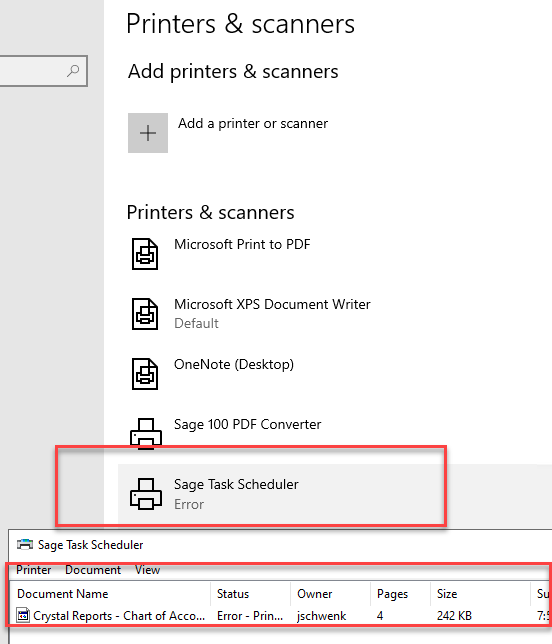
Please forgive my tech skills (or lack thereof), but this is what I have so far. I set up the generic printer.but do not see any tab where I can point it to a file or null. My test cleared Sage and the output is sitting in queue. Is there another step?
------------------------------
Jeff Schwenk
Bottomline Software, Inc.
(540) 221-4444
Original Message:
Sent: 05-23-2024 18:49
From: Kevin Moyes
Subject: Task Scheduler - v2022 ADV
XPS doesn't work since it prompts for file name. You'll end up with a locked process.
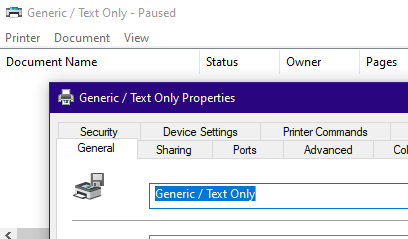
You can use a real printer if you want. Now I'm in the habit of using a dummy print object like this (pointed to File or NUL), to avoid the waste of paper.
------------------------------
Kevin Moyes
Technical Systems Analyst
Munjal White Consulting Co.
Toronto ON
Original Message:
Sent: 05-23-2024 18:43
From: Jeff Schwenk
Subject: Task Scheduler - v2022 ADV
Thanks for confirming my thoughts. So does the Microsoft xps document writer qualify or do I ask for an actual network printer?
------------------------------
Jeff Schwenk
Bottomline Software, Inc.
(540) 221-4444
Original Message:
Sent: 05-23-2024 17:15
From: Kevin Moyes
Subject: Task Scheduler - v2022 ADV
Very finicky for sure.
https://us-kb.sage.com/portal/app/portlets/results/viewsolution.jsp?solutionid=225924650093753
It has to be a print queue on the server that does not prompt for file name, set as the default printer for the Windows login used for the task. We've asked Sage to stop the nonsense status page that prints to the printer, but no luck so far.
It can be a Generic / Text Only printer (paused), but it must be local to the server (not redirected).
------------------------------
Kevin Moyes
Technical Systems Analyst
Munjal White Consulting Co.
Toronto ON