Don't get me wrong. I've worked with SQL starting at IBM in the 70's and MS Access's SQL view almost daily, but I'm not a SQL guru and don't really want to be.
So here's the "How do I" question. How do I more easily create and/or optimize this kind of query. The query's objective is to feed into HTML pop-up within Sage 100 that shows an ItemCode's warehouse availability as a running total based on the existing quantity on hand plus the complete portfollio of open SO's (as negatives) and PO's (as positives). I know I could do a Crystal report much easier, but the customer wants a pop-up from order data entry (I've even offered a Crystal Viewer launched from a script).
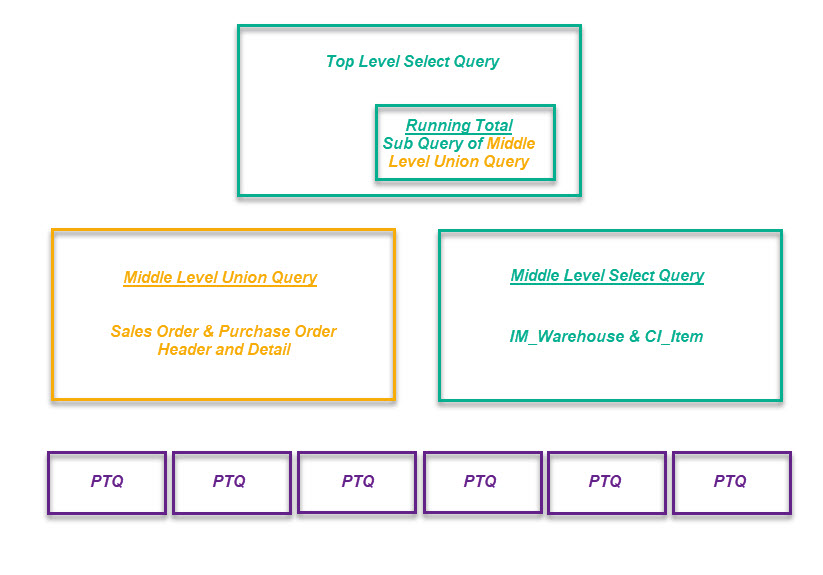
Here's a graphical overview of how I am currently doing it:
 "selWaterfall"
 - Top Level Select Query with Sub Query references the Middle Level Union and Select Queries.
SELECT IIf(IsNull([WF].[ByDate]),DateSerial(1980,1,1),[WF].[ByDate]) AS ByDate,
IIf(IsNull([wf].[OrderNo]),"0000000",[wf].[OrderNo]) AS OrderNo,
selIM_ItemWarehouse2.PrimaryVendorNo AS VendorNo, selIM_ItemWarehouse2.QuantityOnHand,
WF.CompanyName, WF.Type, selIM_ItemWarehouse2.ItemCode, selIM_ItemWarehouse2.ItemCodeDesc,
selIM_ItemWarehouse2.WarehouseCode, WF.QtyOnOrder,[QuantityOnHand]+IIf(IsNull([accBalance]),0,
[accBalance]) AS myBalance, (SELECT SUM(QtyOnOrder) FROM uniOrderWaterfall
WHERE Format(WF.ByDate,"yyyymmdd")+WF.OrderNo+WF.LineNo >=
Format(ByDate,"yyyymmdd")+OrderNo+LineNo and WF.Itemcode = ItemCode and
WF.WarehouseCode = WarehouseCode
GROUP BY WF.WarehouseCode, WF.ByDate, WF.OrderNo, WF.LineNo) AS accBalance,
IIf(IsNull([wf].[LineNo]),"0000",[wf].[LineNo]) AS LineNo
FROM uniOrderWaterfall AS WF RIGHT JOIN selIM_ItemWarehouse2 ON
(WF.ItemCode = selIM_ItemWarehouse2.ItemCode) AND (WF.WarehouseCode = selIM_ItemWarehouse2.WarehouseCode)
ORDER BY IIf(IsNull([WF].[ByDate]),DateSerial(1980,1,1),[WF].[ByDate]), IIf(IsNull([wf].[OrderNo]),"0000000",[wf].[OrderNo]);
"uniOrderWaterfall" - Middle Level Union Query references Pass Through Queries
SELECT "P" & [PO_PurchaseOrderDetail]![PurchaseOrderNo] AS OrderNo,
PO_PurchaseOrderDetail.WarehouseCode, PO_PurchaseOrderHeader.VendorNo, "PO" AS Type,
"Buy Fm: " & [PurchaseName] AS CompanyName,
IIf(IsNull([RequiredExpireDate]),DateSerial(1980,1,1),[RequiredExpireDate]) AS ByDate,
PO_PurchaseOrderDetail.ItemCode, PO_PurchaseOrderDetail.ItemCodeDesc,
[QuantityOrdered]-[QuantityReceived] AS QtyOnOrder, PO_PurchaseOrderDetail.LineKey,
Right([LineKey],4) AS LineNo
FROM PO_PurchaseOrderDetail INNER JOIN PO_PurchaseOrderHeader ON
PO_PurchaseOrderDetail.PurchaseOrderNo = PO_PurchaseOrderHeader.PurchaseOrderNo
UNION ALL
SELECT "S" & [SO_SalesOrderDetail]![SalesOrderNo] AS OrderNo,
SO_SalesOrderDetail.WarehouseCode, SO_SalesOrderDetail.VendorNo, "SO" AS Type,
"Sold To: " & [BillToName] AS CompanyName,
IIf(IsNull([ShipExpireDate]),DateSerial(1980,1,1),[ShipExpireDate]) AS ByDate,
SO_SalesOrderDetail.ItemCode, SO_SalesOrderDetail.ItemCodeDesc,
-([QuantityOrdered]-[QuantityShipped]) AS QtyOnOrder, SO_SalesOrderDetail.LineKey,
Right([LineKey],4) AS LineNo
FROM SO_SalesOrderDetail INNER JOIN SO_SalesOrderHeader ON
SO_SalesOrderDetail.SalesOrderNo = SO_SalesOrderHeader.SalesOrderNo
ORDER BY ByDate, OrderNo;
"selIM_ItemWarehouse2" - Middle Level Select Query references Pass Through Queries
SELECT ptqIM_ItemWarehouse.ItemCode, ptqCI_Item.ItemCodeDesc, ptqIM_ItemWarehouse.WarehouseCode,
ptqIM_ItemWarehouse.QuantityOnHand, ptqCI_Item.PrimaryVendorNo,
ptqIM_ItemWarehouse.QuantityOnPurchaseOrder, ptqIM_ItemWarehouse.QuantityOnSalesOrder
FROM ptqIM_ItemWarehouse INNER JOIN ptqCI_Item ON ptqIM_ItemWarehouse.ItemCode = ptqCI_Item.ItemCode;
"ptqIM_ItemWarehouse" - Sample Third Level Pass Through Query references Sage 100 tables
SELECT IM_ItemWarehouse.ItemCode, IM_ItemWarehouse.WarehouseCode,
IM_ItemWarehouse.QuantityOnHand, IM_ItemWarehouse.QuantityOnSalesOrder,
IM_ItemWarehouse.QuantityOnPurchaseOrder FROM IM_ItemWarehouse
The reason I'm looking for a better approach is that MS Access is very unstable and maintaining this is inefficient at best.
Here's the current result:
------------------------------
Dan Burleson
Software Consultant
Connex Software
Corvallis OR
541-224-6642
------------------------------
Original Message:
Sent: 02-03-2021 11:00
From: Kevin Moyes
Subject: Suggestions for a Query Editor for SOTAMAS90?
Those are two different questions.
- SQL Express is a powerful, stable platform that's relatively easy to deploy and it's free!
- For building your SQL queries, use whatever you wish. I've been writing SQL queries since the late 90's, so I can just type most things out, but if you find a query builder tool that you like: great. You can still deploy using SQL Express. SQL is a standard language so it's transferrable... you can probably even copy/paste your queries from Access into a SQL Express database, only having to change the data sources to a Linked Server.
For "how do I" questions, post them here! :-) My general strategy is to use SQL to consolidate / condense data, and Crystal Reports to format it (including calculating totals).
------------------------------
Kevin Moyes
Technical Systems Analyst
Munjal White Consulting Co.
Toronto ON
------------------------------
Original Message:
Sent: 02-03-2021 04:26
From: Dan Burleson
Subject: Suggestions for a Query Editor for SOTAMAS90?
Thanks Kevin. I do try to incorporate SQL Express instead of MS Access, but I'm looking for a graphical query builder as good or better than Access and more reliable. I'm not a prolific SQL coder so the graphical part is as important. Do you know of any you that would recommend for SQL Server? With Access the foot print on the clients machine is almost non-existent since I don't need to even install Access or drivers - just a tiny MS Access database file (<300KB).
I'm stacking a select query with running totals on top of a union query that pulls 6 SO, PO and IM Header and Detail tables from pass through queries so I need something adept at managing that so I can just copy the SQL statements instead of a whole DBMS. Access constantly crashes and I get the same result on multiple updated Office 365 installations.
I'm looking at FlySpeed SQL at the moment.
------------------------------
Dan Burleson
Software Consultant
Connex Software
Corvallis OR
541-224-6642
Original Message:
Sent: 02-02-2021 17:57
From: Kevin Moyes
Subject: Suggestions for a Query Editor for SOTAMAS90?
We use SQL Express as a bridge for a lot of things. Add your own database, with View... Linked Server to ProvideX data, or set up a synch to mirror tables (for heavier lifting). Since it's MS SQL extra drivers are not needed.
------------------------------
Kevin Moyes
Technical Systems Analyst
Munjal White Consulting Co.
Toronto ON