@John Wilder I was able to get this to work for my client.
The information in my previous post (and from Starship) are missing some steps.
Here are the complete steps I used to correct the issue on Server 2008 R2.
1. Create the keys for TLS 1.2 in the Registry using PowerShell
Either copy and paste these commands one at a time into PowerShell , pressing enter to execute after each command (not the # comments) -OR-, if you know how, save these command as a PowerShell script and execute.
NOTE: If you copy and paste the commands individually, some are long (they may display on two lines) , make sure you get the entire command.
# Enables TLS 1.2 on Windows Server 2008 R2 and Windows 7

# These keys do not exist so they need to be created prior to setting values.

md "HKLM:\SYSTEM\CurrentControlSet\Control\SecurityProviders\SCHANNEL\Protocols\TLS 1.2"

md "HKLM:\SYSTEM\CurrentControlSet\Control\SecurityProviders\SCHANNEL\Protocols\TLS 1.2\Server"

md "HKLM:\SYSTEM\CurrentControlSet\Control\SecurityProviders\SCHANNEL\Protocols\TLS 1.2\Client"

# Enable TLS 1.2 for client and server SCHANNEL communications

new-itemproperty -path "HKLM:\SYSTEM\CurrentControlSet\Control\SecurityProviders\SCHANNEL\Protocols\TLS 1.2\Server" -name "Enabled" -value 1 -PropertyType "DWord"

new-itemproperty -path "HKLM:\SYSTEM\CurrentControlSet\Control\SecurityProviders\SCHANNEL\Protocols\TLS 1.2\Server" -name "DisabledByDefault" -value 0 -PropertyType "DWord"

new-itemproperty -path "HKLM:\SYSTEM\CurrentControlSet\Control\SecurityProviders\SCHANNEL\Protocols\TLS 1.2\Client" -name "Enabled" -value 1 -PropertyType "DWord"

new-itemproperty -path "HKLM:\SYSTEM\CurrentControlSet\Control\SecurityProviders\SCHANNEL\Protocols\TLS 1.2\Client" -name "DisabledByDefault" -value 0 -PropertyType "DWord"
2. Add the ciphers required by UPS in GPEDIT.msc
Hold down WindowsKey+R to get the Run command, then enter GPEDIT.msc
Go to Computer Configuration > Administrative Templates > Network > SSL Configuration Settings
Double Click SSL Cipher Suite Order
Click the Enable radio button
Copy all the text in the SSL Cipher Suites box (in the left pane) and paste text into Notepad
Insert the following text at the beginning of the string. Don't miss the comma at the end, each cipher must be separated with a comma.
TLS_ECDHE_RSA_WITH_AES_256_GCM_SHA384,TLS_ECDHE_RSA_WITH_AES_128_GCM_SHA256,TLS_DHE_RSA_WITH_AES_256_GCM_SHA384,TLS_DHE_RSA_WITH_AES_128_GCM_SHA256,
The list cannot exceed 1024 characters, delete ciphers from the end until the length of the string is <= 1024. Notepad will tell you the cursor position use that to determine the string length.
Copy and paste the string back into the GPEDIT SSL Cipher Suites box.
Click Apply then OK
Exit GPEDIT
Reboot the server (Yes, you do have to reboot)
------------------------------
Greg Stiles
S & W Microsystems
Torrance CA
310.787.1010
------------------------------
Original Message:
Sent: 10-29-2021 11:05
From: Greg Stiles
Subject: StarShip SSL/TLS Rate information not available
I just received this reply from V-Technologies this morning. Haven't tried it yet on my one client that is having this issue.
Here is how to check if OS supports correct ciphers:
- open gpedit.msc - Group Policy Manager
- go to Administrative Template/Network/SSL Configuration Settings
- Double click on ESL Cipher Suite Order
- Check Enabled
- In the left bottom frame you will see a string with all supported ciphers
Here is the MS link-
https://docs.microsoft.com/en-us/windows-server/security/tls/manage-tls
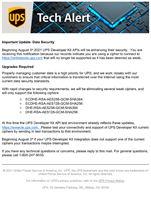
See below for the notification that was sent to UPS customers.
The below ciphers need to be updated on the StarShip server. If you need more info on how to update the security ciphers, please contact UPS at 1-800-247-9035.
------------------------------
Greg Stiles
S & W Microsystems
Torrance CA
310.787.1010
------------------------------
Original Message:
Sent: 10-28-2021 20:45
From: John Wilder
Subject: StarShip SSL/TLS Rate information not available
Yep, they were good. But sounds like only so much they can do. 'UPS thing'.
------------------------------
John Wilder
Technology Integrators
Original Message:
Sent: 10-28-2021 20:43
From: Madeline Stefanou
Subject: StarShip SSL/TLS Rate information not available
I've never seen that. Have you tried V-Technology Support? (sorry)
------------------------------
Madeline Stefanou
RKL eSolutions, LLC
Original Message:
Sent: 10-28-2021 17:34
From: John Wilder
Subject: StarShip SSL/TLS Rate information not available
Is this better? - thanks!
It reads:
The request was aborted. Could not create SSL/TLS secure channel.
Shipment cannot be shipped via UPS. Rate information not available.
------------------------------
John Wilder
Technology Integrators
Original Message:
Sent: 10-28-2021 17:30
From: Madeline Stefanou
Subject: StarShip SSL/TLS Rate information not available
When trying to look at your image, I get an "access denied" message. On the screen I just see a blank box and a spinning widget. Not sure if my IT is blocking it on this end or not.
------------------------------
Madeline Stefanou
RKL eSolutions, LLC