Original Message:
Sent: 12/4/2024 2:14:00 PM
From: Jeff Schwenk
Subject: RE: SOTA ODBC Driver not established in SQL environment
WAD - I just cannot figure out why a weight field is set as a string. Does anyone know of a logical reason relevant in today's environment?
------------------------------
Jeff Schwenk
Owner
Bottomline Software, Inc.
Waynesboro VA
(540) 221-4444
Improving bottom lines for over 25 years!
------------------------------
Original Message:
Sent: 12-04-2024 13:35
From: Kevin Moyes
Subject: SOTA ODBC Driver not established in SQL environment
My guess would be a bad value (blank / null / extra text) in a field that (co-incidentally) only happens for that one SP in the test company.
Edit:
We have some clients who use the item Weight field, or one of the Category fields for numeric values... and occasionally we get complaints about report errors with bad data.
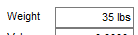
The user typing extra " lbs" text characters may read OK by a human, but of course it isn't numeric anymore, and Crystal Reports would choke on it when trying to do a conversion to number.
------------------------------
Kevin Moyes
Technical Systems Analyst
Munjal White Consulting Co.
Toronto ON
------------------------------
Original Message:
Sent: 12-04-2024 13:21
From: Jane Scanlan
Subject: SOTA ODBC Driver not established in SQL environment
@Wayne Schulz
Your summary is perfect. The report does connect to the database of the test company, it just hits this error when running the report for a selected salesperson. I don't know why and it is driving me bonkers.
------------------------------
Jane Scanlan
Partner
Next Level Manufacturing Consulting Group
Original Message:
Sent: 12-04-2024 10:11
From: Wayne Schulz
Subject: SOTA ODBC Driver not established in SQL environment
Here's what I think you are saying:
- You are using a SQL ODBC to connect ( because SOTAMAS90 would not exist )
- To access a Live vs Test company someone has probably create two different SQL ODBC and set the company code within the SQL ODBC ( reason for this is that SQL ODBC does not prompt for Sage company code like SOTAMAS90 ODBC does)
- And when using the SQL ODBC for the LIVE company - the report works. But when using the SQL ODBC for the Test company the report doesn't work.
- In each of your tests you are using the exact same Crystal Report and only the SQL ODBC is changing
If my understanding and explanation above is correct, could it be something that is not set in the SQL ODBC being used to connect to the test company? I'd try comparing the two.
If I've misunderstood somehow then disregard
------------------------------
Wayne Schulz
wayne@s-consult.com
Schulz Consulting
(860) 516-8990
CT
Original Message:
Sent: 12-03-2024 21:10
From: Jane Scanlan
Subject: SOTA ODBC Driver not established in SQL environment
OK everyone, here's what I know now. This report runs in the live company with the formula I originally posted, but does not run (errors) in the company where the database connecter is assigned. I totally don't understand that. I think what they are trying to do is tie this report's DB to a test company (I suppose so that no one runs it in the live company??). Anyway, it runs without error in the LIVE company, which is not the company that the report is assigned to in the report's connected DB. I feel like I'm in the twilight zone .. nothing makes sense.
------------------------------
Jane Scanlan
Partner
Next Level Manufacturing Consulting Group
Original Message:
Sent: 12-03-2024 20:28
From: Tara Schinkel
Subject: SOTA ODBC Driver not established in SQL environment
And I would use default for nulls too.
--
Tara Morgan Schinkel, CPA
Stewart Technologies, Inc.
CFO/ Team Lead for Apps
----------
Original Message:
Sent: 12/3/2024 8:27:00 PM
From: Robert Osborn
Subject: RE: SOTA ODBC Driver not established in SQL environment
Hi Jane
Make sure in the formula that it is set to use Crystal Syntax

Original Message:
Sent: 12/3/2024 6:59:00 PM
From: Jane Scanlan
Subject: RE: SOTA ODBC Driver not established in SQL environment
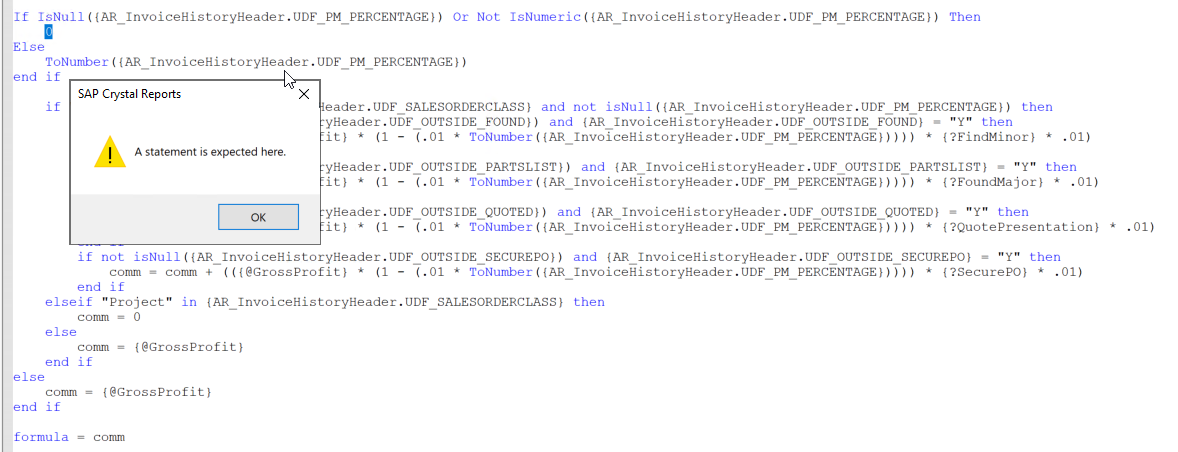
no matter how I break apart the formula, it does not like "Then 0" - it keeps giving me the message that A Statement is expected here" and it highlights the zero
------------------------------
Jane Scanlan
Partner
Next Level Manufacturing Consulting Group
Original Message:
Sent: 12-03-2024 18:08
From: Kevin Moyes
Subject: SOTA ODBC Driver not established in SQL environment
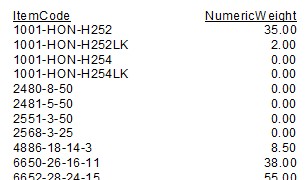
Make each piece of your formula work independently, verified, then put them together. Putting all the complex logic in one formula makes it harder to troubleshoot.
Here is an example, using a stock Sage field that is text, but holds a number...

------------------------------
Kevin Moyes
Technical Systems Analyst
Munjal White Consulting Co.
Toronto ON
Original Message:
Sent: 12-03-2024 17:57
From: Javier Guzman
Subject: SOTA ODBC Driver not established in SQL environment
Hi Jane,
I think you just need to remove the End If in the "check if UDF_PM_PERCENTAGE is null" formula
------------------------------
Javier Guzman
Consultant
ProSolutions
Original Message:
Sent: 12-03-2024 17:42
From: Jane Scanlan
Subject: SOTA ODBC Driver not established in SQL environment
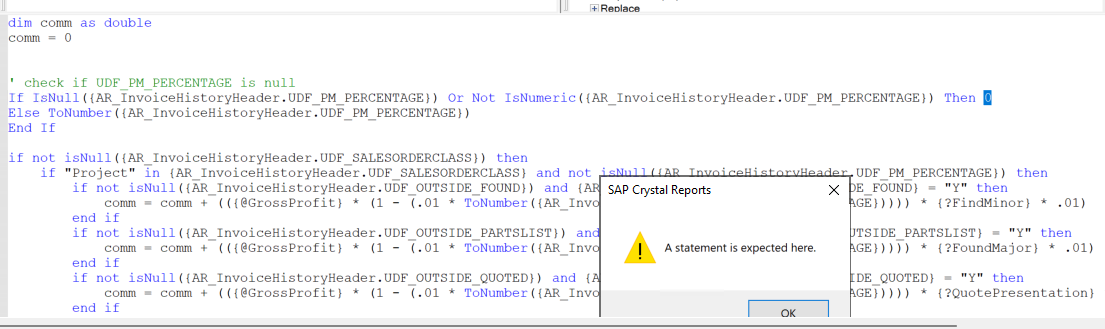
This formula is pi**ing me off. I have incorporated Kevin's syntax and I get this message now. I've used ChatGPT to fix my syntax but it doesn't fix it. I hate this formula and I hate this stupid string field. If they would have set it up as a numeric I wouldn't be on this hate train.
------------------------------
Jane Scanlan
Partner
Next Level Manufacturing Consulting Group
Original Message:
Sent: 12-03-2024 17:18
From: Kevin Moyes
Subject: SOTA ODBC Driver not established in SQL environment
Check for both NULL values and blanks, distinctly. They are technically different things.
Also, always do the ISNULL check first... because (depending on report settings) an uncleaned NULL will break CR formulas.
------------------------------
Kevin Moyes
Technical Systems Analyst
Munjal White Consulting Co.
Toronto ON
Original Message:
Sent: 12-03-2024 17:07
From: Jane Scanlan
Subject: SOTA ODBC Driver not established in SQL environment
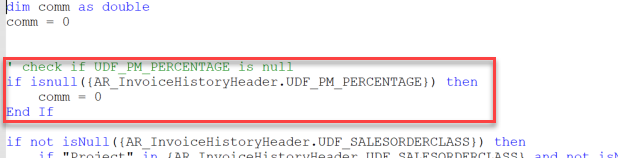
Thanks again for the help. I've added the below to the formula. I'm waiting to hear from the end user if he can run the report without getting an error. @Tara Schinkel I thought about the converting blanks to default, but I didn't think that would work well/help since this dang field is a string instead of a numeric.
------------------------------
Jane Scanlan
Partner
Next Level Manufacturing Consulting Group
Original Message:
Sent: 12-03-2024 16:40
From: Phil McIntosh
Subject: SOTA ODBC Driver not established in SQL environment
I'm not sure how it works on the server. ToNumber("") gets you the string is not numeric error.
Suggestion:
local stringvar percent := UDF_PM_PERCENTAGE;
If trim(percent) = "" then
percent := "0";
Then replace the UDF elsewhere in the formula with percent
------------------------------
Phil McIntosh
Friendly Systems, Inc.
Original Message:
Sent: 12-03-2024 16:20
From: Jane Scanlan
Subject: SOTA ODBC Driver not established in SQL environment
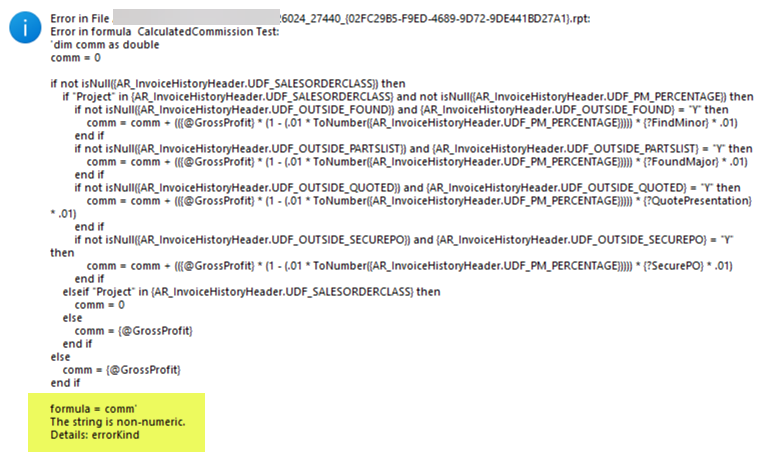
I'm frustrated with a custom Crystal report of my client. It has a fairly complex formula in it and the connection is to the SQL db. The report runs without error when I run the report on the server. When the end user runs the report, they get the following error pitched on the formula. The UDF that is the problem is the UDF_PM_PERCENTAGE as the it was set up as a string (why? I dunno it wasn't me) instead of a numeric. Why don't I get this error when running the report at the server? I've looked at the records in with this field and they are either blank or have a real numeric value.
------------------------------
Jane Scanlan
Partner
Next Level Manufacturing Consulting Group