Sage 100

 View Only
Expand all | Collapse all

SO Invoice Printing Screen Panel Customization

  • 1.  SO Invoice Printing Screen Panel Customization

    Posted 07-22-2024 11:48

    The customer wants me to disable the "Print Comments" drop down selection in SO Invoice Printing.  It should always be set to Full.  Occasionally someone accidentally changes it and then invoices get sent out with no comments.  Sales Order Printing and Picking Sheet Printing appear in Custom Office.  Where is Invoice Printing?


    ------------------------------
    Doug Higgs
    Midwest Commerce Solutions, Inc
    (312) 315-0960
    Chauffeur, Chef, and Personal Assistant to Sprinkles
    ------------------------------


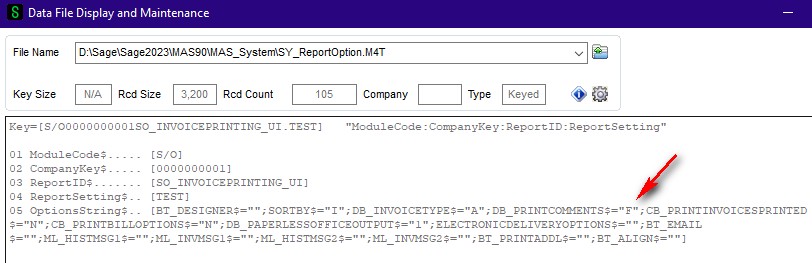
  • 2.  RE: SO Invoice Printing Screen Panel Customization

    Posted 07-22-2024 12:04

    Somebody correct me if I am wrong, but I don't think any of the print screens are accessible via Custom Office.


    ------------------------------
    Phil McIntosh
    Friendly Systems, Inc.
    ------------------------------


  • 3.  RE: SO Invoice Printing Screen Panel Customization

    Posted 07-22-2024 12:07

    Sales Order Printing and Picking Sheet Printing pick screens are available via Custom Office.


    ------------------------------
    Doug Higgs
    Midwest Commerce Solutions, Inc
    (312) 315-0960
    Chauffeur, Chef, and Personal Assistant to Sprinkles
    ------------------------------


  • 4.  RE: SO Invoice Printing Screen Panel Customization

    Posted 07-22-2024 12:20

    Customize the form (with a sub-report for the comment) to basically ignore the checkbox value?


    ------------------------------
    Kevin Moyes
    Technical Systems Analyst
    Munjal White Consulting Co.
    Toronto ON
    ------------------------------


  • 5.  RE: SO Invoice Printing Screen Panel Customization

    Posted 07-22-2024 13:02

    Not available via Custom Office.    Sage developers have a screen editing program.


    ------------------------------
    Lee Graham
    Friendly Systems, Inc.
    ------------------------------


  • 6.  RE: SO Invoice Printing Screen Panel Customization

    Posted 07-22-2024 13:28

    Thanks for confirming @Lee Graham  I wonder if there is a reason why Sales Order Printing and Picking Sheet Printing are available and Invoice Printing is not.  It seems inconsistent on the surface.... not to mention aggravating.


    ------------------------------
    Doug Higgs
    Midwest Commerce Solutions, Inc
    (312) 315-0960
    Chauffeur, Chef, and Personal Assistant to Sprinkles
    ------------------------------


  • 7.  RE: SO Invoice Printing Screen Panel Customization

    Posted 07-22-2024 13:37

    They probably don't want to open the door, inviting complaints about Invoice History Printing, which combines AR / SO invoice printing into one interface.


    ------------------------------
    Kevin Moyes
    Technical Systems Analyst
    Munjal White Consulting Co.
    Toronto ON
    ------------------------------


  • 8.  RE: SO Invoice Printing Screen Panel Customization

    Posted 07-22-2024 12:28

    Ctrl + F9

    ...when on the print screen, will open Customizer for that panel.  Disabling the option is easy... setting the default is not. 

    It looks like a UI script might be possible, but I am not sure on what would work as a script.


    ------------------------------
    Kevin Moyes
    Technical Systems Analyst
    Munjal White Consulting Co.
    Toronto ON
    ------------------------------


  • 9.  RE: SO Invoice Printing Screen Panel Customization

    Posted 07-22-2024 12:36

    Ctrl + F9 doesn't work on the Invoice Printing screen panel.  i tried Ctrl + F9 first and it didn't work.  That's what led me to the Custom Office Customizer Selection.  Interesting / surprising that Sales Order Printing and Picking Sheet Printing are available however Invoice Printing is not.


    ------------------------------
    Doug Higgs
    Midwest Commerce Solutions, Inc
    (312) 315-0960
    Chauffeur, Chef, and Personal Assistant to Sprinkles
    ------------------------------


  • 10.  RE: SO Invoice Printing Screen Panel Customization

    Posted 07-22-2024 12:54

    Ah... I missed that part.  No ideas, other than two sub-reports (one for printing unposted invoice comments, and one for printing posted comments).  Not ideal for sure, but should be possible, if a better solution is not discovered.


    ------------------------------
    Kevin Moyes
    Technical Systems Analyst
    Munjal White Consulting Co.
    Toronto ON
    ------------------------------


  • 11.  RE: SO Invoice Printing Screen Panel Customization

    Posted 07-22-2024 16:54

    Role Maintenance?


    ------------------------------
    Jeff Schwenk
    Bottomline Software, Inc.
    (540) 221-4444
    ------------------------------


  • 12.  RE: SO Invoice Printing Screen Panel Customization

    Posted 07-22-2024 17:11

    I didn't see anything in role maintenance that would help.  


    ------------------------------
    Doug Higgs
    Midwest Commerce Solutions, Inc
    (312) 315-0960
    Chauffeur, Chef, and Personal Assistant to Sprinkles
    ------------------------------


  • 13.  RE: SO Invoice Printing Screen Panel Customization

    Posted 07-22-2024 17:30

    The only other idea I have is editing the M4L directly in the SO folder... which is something I always hesitate to do.  Even then, you'd probably need to clean up any saved report settings with conflicting values.


    ------------------------------
    Kevin Moyes
    Technical Systems Analyst
    Munjal White Consulting Co.
    Toronto ON
    ------------------------------


  • 14.  RE: SO Invoice Printing Screen Panel Customization

    Posted 07-22-2024 17:36

    Great idea @Kevin Moyes


    ------------------------------
    Doug Higgs
    Midwest Commerce Solutions, Inc
    (312) 315-0960
    Chauffeur, Chef, and Personal Assistant to Sprinkles
    ------------------------------


  • 15.  RE: SO Invoice Printing Screen Panel Customization

    Posted 07-23-2024 08:57

    @Kevin Moyes  I am not sure if this solves the issue of a user inadvertently changing the Print Comments from Full to None.  I backed up SY_ReportOptions and changed all of the SO Invoice form records (including STANDARD) so DB_PrintComments$="F".  Initially the Print Comments were Full.  If I changed Print Comments to None then printed an invoice and then returned to the Print screen then None was the value.


    ------------------------------
    Doug Higgs
    Midwest Commerce Solutions, Inc
    (312) 315-0960
    Chauffeur, Chef, and Personal Assistant to Sprinkles
    ------------------------------