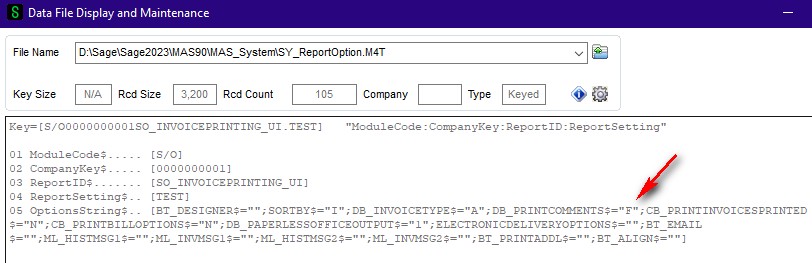
@Kevin Moyes I am not sure if this solves the issue of a user inadvertently changing the Print Comments from Full to None. I backed up SY_ReportOptions and changed all of the SO Invoice form records (including STANDARD) so DB_PrintComments$="F". Initially the Print Comments were Full. If I changed Print Comments to None then printed an invoice and then returned to the Print screen then None was the value.
------------------------------
Doug Higgs
Midwest Commerce Solutions, Inc
(312) 315-0960
Chauffeur, Chef, and Personal Assistant to Sprinkles
------------------------------
Original Message:
Sent: 07-22-2024 17:30
From: Kevin Moyes
Subject: SO Invoice Printing Screen Panel Customization
The only other idea I have is editing the M4L directly in the SO folder... which is something I always hesitate to do. Even then, you'd probably need to clean up any saved report settings with conflicting values.
------------------------------
Kevin Moyes
Technical Systems Analyst
Munjal White Consulting Co.
Toronto ON
------------------------------
Original Message:
Sent: 07-22-2024 17:10
From: Doug Higgs
Subject: SO Invoice Printing Screen Panel Customization
I didn't see anything in role maintenance that would help.
------------------------------
Doug Higgs
Midwest Commerce Solutions, Inc
(312) 315-0960
Chauffeur, Chef, and Personal Assistant to Sprinkles
Original Message:
Sent: 07-22-2024 16:53
From: Jeff Schwenk
Subject: SO Invoice Printing Screen Panel Customization
Role Maintenance?
------------------------------
Jeff Schwenk
Bottomline Software, Inc.
(540) 221-4444
Original Message:
Sent: 07-22-2024 12:54
From: Kevin Moyes
Subject: SO Invoice Printing Screen Panel Customization
Ah... I missed that part. No ideas, other than two sub-reports (one for printing unposted invoice comments, and one for printing posted comments). Not ideal for sure, but should be possible, if a better solution is not discovered.
------------------------------
Kevin Moyes
Technical Systems Analyst
Munjal White Consulting Co.
Toronto ON
Original Message:
Sent: 07-22-2024 12:36
From: Doug Higgs
Subject: SO Invoice Printing Screen Panel Customization
Ctrl + F9 doesn't work on the Invoice Printing screen panel. i tried Ctrl + F9 first and it didn't work. That's what led me to the Custom Office Customizer Selection. Interesting / surprising that Sales Order Printing and Picking Sheet Printing are available however Invoice Printing is not.
------------------------------
Doug Higgs
Midwest Commerce Solutions, Inc
(312) 315-0960
Chauffeur, Chef, and Personal Assistant to Sprinkles
Original Message:
Sent: 07-22-2024 12:27
From: Kevin Moyes
Subject: SO Invoice Printing Screen Panel Customization
Ctrl + F9
...when on the print screen, will open Customizer for that panel. Disabling the option is easy... setting the default is not.
It looks like a UI script might be possible, but I am not sure on what would work as a script.
------------------------------
Kevin Moyes
Technical Systems Analyst
Munjal White Consulting Co.
Toronto ON