Sage 100

 View Only
  • 1.  SO Invoice Batches just won't behave

    Posted 01-23-2025 15:17

    Customer is on Premium 2022.6 32 bit. In December they installed PU6 and the IRD to process payroll. They immediately received click2pay (Nuvei) errors which kicked off a flurry of Nuvei replacing files. At one point the entire AR_Customer table was dropped from the database and all of the SO Quotes vanished. The AR_Customer table was restored from a backup database and the missing SO Quotes extracted and added back to sales order. Since then, roughly 1/5 of the batches they try to post in SO just shuts down during the posting process. No errors, no message of any kind, just is gone. The batch then has an interrupted status. If they try to post again it disappears again and duplicates transactions to AR_invoiceHistoryHeader, AR_TransactionPaymentHistory, and the balance in AR_Open is doubled/tripled/quadrupled. Sometimes the batch will post if you start it again. Sometimes you have to delete the record in SO_InvoiceRestart and then the batch will post. This customer has Click2Pay, fee recovery, normal credit card charging all through Nuvei. I'm working on the server and seeing the same behavior as the workstations. I've tried using ProcMon to confirm antivirus is not running and I'm not seeing any defender or antivirus. Is there something I can check in the SQL Event profiler that would be useful? Sage and Nuvei are both thinking it is the other and I'm grasping at straws. Any help would be appreciated!


    ------------------------------
    Kate Krueger
    Consultant
    MicroAccounting
    214.800.5555x553
    ------------------------------


  • 2.  RE: SO Invoice Batches just won't behave

    Posted 01-23-2025 18:53

    2 things come to mind for next troubleshooting steps:

    1. Stay at the server but attempt to post a batch that you know will fail or re-fail but start up Sage in "Mas90 mode". It wouldn't be surprising if an actual message appears that didn't before. Use a copy company assuming it is possible to do that with Nuvei/Paya CC enabled transactions.

    2. Ask an M/D type put a break in the Update code then manually run it line by line and/or block by block with the idea to see where the premature program exit is occurring. Now they won't be able to see the source code when the Update enters the Nuvei/Paya programs as those will be passworded but they maybe able to narrow down the Nuvei program if that's where the exit is occurring.

      Back in 2023, our customer was getting a weird error in Sales Journal Update after Century eBiz was installed.  The blame game had started but I was able to figure out via program trace their override program was in play when the error occurred and I put together screenshots and other info for them. We sent that to their team which they viewed as helpful and it was enough to get their developer involved who did figure it out.


    ------------------------------
    Alnoor Cassim
    Accounting Systems, Inc. (ASI)
    ------------------------------


  • 3.  RE: SO Invoice Batches just won't behave

    Posted 01-23-2025 18:53

    Post in a test company, with CC processing disabled, and confirm if it is related to Nuvei functionality?


    ------------------------------
    Kevin Moyes
    Technical Systems Analyst
    Munjal White Consulting Co.
    Toronto ON
    ------------------------------


  • 4.  RE: SO Invoice Batches just won't behave

    Posted 01-23-2025 22:38

    Thanks for the suggestion Kevin! It seems tangentially related to Click 2 Pay as the invoices that are failing have the Click2Pay flag set to "Y" even though the customer is not a C2P customer. This got a bit weirder however once I determined that the stuck batches were because of invoices for a specific customer. I looked at the customer record in AR_Customer in SQL (SSMS) and AR_Customer has 56 records all with the same division and customer number. The records all appear to be identical. Looking at DFDM I can only see one customer record. I made sure data dictionary knows to create the table in SQL but duplicate records like that is something I have never seen. I can start another thread for this duplicate SQL thing but it seemed far too coincidental that the invoices that are failing are for a customer with duplicate SQL records. 


    ------------------------------
    Kate Krueger
    Consultant
    MicroAccounting
    214.800.5555x553
    ------------------------------


  • 5.  RE: SO Invoice Batches just won't behave

    Posted 01-24-2025 08:17

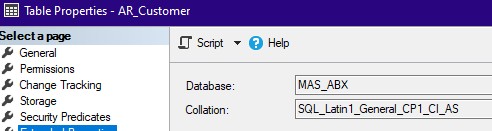
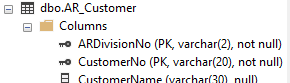
    Duplicates in SQL should be impossible, if the Primary Key is configured properly.
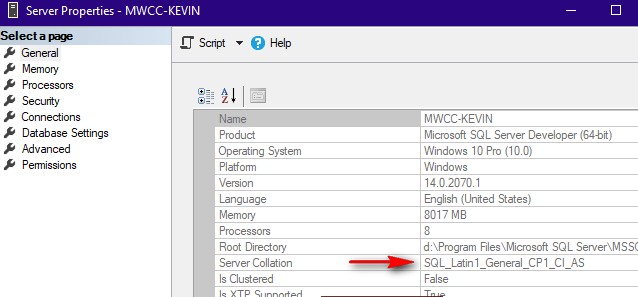
    As an additional thought, check the server collation and table collation.  Anything other than the correct collation method will cause data corruption.


    ------------------------------
    Kevin Moyes
    Technical Systems Analyst
    Munjal White Consulting Co.
    Toronto ON
    ------------------------------


  • 6.  RE: SO Invoice Batches just won't behave

    Posted 01-24-2025 10:06

    You are right!

    AR_Customer lost the primary keys! I'll get those re-set and maybe the nightmare will be over. Thanks so much!


    ------------------------------
    Kate Krueger
    Consultant
    MicroAccounting
    214.800.5555x553
    ------------------------------


  • 7.  RE: SO Invoice Batches just won't behave

    Posted 01-24-2025 17:55

    Final update - removing the duplicate customers in the AR_Customer SQL table and getting the primary keys set again has resolved the issue. The stuck SO Invoice batches are happily posting now. Thanks for the help!


    ------------------------------
    Kate Krueger
    Consultant
    MicroAccounting
    214.800.5555x553
    ------------------------------